Your customer data just became someone else's product on the dark web, and you're wondering if changing your password is enough. It's not.
The February 2026 Odido data breach in the Netherlands exposed 6.2 million customer records: names, addresses, bank accounts (IBANs), passport numbers, dates of birth, and internal customer service notes detailing payment issues and personal circumstances. ShinyHunters, the hacking collective behind breaches at Ticketmaster and Pornhub, extracted everything through voice phishing attacks targeting Odido employees who believed they were speaking with IT support.
Write FREE SEO-optimized Blog Articles! Our Article Writer ensures your blog is loved by both Google and your readers, turning those clicks into customers.
👉 Write your article here
Odido refused to pay the ransom. The hackers published the data anyway.
This is a blueprint for what happens when cybersecurity becomes an afterthought, when data retention policies ignore GDPR principles, and when startups building in telecom, fintech, or any customer-facing space fail to learn from disasters that shouldn't have happened.
Here is why this matters for your startup, what Odido got catastrophically wrong, and the exact steps customers must take now. If you're building anything that touches customer data, this article will save you from becoming the next headline.
What Happened: The Odido Breach Timeline
On February 7-8, 2026, cybercriminals from ShinyHunters infiltrated Odido's customer contact system (CRM). They used AI-powered voice phishing: calling employees, impersonating IT staff, and convincing them to provide access credentials.
By February 12, Odido confirmed the breach publicly and reported it to the Dutch Data Protection Authority (Autoriteit Persoonsgegevens). The stolen data included:
- Full names and residential addresses
- Mobile phone numbers and email addresses
- Bank account numbers (IBANs)
- Dates of birth
- Customer account numbers
- Passport and driver's license numbers (with validity dates)
- Internal customer service notes (payment agreements, administrator details, behavioral flags)
Former customers who had service within the past two years were also affected. Some reports suggest data from customers who left 5-10 years ago remained in the system, directly contradicting Odido's stated two-year retention policy.
ShinyHunters demanded a low seven-figure ransom by February 26, 2026. Odido refused. The hackers began publishing 1 million lines of data daily on dark web forums.
Identity fraud reports more than doubled within a week, with 590 confirmed cases traced to the breach within days.
The Technical Breakdown: How ShinyHunters Got In
The Attack Vector: AI Voice Phishing at Scale
ShinyHunters didn't exploit a zero-day vulnerability or sophisticated malware. They called employees.
The group used AI voice agents powered by platforms like Bland AI and Vapi to automate social engineering calls. These tools dynamically adjust conversation flow based on victim responses, making the calls indistinguishable from legitimate IT support.
The attack pattern:
- Reconnaissance: Scraped employee information from LinkedIn, company websites, and leaked credentials databases
- Impersonation: Used VoIP services (Twilio, Google Voice, 3CX) with spoofed caller IDs matching Odido's internal IT numbers
- Credential Harvesting: Convinced employees they needed to "verify access" or "update security protocols"
- System Access: Logged into Odido's CRM using stolen credentials
- Data Exfiltration: Downloaded 6.2 million records before detection
The entire operation likely took hours, not days. ShinyHunters is known for using valid accounts (MITRE ATT&CK technique T1078) and exploiting public-facing applications (T1190) without leaving malware traces.
Why CRM Systems Are Prime Targets
Customer Relationship Management (CRM) platforms concentrate the exact data cybercriminals monetize:
- Identity data for account takeovers
- Financial data for direct fraud
- Contact data for phishing campaigns
- Relationship data for targeted social engineering
Odido's CRM contained what EclecticIQ analysts call "data primacy": everything needed to impersonate customers to banks, government agencies, and other service providers.
The attack succeeded because:
- No multi-factor authentication (MFA) on employee accounts
- No rate-limiting on login attempts
- No anomaly detection flagging unusual data downloads
- No zero-trust architecture segregating customer data access
- Inadequate employee training on voice phishing tactics
GDPR Violations: Why Was This Data Still Here?
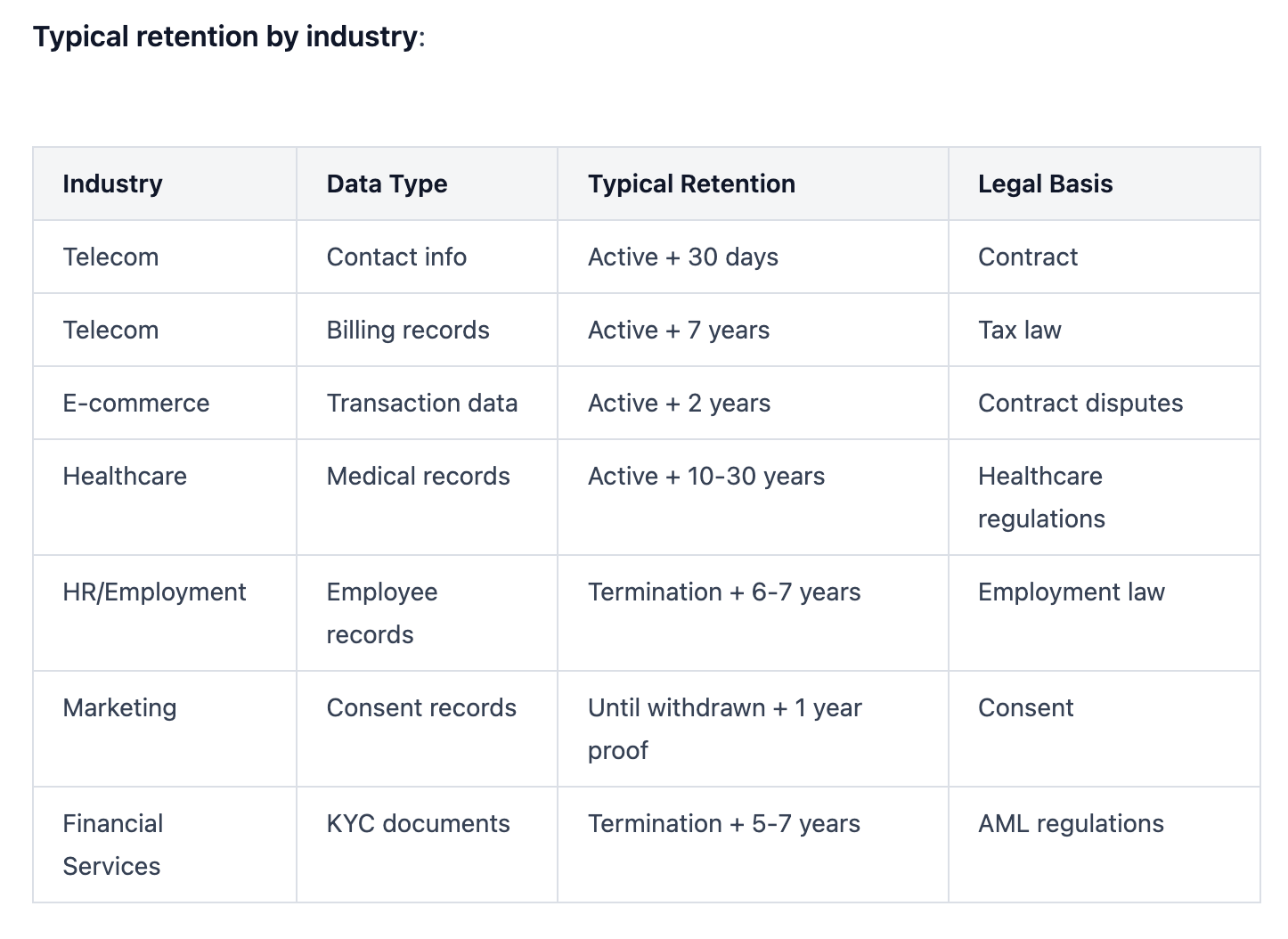
The General Data Protection Regulation (GDPR) Article 5(1)(e) mandates "storage limitation"; personal data must be kept only as long as necessary for its original purpose. Telecom providers typically justify retention for billing disputes, legal compliance, and service continuity.
The Two-Year Problem
Odido publicly stated it retained customer data for a maximum of two years after service termination. The breach revealed data from customers who left 5-10 years prior.
This is a direct GDPR violation. Under Article 17 (Right to Erasure), individuals can demand deletion once data is no longer necessary. Under Article 30 (Records of Processing Activities), controllers must document and justify retention periods.
Average GDPR fines for retention violations: €4 million
Studies show companies keep data an average of 5 years longer than needed. In retail and marketing, 75% of retention failures come from legacy databases and old systems. The pattern at Odido suggests:
- Failure to implement automated deletion workflows
- Lack of data classification and inventory
- No regular retention audits
- Confusion between data controllers and processors about deletion responsibilities
Legal Exposure
Odido faces potential fines up to 4% of annual global revenue if regulators determine inadequate security measures and improper retention. The Dutch Data Protection Authority has been increasingly aggressive with enforcement. For how the new Cyberbeveiligingswet adds 24-hour and 72-hour reporting deadlines on top of GDPR, see our Albert Heijn hack deep dive.
Previous violations:
- In 2024, Odido (formerly T-Mobile Nederland) was fined €175,000 for illegally processing traffic and location data from 2.5-4.5 million users between 2018-2019 without proper legal basis under the Dutch Telecommunications Act
The 2026 breach investigation will examine:
- Why customer data exceeded stated retention periods
- Whether technical and organizational measures met GDPR Article 32 standards
- If access controls, encryption, and monitoring were adequate
- Whether incident response procedures complied with Article 33 (72-hour breach notification)
What Customers Must Do Right Now
If you're an Odido customer or received a breach notification from any service, follow this sequence immediately.
Immediate Actions (Within 24 Hours)
1. Verify the notification legitimacy
Contact Odido directly through their official website (type the URL manually, don't click email links). Odido sends breach notifications from info@mail.odido.nl and via SMS, but phishing attacks spike immediately after breaches.
2. Change your Odido account password
Use a unique, randomly generated password at least 16 characters long. Enable two-factor authentication if available.
3. Monitor bank accounts for unauthorized transactions
Check your transaction history daily. Set up fraud alerts and spending limits through your bank's mobile app.
4. Contact your bank about IBAN exposure
Since bank account numbers were compromised, ask your bank:
- Whether they recommend issuing a new IBAN
- If they can add fraud monitoring to your account
- About setting up transaction approval alerts
- If you can enable code words or additional verification for phone banking
Most banks recommend issuing a new IBAN only if fraudulent activity occurs, as changing account numbers creates significant administrative burden (updating direct debits, salary deposits, automatic payments). Monitor closely first.
5. Place fraud alerts on your credit file
Contact the three major credit bureaus:
- Equifax
- Experian
- TransUnion
A fraud alert warns creditors to verify identity before opening accounts. In the Netherlands, contact the Central Credit Registration Office (BKR) and request enhanced verification.
Short-Term Actions (Within 7 Days)
6. Get free credit reports
Request reports from all three bureaus to check for unexplained accounts opened in your name. In the EU, you're entitled to one free report per year per bureau.
7. Consider credit freezing
A credit freeze prevents anyone from accessing your credit report or opening accounts in your name. You must lift the freeze when applying for legitimate credit. This is stronger than fraud alerts but requires more management.
8. Update security questions everywhere
If the breached account used security questions, assume attackers have the answers (date of birth, mother's maiden name). Update them with nonsensical answers you store in a password manager.
9. Watch for targeted phishing
Expect emails, SMS, and phone calls referencing your personal details. Attackers will impersonate Odido, your bank, government agencies, or other legitimate organizations.
Red flags:
- Urgency ("verify immediately or account closure")
- Requests for additional information
- Links to websites (type URLs manually instead)
- Pressure to act without verification
10. Document everything
Keep copies of:
- Odido's breach notification
- All correspondence with your bank
- Credit report requests and results
- Any suspicious contact attempts
- Timeline of protective actions taken
This documentation supports identity theft claims, disputes, and potential compensation requests.
Long-Term Monitoring (6-12 Months)
11. Set up persistent account monitoring
Identity theft can manifest months or years after a breach. Consider:
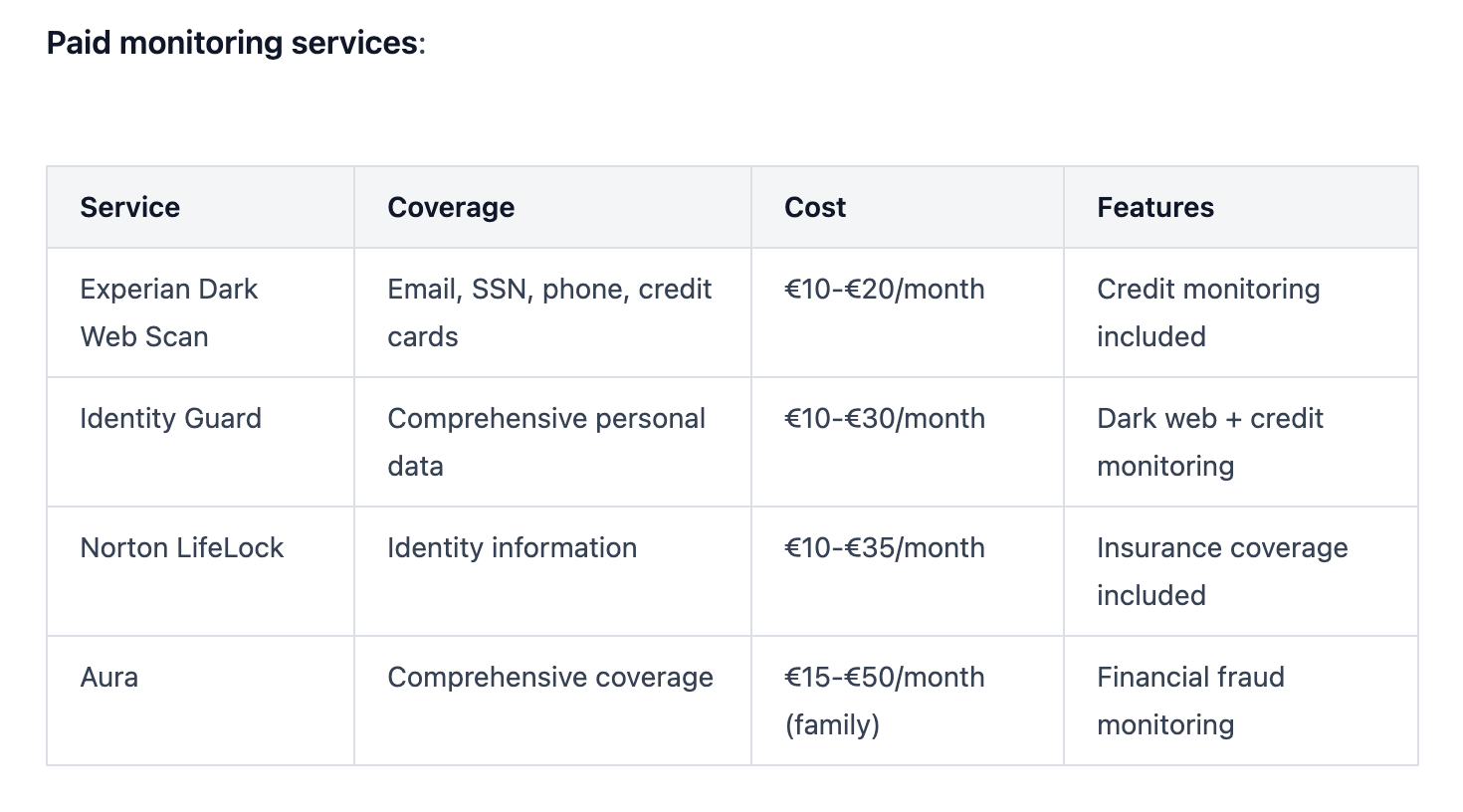
- Credit monitoring services
- Dark web monitoring for your email and personal data
- Bank alert systems
- Government identity fraud reporting (in Netherlands: Central Identity Fraud Reporting Point / CMI)
12. File a police report if fraud occurs
If you detect unauthorized accounts, transactions, or identity misuse, file a report immediately. This creates an official record and often required for dispute resolution.
13. Review insurance coverage
Some home insurance policies include identity theft coverage. Check if you're eligible for reimbursement of recovery costs.
Startup Lessons: What Odido Got Wrong (And How You Avoid It)
If you're building in telecom, fintech, healthtech, or any space handling sensitive customer data, the Odido breach provides a masterclass in what NOT to do.
Lesson 1: Your Employees Are Your Weakest Link And Your Strongest Defense
The Problem: ShinyHunters gained access through voice phishing: employees who believed they were helping IT support.
The Solution:
- Mandatory security awareness training covering voice phishing, deepfakes, and AI-generated social engineering
- Verification protocols requiring employees to independently confirm IT requests through known channels
- Code words or callback procedures for sensitive access requests
- Regular phishing simulations to test and reinforce training
According to Violetta Bonenkamp, a cybersecurity expert and serial entrepreneur with over 20 years experience building deeptech startups including CADChain (blockchain security for intellectual property):
"Most startups fail at security because they treat it as a technology problem. It's a human problem. Your team will make mistakes. Design your systems assuming errors will happen, not if they happen."
Bonenkamp recommends:
- Zero-trust architecture from day one: verify every access request regardless of source
- Incident response drills where team members practice detecting and reporting suspicious activity
- Blameless post-mortems when security mistakes occur, focusing on process improvement not punishment
Lesson 2: Multi-Factor Authentication Isn't Optional
The Problem: Odido's CRM apparently lacked MFA on employee accounts, allowing stolen credentials to provide immediate access.
The Solution:
Enforce MFA on:
- All administrative accounts
- CRM and customer data systems
- Cloud infrastructure access
- Email and collaboration tools
- VPNs and remote access
Use strong MFA methods:
- ✅ Hardware security keys (YubiKey, Google Titan)
- ✅ Authenticator apps (Authy, Google Authenticator, Microsoft Authenticator)
- ❌ SMS-based codes (vulnerable to SIM swapping)
Studies show MFA blocks 99.9% of automated attacks. The 0.1% that succeed typically exploit human factors (approval fatigue, social engineering) rather than technical weaknesses.
Insider tip: Configure "number matching" in authenticator apps: users must enter a displayed number rather than just approve a notification. This prevents accidental approvals during phishing attacks.
Lesson 3: Role-Based Access Control (RBAC) Limits Blast Radius
The Problem: The breach extracted 6.2 million records, suggesting broad employee access to customer data without segmentation.
The Solution:
Implement RBAC with least privilege:
- Sales teams see only their assigned accounts
- Support teams access only customer tickets they're handling
- Finance teams view billing data without full personal profiles
- Executives don't have direct data access without business justification
Technical implementation:
User Role: Support Agent Level 1
- Read: Customer contact info, account status
- Write: Support ticket notes
- No Access: Financial data, identification documents, historical records older than 6 months
User Role: Support Agent Level 2
- Read: Full customer profile
- Write: Account modifications, payment arrangements
- No Access: Bulk data export, API access
Monitoring: Set alerts for anomalous access patterns:
- User accessing 10x more records than typical
- Downloads exceeding normal volume
- Access outside business hours
- Geographic location mismatches
Lesson 4: Data You Don't Have Can't Be Stolen
The Problem: Odido retained customer data far beyond stated policies and operational necessity.
The Solution:
Build retention into your product from day one:
Data minimization:
- Collect only what you need for the specific purpose
- Don't store credit card numbers; use tokenization through payment processors
- Avoid storing identification documents if verification services can confirm identity
Automated deletion workflows:
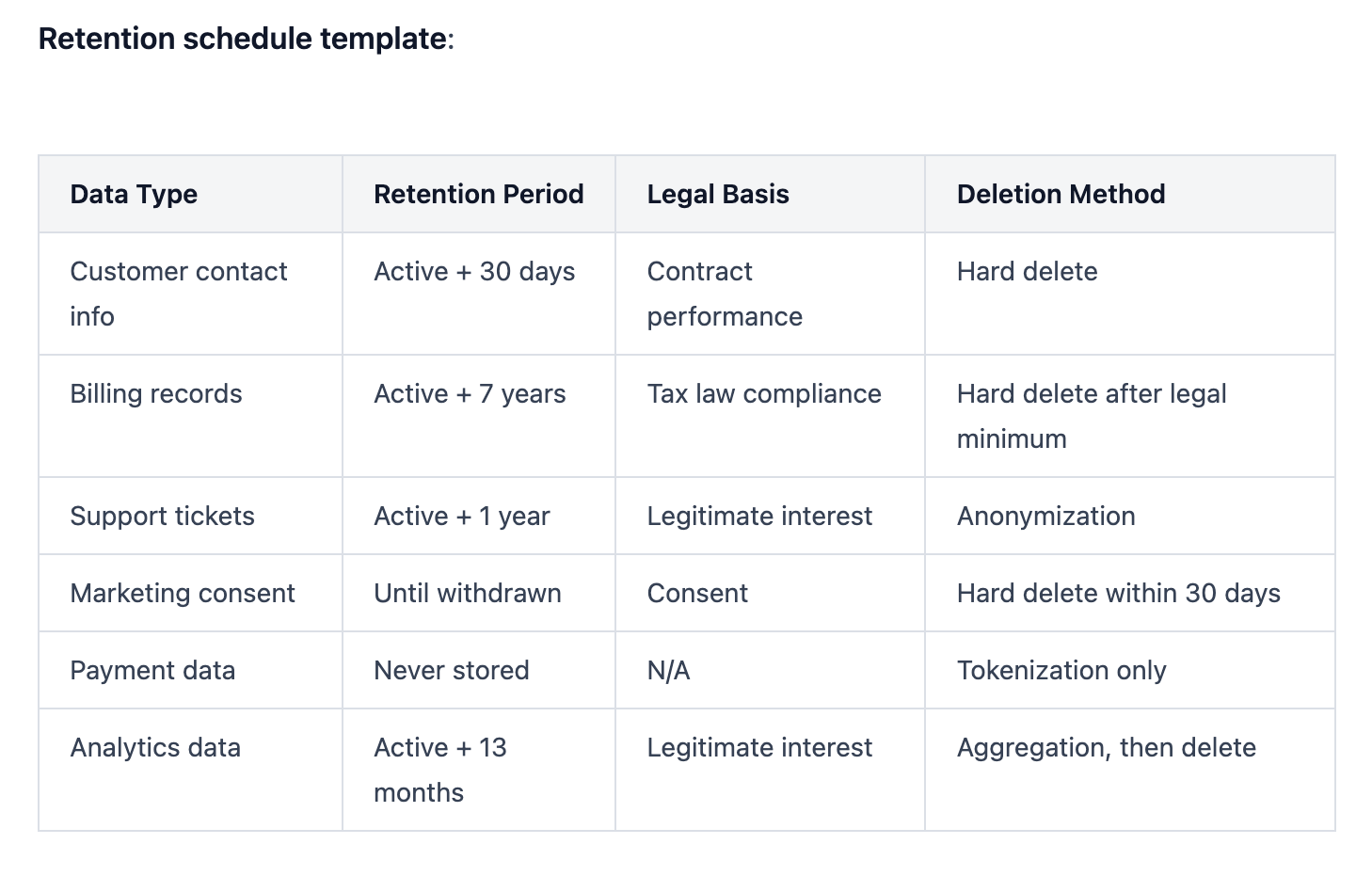
Customer Status: Service Terminated
Action: Anonymize personal identifiers after 30 days
Retain: Aggregated analytics, billing records (per tax law: 7 years)
Delete: Contact info, identification numbers, CRM notes, location data
Enforcement:
- Automated scripts checking for expired data quarterly
- Deletion logs reviewed by DPO or compliance officer
- Regular audits comparing stated policies to actual retention
- Customer-accessible dashboard showing what data you hold and deletion dates
GDPR Article 30 requirement: Document your retention schedule and be able to justify every time period.
Lesson 5: CRM Security Deserves Infrastructure-Level Investment
The Problem: Odido's CRM breach suggests the platform wasn't secured with the same rigor as core network infrastructure.
The Solution:
Treat customer databases as critical assets:
Network segmentation:
- CRM on isolated network segment with firewall rules
- No direct internet access; all connections through VPN or bastion hosts
- Separate development, staging, production environments
Encryption:
- Data at rest: AES-256 encryption
- Data in transit: TLS 1.3 minimum
- Database-level encryption with separate key management
- Field-level encryption for sensitive columns (SSN, passport numbers, bank accounts)
Access logging:
- Audit trail of every data access with timestamp, user ID, IP address, action taken
- Immutable logs stored separately from CRM
- SIEM (Security Information and Event Management) integration for real-time alerting
Backup security:
- Encrypted backups stored separately from production
- Access controls on backups as strict as production data
- Test restoration procedures quarterly
API security:
If your CRM exposes APIs:
- Token-based authentication with short expiration (1-hour max)
- Rate limiting to prevent bulk extraction
- IP allowlisting for known integrations
- Webhook signature verification
Lesson 6: Incident Response Planning Before The Incident
The Problem: Odido detected the breach on February 7-8 but didn't disclose publicly until February 12 (within GDPR's 72-hour reporting window to authorities, but customers waited longer).
The Solution:
Document your incident response runbook:
Phase 1: Detection (Hours 0-2)
- Automated alerts for anomalous data access
- On-call security team receives notification
- Initial assessment: Is this real or false positive?
Phase 2: Containment (Hours 2-6)
- Isolate affected systems
- Revoke compromised credentials
- Block suspicious IP addresses
- Preserve forensic evidence
Phase 3: Assessment (Hours 6-24)
- Determine scope: What data was accessed?
- Identify affected customers
- Assess attack vector
- Engage external forensics if needed
Phase 4: Notification (Hours 24-72)
- Report to data protection authority within 72 hours (GDPR requirement)
- Notify affected customers with specific details about their exposure
- Prepare public statement
- Establish customer support hotline
Phase 5: Recovery (Days 3-30)
- Implement security improvements
- Monitor for secondary attacks
- Offer credit monitoring or identity protection services to customers
- Conduct post-incident review
Phase 6: Long-term (Months 1-12)
- Implement lessons learned
- Update security policies
- Regulatory cooperation
- Reputation management
Template customer notification:
Subject: Security Incident Notification - Action Required
Dear [Customer Name],
On [Date], we detected unauthorized access to our customer contact system. We immediately contained the breach, reported it to authorities, and engaged security experts.
YOUR SPECIFIC DATA AFFECTED:
- Name, address, email
- Phone number
- [Other specific fields]
DATA NOT AFFECTED:
- Passwords
- Call records
- [Other excluded data]
ACTIONS WE'VE TAKEN:
- Secured the vulnerability
- Reported to [Data Protection Authority]
- Enhanced monitoring
ACTIONS YOU SHOULD TAKE:
1. Monitor accounts for suspicious activity
2. Enable fraud alerts (we've included instructions)
3. Watch for phishing attempts referencing your personal details
We're offering [12 months free credit monitoring] to all affected customers.
Contact our dedicated support line: [Phone Number]
More information: [URL]
We deeply apologize for this incident.
[Executive Name]
[Title]
Lesson 7: Penetration Testing Finds Vulnerabilities Before Attackers Do
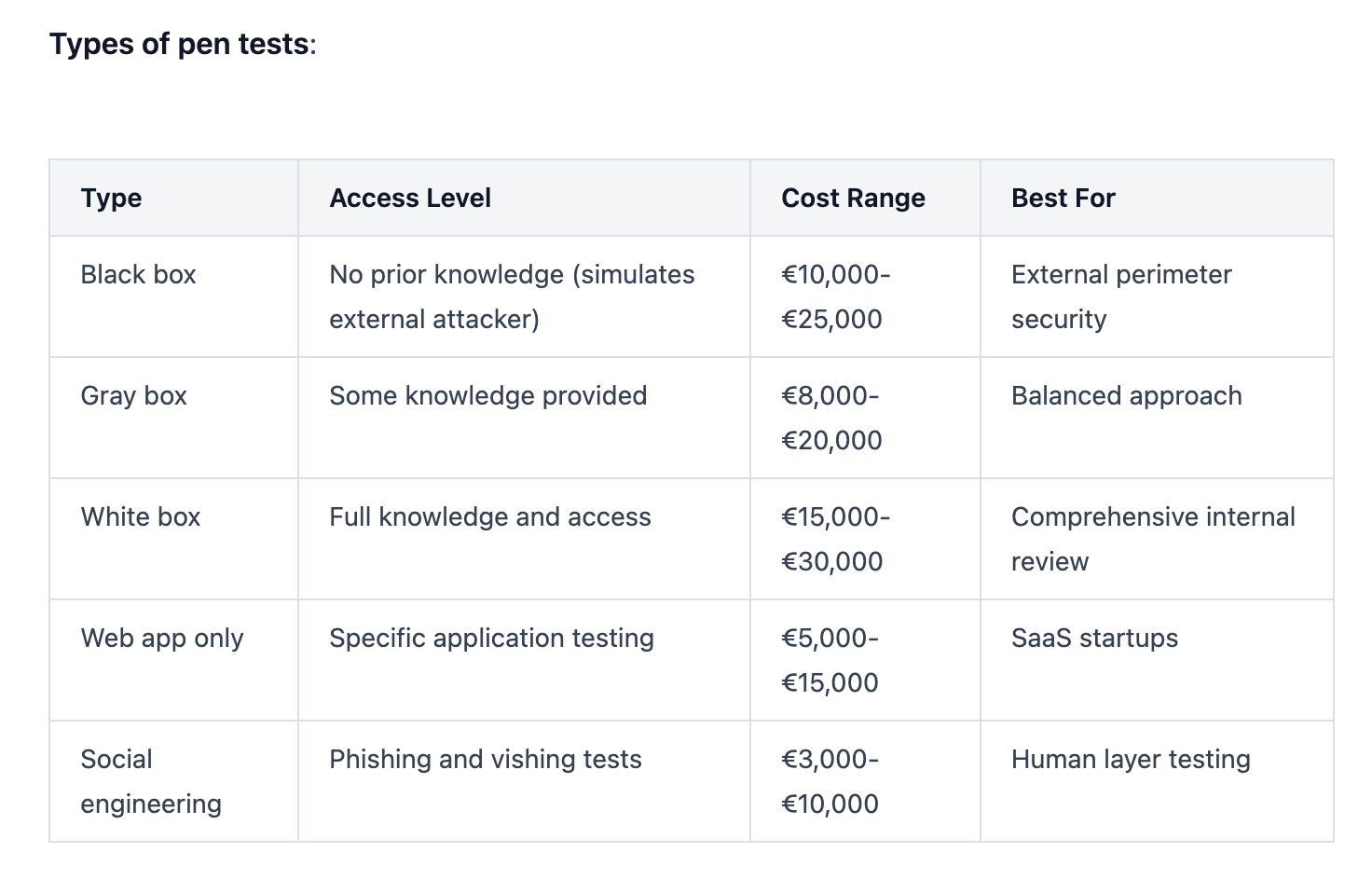
The Problem: Voice phishing and social engineering suggest Odido didn't regularly test employee susceptibility to these attacks.
The Solution:
Schedule regular security assessments:
External penetration testing (Annually):
- Independent security firm attempts to breach your systems
- Tests technical controls (firewalls, encryption, access controls)
- Social engineering testing (phishing, vishing, physical security)
- Written report with prioritized remediation recommendations
Internal red team exercises (Quarterly):
- Your security team simulates attacks
- Tests incident detection and response
- Identifies configuration drift and policy violations
- Lower cost than external testing; maintains vigilance
Bug bounty programs (Continuous):
- Public or private program rewarding security researchers for finding vulnerabilities
- Platforms: HackerOne, Bugcrowd, Synack
- Pay per valid finding; cost-effective for startups
Cost expectations:
- Small startup penetration test: €5,000-€15,000
- Mid-size company comprehensive assessment: €20,000-€50,000
- Bug bounty payouts: €100-€10,000 depending on severity
Violetta Bonenkamp notes: "Early-stage startups often skip security testing to move faster. That's gambling with your entire business. A €10,000 penetration test is cheaper than a €4 million GDPR fine."
The Financial Reality: What Data Breaches Cost Startups
Let's talk numbers. The average cost of a data breach in 2026:
- Global average: $4.88 million per incident
- GDPR fines: Up to €20 million or 4% of annual global revenue (whichever is higher)
- Customer churn: 25-40% after a publicized breach
- Stock price impact: 7.5% average decline in publicly traded companies
- Legal costs: $1.2-$3 million in investigation, notification, and litigation
For startups:
- Early-stage (pre-Series A): A breach can be existential, killing fundraising and destroying credibility
- Series A-B: Customer acquisition costs skyrocket as trust rebuilds; expect 12-18 month impact
- Growth stage (Series C+): Regulatory scrutiny intensifies; institutional investors demand governance changes
Hidden costs:
- Lost productivity during incident response
- Emergency security upgrades
- Credit monitoring services for customers
- PR and reputation management
- Insurance premium increases
- Regulatory audits and follow-up assessments
Opportunities: How Security Becomes Competitive Advantage
Smart startups flip security from cost center to revenue driver.
Opportunity 1: Security as Sales Differentiator
When customers evaluate vendors, they ask: "What's your security posture?"
Documentation that wins deals:
- SOC 2 Type II certification
- ISO 27001 compliance
- GDPR compliance documentation
- Penetration test results (executive summary)
- Incident response capabilities
- Data residency guarantees
Sales messaging: "Unlike Odido, we implement zero-trust architecture, MFA on all accounts, and automated data deletion. Here's proof."
Opportunity 2: Security Talent Attracts Security Talent
Top engineers care about security. Companies with strong security cultures attract better candidates.
Recruiting signals:
- Dedicated security team member (even fractional)
- Bug bounty program
- Open-source security contributions
- Security blog with technical depth
- Incident disclosure and lessons learned transparency
Opportunity 3: Premium Pricing for Security Features
B2B customers pay more for enhanced security:
- SOC 2 compliance: 15-30% premium
- Data residency controls: 10-20% premium
- Custom retention policies: 5-15% premium
- Advanced audit logging: 5-10% premium
- Dedicated support for security inquiries: 10-25% premium
Opportunity 4: Faster Enterprise Sales Cycles
Security delays kill deals. Having documentation ready shortens sales cycles by 30-40%.
Acceleration tactics:
- Security questionnaire pre-filled
- Trust center website (public security documentation)
- API security documentation
- Reference customers in regulated industries
- Insurance coverage proof
Opportunity 5: Reduced Insurance Costs
Demonstrable security controls lower cyber insurance premiums by 20-40%.
Underwriters reward:
- MFA implementation
- Regular penetration testing
- Incident response plan
- Security training program
- Backup and disaster recovery procedures
What Regulators Are Watching (And Why You Should Care)
The Odido breach will influence regulatory enforcement across Europe.
Key Regulatory Trends 2026
1. Data retention enforcement intensifying
One in six GDPR fines now specifically targets excessive retention. Average fine: €4 million. Regulators are checking whether companies can justify retention periods and enforce automated deletion.
2. AI-powered attacks changing liability
Voice phishing using AI is prompting regulators to require specific employee training on deepfakes and synthetic media. Expect new guidelines by Q3 2026.
3. Supply chain accountability expanding
Breaches through third-party vendors now trigger investigations of both parties. Controllers can't deflect blame to processors anymore.
4. Incident response timelines under scrutiny
72-hour notification to authorities is law, but regulators are examining internal detection capabilities. Companies that take weeks to detect breaches face harsher penalties than those detecting within hours.
5. CRM-specific guidance coming
The concentration of personal data in CRM platforms is prompting sector-specific security requirements, similar to financial services regulations.
Regulatory Checklist for Startups
- Documented legal basis for every data processing activity
- Retention periods justified and enforced
- Data Processing Agreements (DPAs) with all processors
- Breach notification procedures with 72-hour timeline
- Customer rights procedures (access, deletion, portability)
- Privacy by design documentation
- Data Protection Impact Assessments (DPIAs) for high-risk processing
- Representative appointed if operating in EU without establishment
- Records of processing activities (Article 30)
- Regular compliance audits (annually minimum)
FAQ: Everything You Need to Know About Data Breaches
How do I know if my data was included in the Odido breach?
Odido is notifying affected customers via email (from info@mail.odido.nl) and SMS. Check your email and text messages from Odido. You can also contact Odido customer service directly through their official website to verify your status. Do not click links in emails; type the Odido URL manually into your browser.
If you were an Odido or Ben NL customer (current or former within the past 2-10 years), assume your data may be compromised. Simpel customers were not affected.
Search your email for any communication from Odido dated February 12, 2026 or later with subject lines containing "security incident" or "data breach notification."
Should I change my bank account (IBAN) after a data breach exposing financial information?
Not immediately. Monitor your bank account closely for unauthorized transactions first. Most banks recommend waiting to see if fraud occurs before changing your IBAN, since account number changes create administrative burden.
Take these steps instead:
- Enable transaction alerts on your banking app
- Set up fraud monitoring with your bank
- Establish spending limits if possible
- Add additional verification steps for large transactions
- Check your account daily for 30 days, then weekly for 6 months
Change your IBAN only if:
- You detect unauthorized transactions
- Your bank specifically recommends it
- You receive notification that your account was used for fraud attempts
- You want absolute peace of mind despite the administrative hassle
Administrative consequences of IBAN change:
- Update all direct debits (subscriptions, utilities, insurance)
- Notify employer for salary deposits
- Update any standing orders
- Inform government agencies (tax, benefits)
- Update stored payment information on websites
Contact your bank to discuss your specific situation. They can assess your risk level and recommend appropriate action.
What is ShinyHunters and why are they so successful at data breaches?
ShinyHunters is a financially motivated cybercriminal group that emerged in 2020. They've stolen over 400 million records from 60+ companies, including Ticketmaster (560 million records), Pornhub, Microsoft, AT&T, and now Odido.
Why they succeed:
- AI-powered social engineering: They use voice bots and deepfake technology to impersonate legitimate personnel, making their phishing attacks indistinguishable from real IT support calls
- Supply chain targeting: They compromise vendors and third-party services to access multiple victims through a single breach
- Valid account exploitation: Rather than using malware, they steal legitimate credentials through phishing, leaving no technical traces
- Insider recruitment: They recruit malicious insiders and compromised employees through dark web forums
- Data extortion model: They threaten to publish stolen data unless ransoms are paid, then publish anyway to maintain credibility
Their tactics (MITRE ATT&CK framework):
- T1078: Valid Accounts - Using stolen credentials to bypass security
- T1190: Exploit Public-Facing Application - Finding vulnerabilities in web-facing systems
- T1566: Phishing - Email and voice phishing campaigns
- T1598: Phishing for Information - Reconnaissance before attacks
ShinyHunters operates through Telegram and English-speaking cybercrime forums like BreachStars and OGUsers, where they sell or leak stolen data. They have connections to other cybercriminal groups including Scattered Spider and The Com, creating a network that shares tools, techniques, and targets.
The group's name references Pokémon, "shiny hunters" in gaming search for rare shiny Pokémon, while the criminal group hunts for valuable personal data.
How long should companies keep customer data under GDPR?
GDPR doesn't specify fixed retention periods. Article 5(1)(e) requires data be kept "no longer than is necessary for the purposes for which the personal data are processed."
You must determine retention based on:
- Purpose of processing: Why did you collect it?
- Legal obligations: Do laws require minimum retention?
- Legitimate interests: Is there valid business need?
- Customer expectations: What did you tell them?
Three key requirements:
- Document your retention schedule (GDPR Article 30 requirement)
- Implement automated deletion when retention expires
- Be able to justify every retention period to regulators
Warning signs of non-compliance:
- Keeping all data "just in case"
- No deletion workflows or policies
- Retaining data from customers who left years ago
- Different teams giving different answers about retention
- No regular audits of stored data
Odido's failure to delete data from customers who left 5-10 years ago, despite claiming a 2-year retention policy, represents a serious GDPR violation that will increase their regulatory penalties.
What cybersecurity measures can prevent social engineering attacks like the one at Odido?
Social engineering attacks exploit human psychology rather than technical vulnerabilities, so prevention requires human-focused controls.
Technical controls:
- Multi-factor authentication (MFA): Even if attackers steal credentials through phishing, they can't access systems without the second factor
- Number matching MFA: Requires users to enter a displayed number rather than just clicking "approve," preventing accidental approvals
- IP allowlisting: Restrict system access to known locations
- Time-based access restrictions: Flag access attempts outside business hours
- Anomaly detection: Alert on unusual data access patterns
- Zero-trust architecture: Verify every access request regardless of source
Process controls:
- Verification protocols: Require employees to independently verify requests through known channels before providing access
- Callback procedures: If IT calls requesting access, hang up and call them back at their official number
- Code words: Establish secret phrases that legitimate IT staff must provide
- Dual authorization: Require two employees to approve high-risk actions
- Separation of duties: No single employee can access and exfiltrate massive data alone
Training controls:
- Security awareness training (quarterly minimum) covering:
- Voice phishing (vishing) recognition
- AI-generated deepfakes
- Social engineering tactics
- Verification procedures
- Incident reporting
- Phishing simulations: Send fake phishing emails to employees; those who click get immediate training
- Vishing simulations: Call employees with fake IT requests to test verification procedures
- Success metrics: Track click rates, reporting rates, and time to report
Cultural controls:
- Blameless reporting: Employees who report suspicious calls get thanked, not blamed
- Security champions: Designate team members who model good security behavior
- Regular reminders: Security tips in team meetings and company communications
- Incident storytelling: Share breach stories (like Odido) to maintain awareness
Red flags employees should recognize:
- Unsolicited calls requesting credentials or access
- Urgency or pressure ("we need this immediately")
- Requests to bypass normal procedures
- Caller who knows personal details (these may be from previous breaches)
- Background noise inconsistent with office environment
- Slight pronunciation or cadence issues (AI voice agents)
Violetta Bonenkamp emphasizes: "Technical controls fail without human awareness. Train your team to be skeptical, verify independently, and report suspicious contacts. The best security culture assumes trust but always verifies."
What should startups prioritize first when building cybersecurity programs?
Start with the controls that prevent the most common and damaging attacks.
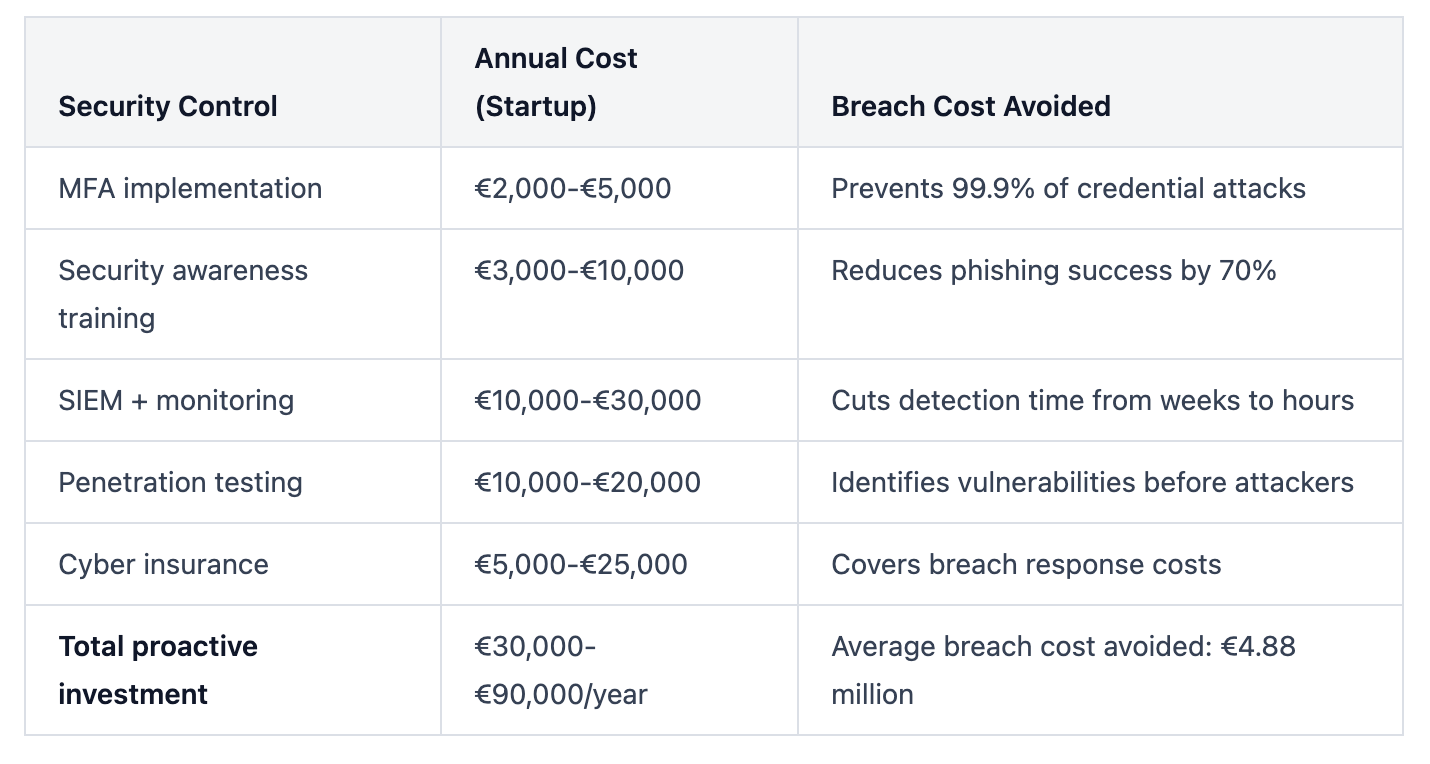
Priority 1: Identity and Access Management (Month 1)
- Enable MFA on all systems (blocks 99.9% of credential attacks)
- Implement password manager for team
- Establish role-based access control
- Remove unnecessary admin privileges
- Cost: €2,000-€5,000
Priority 2: Data Inventory and Minimization (Month 1-2)
- Document all systems processing personal data
- Implement data retention schedule
- Set up automated deletion workflows
- Encrypt sensitive data at rest and in transit
- Cost: €5,000-€10,000 (mostly time investment)
Priority 3: Monitoring and Detection (Month 2-3)
- Deploy basic SIEM or log aggregation
- Configure alerts for critical security events
- Establish incident response plan
- Designate security point person
- Cost: €10,000-€20,000
Priority 4: Human Layer (Month 3)
- Security awareness training for all employees
- Phishing simulation campaign
- Verification protocols for sensitive requests
- Cost: €3,000-€10,000
Priority 5: Testing and Validation (Month 4+)
- External penetration test
- Vulnerability scanning
- Incident response tabletop exercise
- Cost: €10,000-€20,000
Total first-year investment: €30,000-€65,000
Budget constraints? Focus on:
- MFA (non-negotiable, under €5,000)
- Data retention documentation and basic deletion (mostly time)
- Security training (free resources available)
- Incident response plan (template-based, free)
Don't prioritize:
- Expensive enterprise tools without usage plan
- Shiny security products solving problems you don't have
- Compliance certifications before security fundamentals
- Building in-house tools when commercial solutions exist
Remember: 70% of startup security incidents trace back to misconfigured basic controls, not missing advanced tools.
How do penetration tests work and are they worth the cost for startups?
Penetration testing (pen testing) is ethical hacking: security professionals attempt to breach your systems the same way criminals would.
What happens during a pen test:
Phase 1: Reconnaissance (Days 1-3)
Testers gather information about your company:
- Public records and website content
- Employee names and emails (LinkedIn, social media)
- Technology stack identification
- Domain and IP address mapping
- Previous breach databases
Phase 2: Scanning and Enumeration (Days 3-5)
Technical scanning for vulnerabilities:
- Network port scanning
- Web application vulnerability scanning
- Configuration reviews
- Authentication mechanism testing
- API endpoint identification
Phase 3: Exploitation (Days 5-10)
Attempting to breach systems:
- Exploiting discovered vulnerabilities
- Testing for SQL injection, cross-site scripting
- Privilege escalation attempts
- Social engineering (with your permission)
- Physical security testing (if included)
Phase 4: Post-Exploitation (Days 10-12)
After gaining access:
- How far can they move laterally through systems?
- What data can they access?
- Can they maintain persistent access?
- Would you detect their activities?
Phase 5: Reporting (Days 13-15)
Detailed report including:
- Executive summary for leadership
- Technical findings with evidence
- Risk ratings (Critical, High, Medium, Low)
- Proof of concept for each vulnerability
- Prioritized remediation recommendations
- Estimated effort to fix each issue
Cost factors:
- Scope (number of IP addresses, applications, employees to test)
- Testing depth (how thorough)
- Compliance requirements (PCI DSS requires annual pen tests)
- Tester expertise and reputation
- Report detail level
- Remediation support included or separate
Are pen tests worth it?
Yes, if:
- You're raising Series A+ (investors ask for pen test results)
- You're selling to enterprise customers (often contractually required)
- You're in regulated industries (healthcare, finance, government)
- You've never had independent security assessment
- You're approaching SOC 2 or ISO 27001 certification
- You handle sensitive customer data at scale
Consider alternatives if:
- You're pre-revenue or bootstrapping with <10 customers
- You can't afford remediation after testing (discovering vulnerabilities you can't fix creates liability)
- Your systems are too immature (fix obvious issues first)
Alternatives for early-stage startups:
- Bug bounty programs: Pay only for valid findings (HackerOne, Bugcrowd)
- Automated scanning: Tools like Qualys, Nessus (€1,000-€5,000/year)
- Open source tools: OWASP ZAP, Burp Suite Community Edition (free)
- DIY assessment: Use security checklists and frameworks
What to do after a pen test:
- Prioritize Critical and High findings for immediate remediation
- Create remediation project plan with deadlines
- Re-test after fixes (many firms include one free re-test)
- Document findings and fixes for compliance purposes
- Schedule next test (annually for most companies)
Warning: Hire only reputable firms with verified credentials. Bad pen testers can break production systems or leak your data. Ask for:
- Certifications (OSCP, CEH, GPEN)
- References from similar companies
- Proof of liability insurance
- Non-disclosure agreement
- Clear scope document preventing disruption
Conclusion: The Startup Security Imperative
The Odido breach exposed 6.2 million records because fundamentals failed: no MFA, poor employee training, excessive data retention, and inadequate access controls.
These aren't failures of sophisticated technology. They're failures of security culture.
Your startup can't afford to treat cybersecurity as a checkbox. Investors ask about it. Customers demand it. Regulators enforce it. One breach can destroy years of trust-building and customer acquisition.
But security done right becomes competitive advantage:
- Faster enterprise sales cycles
- Premium pricing for compliant solutions
- Better talent attraction
- Lower insurance costs
- Investor confidence
Start with the basics:
- Enable MFA everywhere
- Train your team on social engineering
- Implement role-based access control
- Document and enforce data retention
- Build incident response plans
Every €1 invested in proactive security returns €54 in avoided breach costs.
The choice is clear: Build security into your foundation, or become the next cautionary tale startups write about.
As Violetta Bonenkamp puts it: "Security isn't what you do after building a successful startup. Security is how you build a successful startup."
Start today. Your customers are counting on you.