TL;DR: How to connect the Tilda MCP server to Claude Code
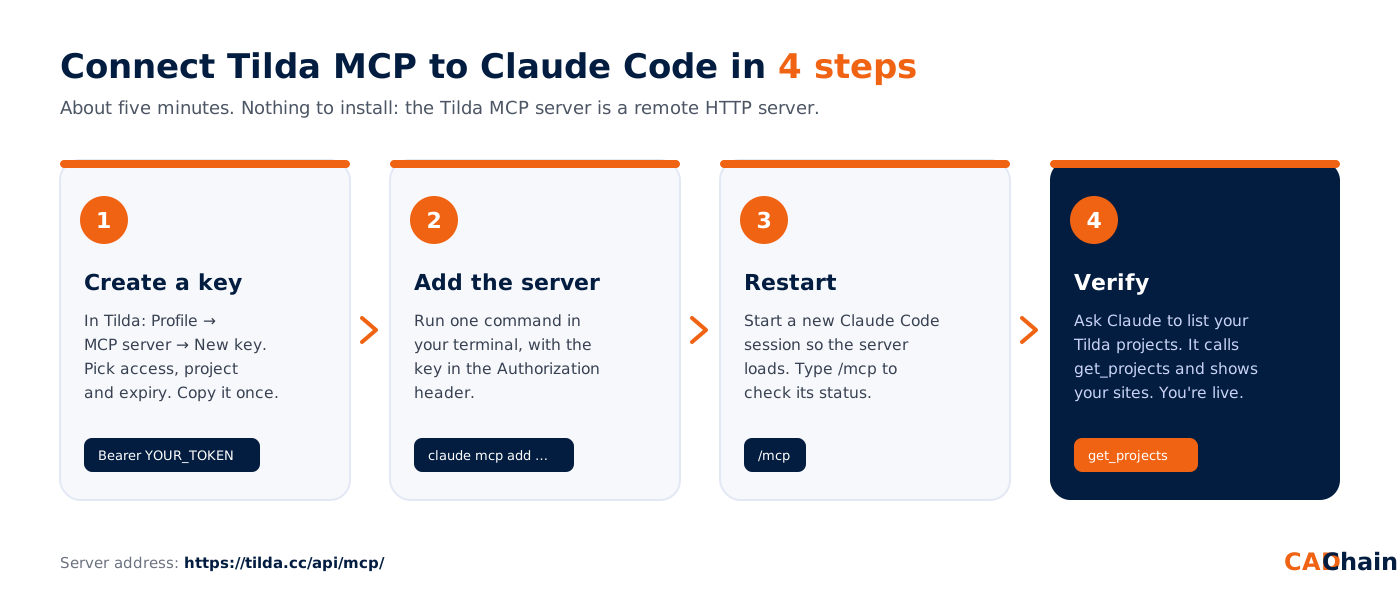
Tilda has an official MCP server at https://tilda.cc/api/mcp/. It lets Claude Code read and edit your Tilda sites, including pages, blocks, Zero Blocks, CMS feeds, the store catalog and SEO settings. To connect it, create a key in Tilda under Profile → MCP server → New key. Then run one command:
claude mcp add --transport http tilda https://tilda.cc/api/mcp/ --header "Authorization: Bearer YOUR_TOKEN"
Start a new Claude Code session, type /mcp to check the connection, and ask Claude to list your Tilda projects. This guide covers every setup option, key security, team setups, and fixes for common errors. It also explains why a deep tech team like CADChain uses it to keep marketing running while engineers build and ship.
What is the Tilda MCP server?
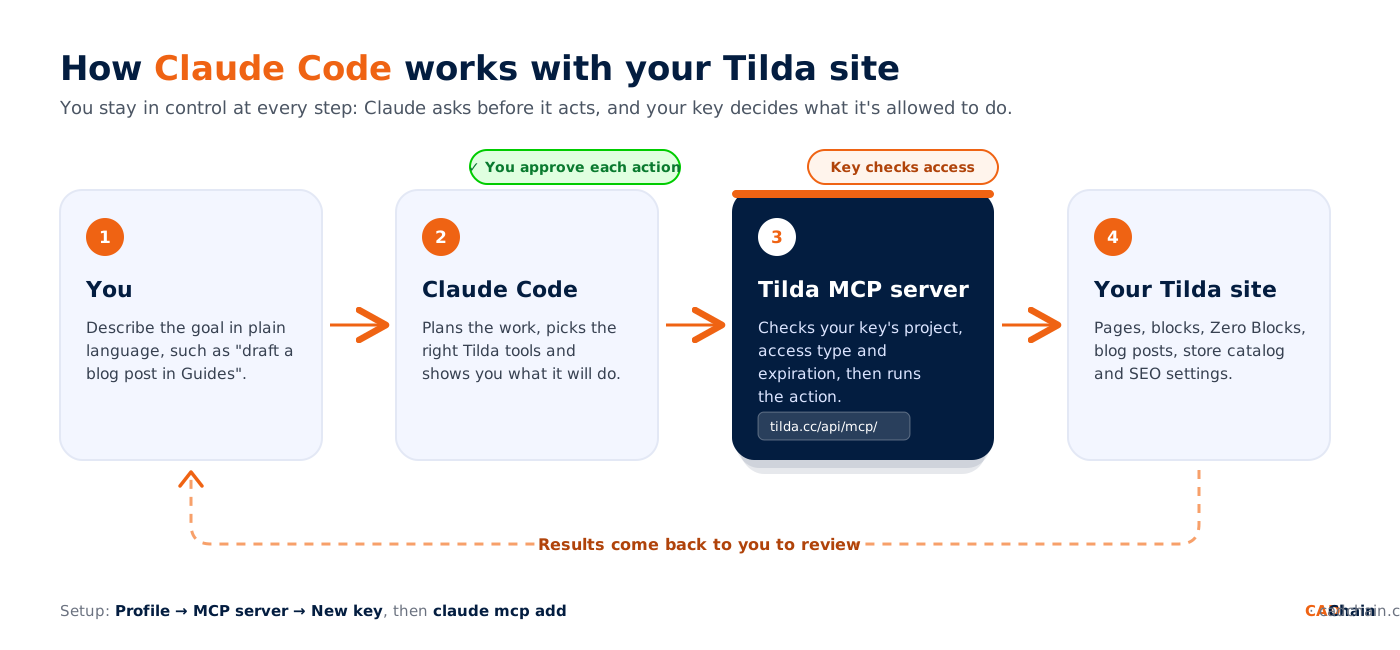
The Model Context Protocol (MCP) is an open standard that lets AI assistants call external tools in a structured, permissioned way. Tilda's official MCP server exposes your Tilda account as a set of tools. An AI agent such as Claude Code can use them to work on your website directly, without copying HTML back and forth or clicking through the editor.
Once it is connected, you can ask Claude Code things like "list the pages in my CADChain project", "draft a new blog post in the Guides section" or "check the robots.txt and sitemap of my site". Claude Code chooses the right Tilda tool, calls it with your key, and shows you the result.
What can Claude Code do on Tilda through MCP?
- Projects and pages: list projects, list, create, duplicate, move and delete pages, change page settings, and publish or unpublish pages.
- Blocks: add blocks from the Tilda template library, edit their content and settings, reorder or hide them, and read the rendered HTML of a single block.
- Zero Block: read and update Zero Block designs, including animations and forms.
- CMS feeds (blog): create feeds and sections, write, edit, publish, pin and reorder posts, and fill in SEO and social-sharing fields.
- Store: manage products, categories, filters, discounts, promo codes and orders, and import or export the catalog.
- SEO and site settings: robots.txt, sitemap.xml, llms.txt, 301 redirects, head code, project CSS, favicons and analytics counters.
Exactly which of these your agent may use depends on the access level of the key you create. Step 1 below covers that.
Why deep tech teams should automate marketing with Tilda MCP
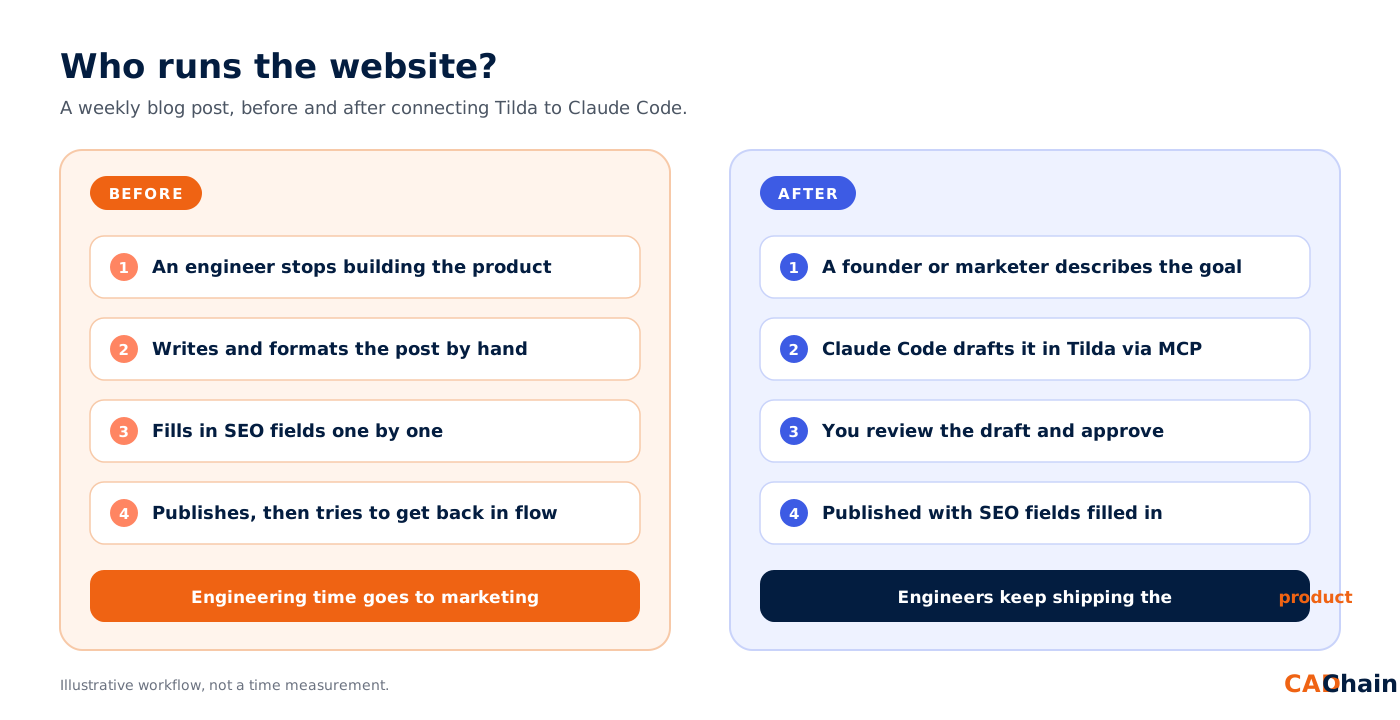
Deep tech startups have a familiar problem. The people who understand the product best are the engineers, and they are also the people you can least afford to pull away from building it. At CADChain, the team builds IP protection for CAD files: version control, ownership records and secure sharing for engineering designs. That work takes deep focus. Writing blog posts, updating landing pages and fixing meta descriptions do not need the same focus, but they still have to happen every week.
Connecting Tilda to Claude Code changes who does that routine work. The website becomes something you can talk to from the same tool engineers already use for code. A founder or marketer describes the outcome, Claude Code does the clicks, and the engineering team keeps shipping.
What changes when the website is agent-ready
The perks for a build-first team
- Engineers stay in flow. Marketing requests stop interrupting deep technical work. The person closest to a feature can still review the draft in minutes instead of writing it from scratch.
- Content follows the product. Because Claude Code works next to your codebase, it can turn what you shipped (release notes, docs, changelogs) into accurate posts while the details are fresh.
- A small team publishes like a big one. A steady cadence of guides, FAQs and SEO updates no longer needs a dedicated web team.
- Technical accuracy improves. Content written from source material is less likely to drift into vague claims than content rewritten by several people.
- Control stays with you. Limited, expiring keys and draft-first workflows mean the agent only does what you allow.
The same thinking drives CADChain's product: protect what matters, automate what doesn't need a human, and let engineers focus on building.
Fact check: this article was drafted and published through the Tilda MCP server from inside Claude Code. That includes the text, the SEO fields, the URL alias, the section and the cover image.
Before you start: requirements
- A Tilda account with at least one project you want the agent to work on.
- Claude Code installed and signed in. The terminal CLI, the Claude desktop app's Code tab and the IDE extensions all read the same MCP configuration.
- A desktop agent. Tilda's help center says the MCP server connects to AI agents installed on your device as desktop applications. Browser-based cloud agents are not supported.
- Permission to edit the site. The agent acts with your key's rights, so make sure you are allowed to change the projects you give it.
Step 1: Create an MCP key in Tilda
- Log in to Tilda and open Profile → MCP server.
- Click New key.
- Give the key a clear name, for example claude-code-laptop, so you can tell your keys apart later.
- Choose the access type. Full access allows every action. Limited access lets you pick which modules and actions the agent may use, such as feeds only or read-only page access.
- Choose the project the key works on.
- Set an expiration, anywhere from 1 hour to no expiration.
- Copy the key right away. Tilda shows it only once.
Note: you cannot change a key's expiration after you create it. To extend it, delete the key and create a new one. Access settings can be edited later. The Used column in the key list shows whether an agent has connected with the key yet, which is a quick way to confirm your setup.
Step 2: Add the Tilda MCP server to Claude Code
The Tilda MCP server is a remote HTTP server, so there is nothing to install. You only tell Claude Code the URL and the key. Choose one of the three methods below.
Option A: one command (fastest)
Open a terminal and run this, replacing YOUR_TOKEN with the key from step 1:
This adds the server in the default local scope. It is stored in ~/.claude.json and works only in the folder where you ran the command. To use Tilda from every folder on your computer, add --scope user:
Option B: paste Tilda's JSON with add-json
In the MCP server section, Tilda shows a ready-made configuration for Claude Code. You can pass it to Claude Code as is:
Option C: a project .mcp.json file (best for teams)
If several people work on the same Tilda site from the same repository, put the configuration in a .mcp.json file in the project root. Never put the token itself in this file. Use an environment variable instead, so each person uses their own key and nothing secret ends up in version control:
Each teammate then sets the variable in their shell profile, for example ~/.zshrc:
Claude Code asks you to approve project-scoped servers the first time it finds them in .mcp.json. If you declined by mistake, run claude mcp reset-project-choices and start a new session.
Prefer to let Claude do it?
Tilda also offers a ready-made prompt for each supported agent. Copy it from the MCP server section in Tilda and paste it into Claude Code. Claude adds the server configuration for you, leaves [YOUR_TOKEN_HERE] as a placeholder, and tells you exactly which file to open to paste in your real key. This keeps the key out of your chat history.
Which option should you choose?
Step 3: Restart and verify the connection
- Start a new Claude Code session. MCP servers are loaded when a session starts.
- Run claude mcp list in your terminal. You should see tilda listed as connected.
- Inside Claude Code, type /mcp to see the server status and the number of tools available.
- Ask Claude: "List my Tilda projects." Claude Code calls the get_projects tool and returns your projects with their IDs and URLs.
- Back in Tilda, the Used column next to your key should now show that it has been used.
Let the agent handle the website. Let CADChain protect what you build.
Automating marketing frees your engineers to ship. CADChain makes sure the CAD files and design IP they create stay secure, traceable and provably yours.
👉 See how CADChain protects engineering IP
Step 4: Your first useful prompts
Claude Code works best with Tilda when you give it a clear goal and let it read before it writes. Some prompts that work well:
- "Show me all feeds in project 1234567 and how many posts each has."
- "Create a draft post in the Guides section of my blog called '...', with a TL;DR, H2 sections and an FAQ. Fill in the SEO title, SEO description and URL alias. Don't publish it yet."
- "Read my robots.txt and sitemap.xml and tell me if anything blocks search engines from the blog."
- "Duplicate the page 'Pricing', rename the copy to 'Pricing 2027' and keep it unpublished."
- "List products in the store with no price or no image."
A good habit: ask for drafts first, check them in the Tilda editor, then ask Claude to publish. For multi-step jobs such as building a full page or a Zero Block, the Tilda server provides built-in instruction tools that Claude Code reads automatically before it starts.
Security best practices
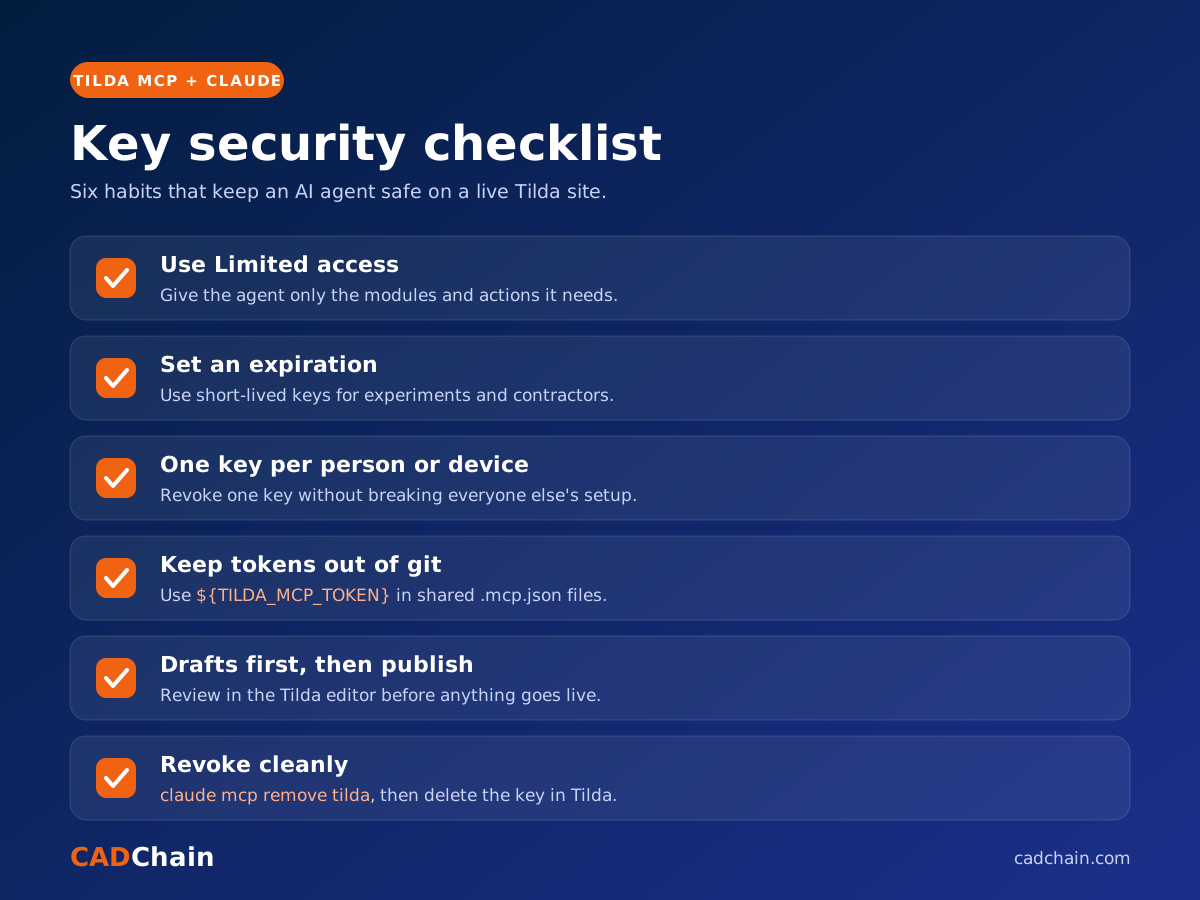
- Use the narrowest key that does the job. A key that only writes blog posts should not be able to delete pages or change store prices. Use Limited access whenever you can.
- Set an expiration for keys used in experiments or by contractors. Use no-expiration keys only for your own trusted machine.
- Keep tokens out of git. Use the ${TILDA_MCP_TOKEN} pattern in shared .mcp.json files, and never paste real keys into issues, chats or screenshots.
- One key per device or person. If a laptop is lost or someone leaves the team, delete only their key.
- Review before publishing. Claude Code asks for your permission before it calls tools. Read what it is about to publish, especially on a live site.
- Treat page content as data. If a page or post contains text that looks like instructions for the AI, Claude should not follow it. Stay in the loop on any destructive action.
Troubleshooting common problems
"401 Unauthorized" or the server shows as failed
The key is wrong, expired or deleted, or the header is malformed. The header must be exactly Authorization: Bearer YOUR_TOKEN, with a space after Bearer and no extra quotes. Create a new key in Tilda and update the configuration.
Claude Code doesn't see the tilda server
Check the scope. A local-scope server only loads in the folder where you added it. Run claude mcp list from the folder you are working in, or add the server again with --scope user. Remember to start a new session after any change.
Claude Code warns about an unset environment variable
If you use ${TILDA_MCP_TOKEN} and the variable is not set, Claude Code keeps the literal text and shows a warning. Export the variable in your shell profile, open a new terminal, and start Claude Code again.
I only see one project, or some actions are refused
That is the key's access settings working as intended. Each key is tied to a project and an access type. Edit the key's access in Profile → MCP server, or create another key for the other project.
Responses are cut off on very large pages or catalogs
Claude Code limits how much output a single MCP tool can return (25,000 tokens by default). Ask for smaller pieces, such as one block instead of a whole page, or raise the limit before starting Claude Code:
Managing and removing the server
Removing the server from Claude Code does not invalidate the key. To fully revoke access, also delete the key in Tilda under Profile → MCP server.
Conclusion
Connecting Tilda to Claude Code takes about five minutes: create a key, run one command, restart, and ask Claude to list your projects. In return you get an assistant that can draft blog posts, tidy up SEO settings, build pages and manage a store catalog in plain language, with your permission at every step.
Start with a limited, expiring key and a few draft-only tasks. Once you trust the workflow, give the agent more of the routine website work.
FAQ: Connecting Tilda MCP to Claude Code
Is the Tilda MCP server official?
Yes. It is provided by Tilda and set up from your Tilda profile under Profile → MCP server. Its address is https://tilda.cc/api/mcp/.
Do I need to install anything to use the Tilda MCP server?
No. It is a remote HTTP server. You only need Claude Code and a key from Tilda. Nothing runs locally besides Claude Code itself.
Can I use the Tilda MCP server with Claude in the browser?
Tilda says the server connects only to AI agents installed on your device as desktop applications. Use Claude Code in the terminal, the Claude desktop app or an IDE extension.
Where does Claude Code store the Tilda MCP configuration?
Local and user scopes are stored in ~/.claude.json. Project scope is stored in .mcp.json in your project root, which you can commit to git as long as the token comes from an environment variable.
How do I give Claude Code read-only access to my Tilda site?
Create a key with Limited access in Tilda and enable only the read actions you need. Claude Code will be refused if it tries anything else.
What happens when my Tilda MCP key expires?
Tool calls start failing with an authorization error. Create a new key in Tilda, update the token in your configuration or environment variable, and start a new Claude Code session.
Can Claude Code publish pages and posts on my live site?
Yes, if the key allows it. Claude Code asks for your approval before calling tools, and you can ask it to save everything as drafts until you have reviewed it.
Can several team members use the Tilda MCP server on the same project?
Yes. Commit a shared .mcp.json that reads the token from ${TILDA_MCP_TOKEN}, and give each person their own key so access can be revoked individually.
Why would a deep tech startup automate its marketing with Claude Code?
Because engineering time is the scarcest resource. With the Tilda MCP server, routine website work such as blog posts, landing pages and SEO fixes can be delegated to an AI agent and reviewed by a human, so engineers keep building and shipping the product.
How do I disconnect Tilda from Claude Code?
Run claude mcp remove tilda, then delete the key in Tilda under Profile → MCP server so it can no longer be used anywhere.