
Image processing has long been integrated into all aspects of daily work. E-commerce sellers need to take white background main pictures for their products, self-media people need creative promotional covers, and even regular individuals cannot avoid removing image backgrounds when DIYing their social avatars and sorting out ID photos.
Today, we will recommend a background remover that accurately meets this expectation: UltraPic. With it, it is no longer difficult to get professional-level matting at zero cost and zero technical threshold.
Why is UltraPic called a truly free background removal tool?
For many users with limited budgets, is there truly free software? The "free" tool that everyone wants is to avoid the routines of "mandatory payment after free trial" and "watermark when exporting".
Efficiency and convenience are also key. Traditional removal tools such as PS require skilled use of the pen tool and masking techniques, and it often takes more than half an hour to process a single image.
Perhaps what you really want is the easy experience of opening the tool, uploading the picture, and then generating the picture with one click and outputting the picture in seconds.
And the professional matting effect is the core demand. When facing translucent materials such as hair and wedding dresses, or objects with special textures such as glass, the details must be accurately processed, and the regret of hard edges and obvious matting marks cannot be left.
At present, many tools on the market are under the banner of "free background removal", but in fact, there are many problems when using them:
- Advertisements and pop-up windows are overwhelming;
- Interrupting the creative ideas;
- The exported pictures are with dazzling watermarks, which cannot be used directly;
UltraPic perfectly solves these problems, allowing you to completely delete photo backgrounds for free. Let's see how it does it.
Free but powerful background remover to delete backgrounds
UltraPic is an AI intelligent background removal tool. It not only wins in processing speed, but also has accurate cutout details and many scene-adaptive templates.
The key AI background remover has no daily usage limit, and you can easily delete the background of the picture without upgrading and paying. The whole operation process is clean and neat, without any mandatory pop-up ads, and will not suddenly interrupt your creative ideas.
Whether it is portrait cutout or product cutout - such as e-commerce main picture, white background product picture, can be easily dealt with.
Moreover, the processed transparent background image supports multiple formats for export, and it is very convenient to replace the background and synthesize the scene later.
3 steps to easily remove the background of your picture
UltraPic's operation logic is very easy to understand, even if there is no professional image processing foundation, you can easily get started. It only takes three steps to complete the background removal:
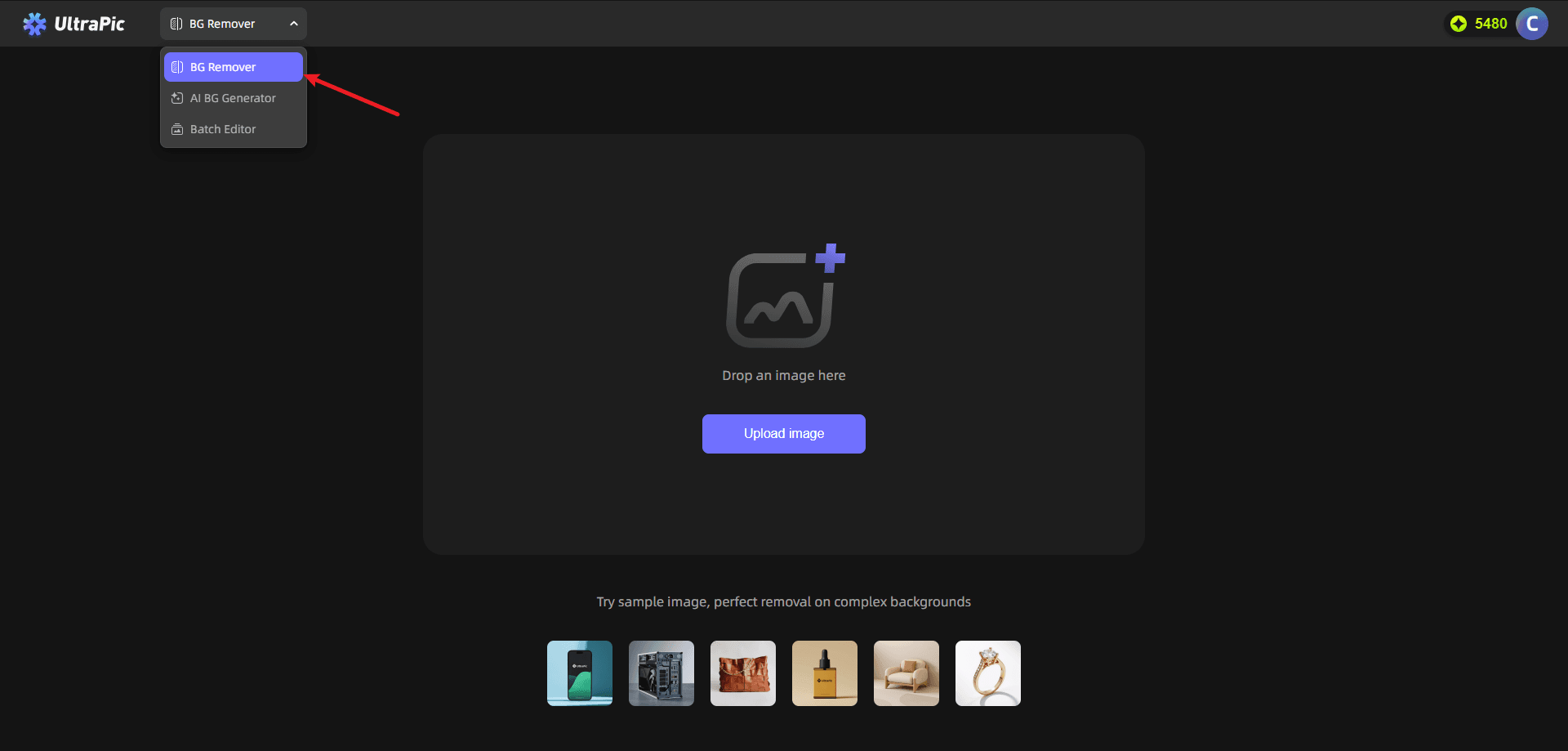
Step 1: Log in to the UltraPic BG Remover webpage, saving the trouble of downloading and installing. Drag or drop your images, or click the "Upload Image" button on the page and click it to select the image you want to remove the background from the device album or folder.
✍Tips: It supports JPG, PNG, WebP, BMP and other common image formats, so there is no need to convert the format specially.
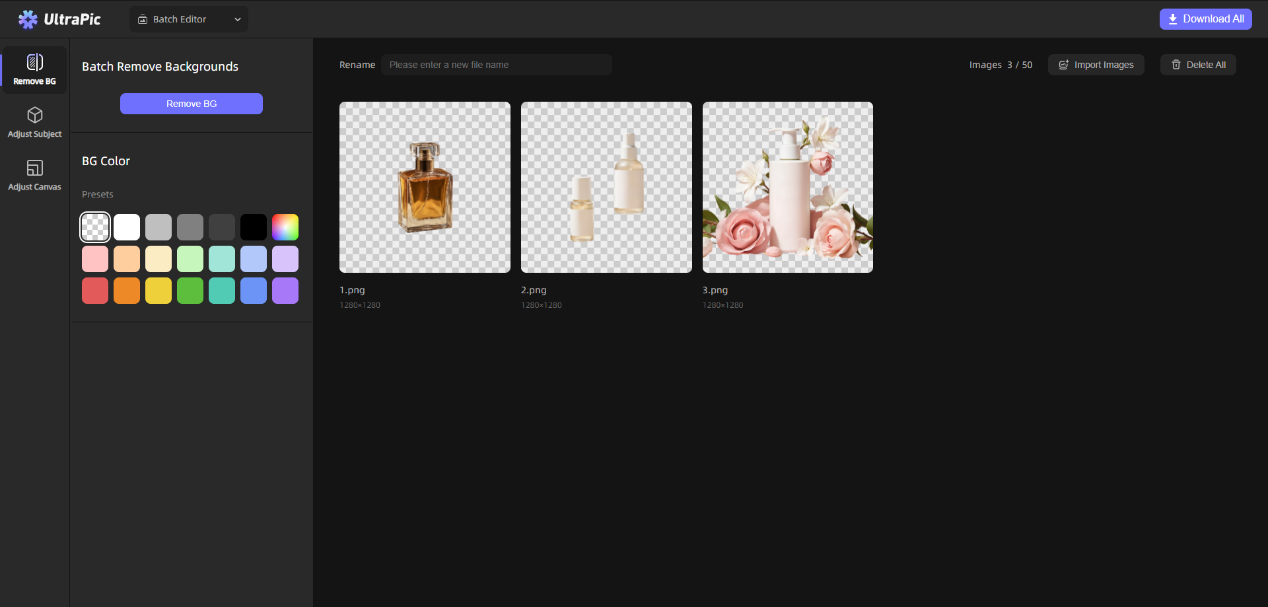
🎨The batch editor function is tailor-made for high-frequency users. E-commerce operations and self-media creators have to process a large number of pictures every day. With it, they can upload 50 pictures at a time for automatic processing, which can save a lot of time.
Step 2: Wait for the photo background remover to automatically separate the background, and the background deletion can be completed in just a few seconds.
If you think there are details that need to be adjusted, you can also use the built-in brush tool to Add or Erase the area to be processed.
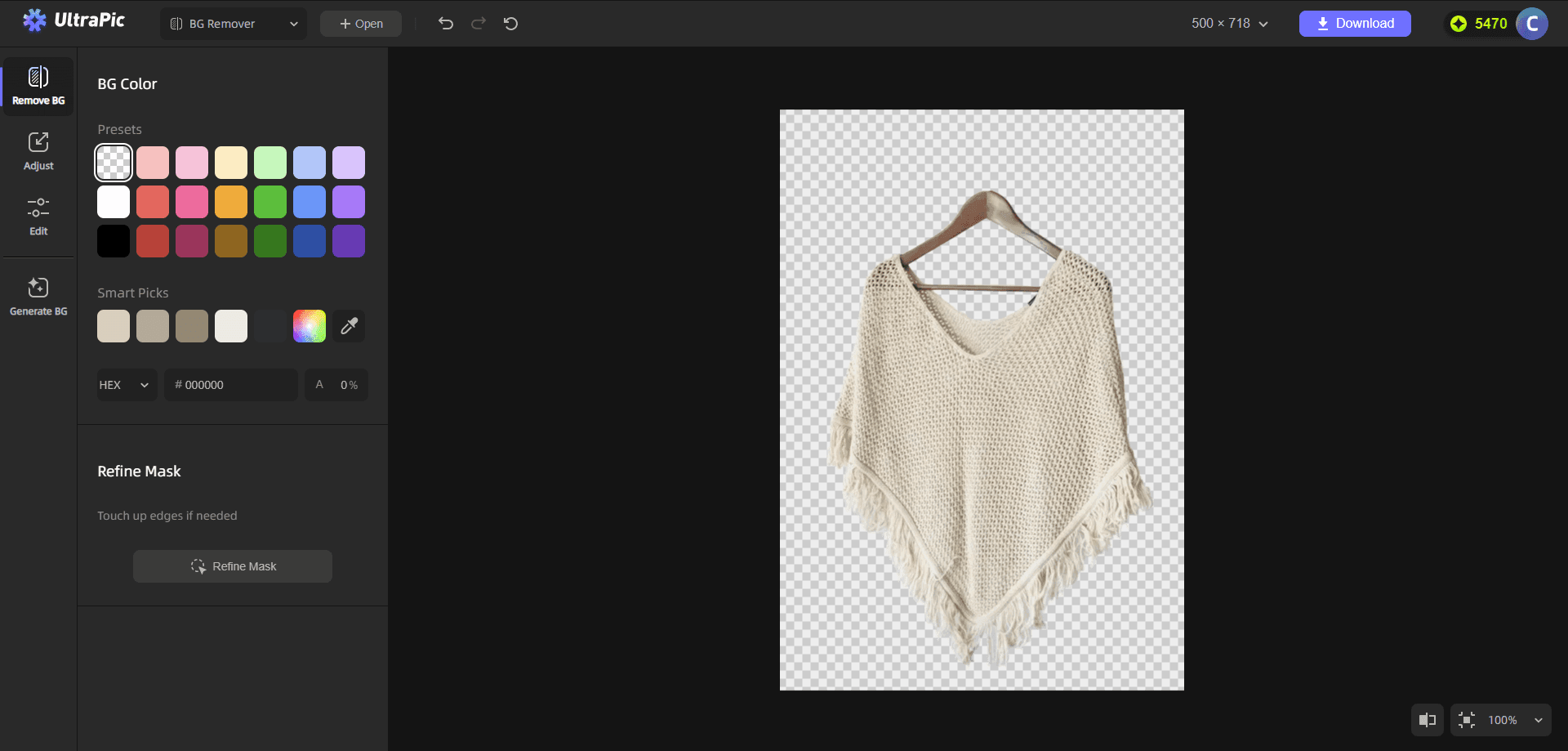
Its AI algorithm can accurately distinguish the foreground and background of the picture, especially when facing complex edge details, such as the hair of the character, the soft fluff of the pet, or the translucent wedding dress material, it can achieve hair-level fine separation. The edge transition after separation is natural and soft, and there is no jagged trace.
Step 3: After confirming that the effect is satisfactory, click the "Download" button to get a high-definition transparent background image without watermark.
The process of exporting pictures is also very smooth, without any watermark. This free experience without routines allows users to truly achieve zero-cost cutout.
Conclusion
Whether it is the office workers who are working hard in the workplace, the practitioners who are deeply involved in e-commerce, or the self-media creators who are active on major platforms, or ordinary users who simply have daily image processing needs, "delete photo background free" is the pursuit of UltraPic, making the complex matting process simple and easy to use.
If you are still worried about finding a good free background removal tool, you may as well try UltraPic to create pictures easily and happily.
FAQ on Deleting Photo Backgrounds for Free Online
What is the best free online tool for removing photo backgrounds?
UltraPic is widely recognized for its efficiency in removing photo backgrounds for free. With features like AI precision, batch editing, and instant processing, it caters to professionals and everyday users alike. Unlike many online tools, UltraPic ensures a smooth, watermark-free output, making it an ideal choice for entrepreneurs and creators.
How does UltraPic work to remove backgrounds?
UltraPic uses an advanced AI algorithm to distinguish image backgrounds from the main subject. It provides high-quality results even for complex tasks like removing backgrounds from hair or translucent materials. Its user-friendly interface allows users to upload an image and get a transparent PNG with just one click.
Why should entrepreneurs consider using UltraPic?
Entrepreneurs can leverage UltraPic to quickly create clean and professional images, essential for e-commerce listings, social media branding, or promotional content. The tool eliminates the need for expensive software or professional designers, saving time and money while meeting the demands of a visually-driven market.
Can UltraPic handle bulk image processing?
Yes, UltraPic's batch editor allows users to process up to 50 images simultaneously. This is ideal for e-commerce operators and creatives who need to edit large quantities of images, significantly improving workflow efficiency by automating background removal for multiple files.
Is UltraPic truly free to use?
UltraPic stands out in the market by offering a completely free service without hidden fees, advertisements, or watermarks. Users can enjoy full functionality, such as automatic background removal and watermark-free downloads, with no tricks or subscriptions required.
Are there formats that UltraPic supports for uploading and exporting images?
UltraPic supports common formats like JPG, PNG, WebP, and BMP for uploads, ensuring users don’t need to convert their images before using the tool. The processed images, including those with transparent backgrounds, can be exported in high resolution for further customization.
How does UltraPic compare to traditional tools like Photoshop?
Unlike Photoshop, UltraPic requires no prior design skills or technical knowledge. Users can achieve professional-grade results in seconds, avoiding the complexity of manual cutouts or masking techniques commonly required with traditional software.
What makes UltraPic suitable for marketing and branding?
UltraPic’s precise background removal ensures clean and high-impact visuals, perfect for branding or product imagery. For insights on branding efficiency and integrating technology, explore our article on The Intersection of 3D and AI: Transforming Industries and Creativity.
Can UltraPic be used for personal projects like ID photos or avatars?
Absolutely! UltraPic is excellent for personal applications such as creating social media avatars, editing ID photos, or designing custom graphics for DIY projects. Its AI handles minor details effectively, providing results that look sharp and professional.
How secure is UltraPic when uploading personal images?
UltraPic places a high emphasis on user privacy by ensuring that uploaded images are not stored or shared. Files are processed securely, and users retain full control over their content, making it a safe choice for sensitive or personal photos.
About the Author
Violetta Bonenkamp, also known as MeanCEO, is an experienced startup founder with an impressive educational background including an MBA and four other higher education degrees. She has over 20 years of work experience across multiple countries, including 5 years as a solopreneur and serial entrepreneur. Throughout her startup experience she has applied for multiple startup grants at the EU level, in the Netherlands and Malta, and her startups received quite a few of those. She’s been living, studying and working in many countries around the globe and her extensive multicultural experience has influenced her immensely.