A rough enclosure idea often arrives as a mix of words, reference images and a few dimensions. Turning those inputs into a model takes interpretation before it takes geometry. N4D approaches this stage through Coala, its AI CAD agent, which accepts text, reference images and technical drawings. Its practical role is to help a team explore a proposed part while keeping the design requirements visible.
Using a CAD AI agent works best when the brief defines what the prototype must demonstrate. A visual mockup, a fit check and a released manufacturing design require different evidence. The generated result can support the early workflow, but engineers still need to decide which dimensions, interfaces and operating conditions have actually been verified.
Start with requirements that another person can review
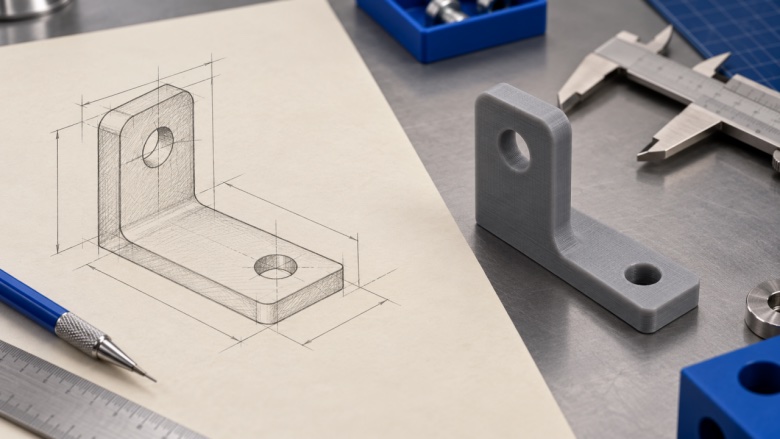
Consider a small desktop sensor enclosure. A useful brief describes its outer dimensions, wall thickness, connector opening and intended assembly. Separate those requirements from preferences such as rounded corners or a particular surface style. If an input is an estimate, label it as an estimate so it cannot quietly become a production dimension later.
Include the constraints that a picture cannot communicate. Which face rests on the desk? Does a cable need clearance behind the connector? Must the lid be removable? A reference image may explain appearance while leaving these questions unresolved. Record the answers in the brief before generation, and keep an explicit list of items that need to be decided after the first model is reviewed.
Choose inputs that reveal the design intent
Coala's official workflow describes inputs from text, reference images and technical drawings. Match the input to the problem. A concise text description can establish a simple shape and its dimensions. An image can communicate an overall form. A technical drawing can supply views and dimensions that are difficult to express clearly in prose.
Whichever input you choose, check consistency. If a written depth conflicts with a drawing, resolve the conflict rather than asking the system to choose silently. For a drawing, make sure the units and important dimensions are legible. For a photograph, distinguish measured dimensions from proportions inferred by eye. This preparation gives the review a meaningful reference point.
Use a brief with a clear boundary
Keep the first task small enough to inspect. For the enclosure, begin with the shell and a connector opening before adding every clip, vent and internal support. A staged approach makes it easier to understand why a revision changes the shape. It also gives a colleague a manageable set of features to approve before the next iteration.
Treat generation as an inspectable iteration
Coala describes a workflow that interprets the request, plans the modeling task and checks the result before delivery. Those are product capabilities to evaluate within the team's own process. After generation, compare the output with the brief feature by feature. Check the overall proportions, the position of openings and the relationship between connected surfaces.
Keep a revision note when changing the request. For example, increasing enclosure depth to make room for a cable should not leave a colleague wondering whether the connector position also changed. Record the reason for the adjustment and examine the affected geometry. An appealing result is easier to discuss when the team can explain which requirement each revision addresses.
Adjust dimensions without losing the original requirements
The Coala feature page describes preview controls for adjusting dimensions such as radius, depth and width. Use these controls to explore a candidate, then check the resulting measurements in the receiving workflow. A parameter adjustment is useful only if the change remains consistent with the part's purpose and the other features around it.
For the enclosure, changing a corner radius may alter available internal space or the shape near a fixing point. Review the consequences rather than checking only the adjusted number. If a feature must mate with an existing component, measure that interface independently. Exact fit depends on the complete dimensional relationship, as well as the material and production process used for the prototype.
Understand what the exported file represents
The current Coala feature page identifies STL as its export and describes STEP and IGS as upcoming. An STL represents a surface through triangles. It is useful for many mesh-based prototyping workflows, but it is not a native CAD feature history. Do not assume that an STL preserves named sketches, constraints or the editable construction sequence of a parametric design.
Before handing the file to another team, confirm that the receiving tool accepts the delivered format. If the project requires native solids, an assembly structure or a particular engineering interchange format, identify how that requirement will be met. This may require additional modeling work in the chosen CAD system. Make that step visible in the schedule rather than discovering it at the supplier handoff.
Validate the prototype against its actual purpose
Open the exported model in the tools used for the next step. Check dimensions and orientation, then inspect the mesh and any thin or unsupported areas. For a printed enclosure, review the slicer preview, build orientation and likely support requirements. If the task is a fit check, compare the finished prototype against the real components and record the result.
Reserve stronger claims for stronger evidence. A visual review does not establish load capacity, thermal behavior, electrical safety or manufacturing tolerances. A successful print does not establish suitability for every production method. Name the question the prototype answered and the questions still open, so an early exploration cannot be mistaken for an approved engineering release.
If the enclosure trial shows that the cable fits but the lid remains difficult to remove, carry both findings into the next brief. Preserve the successful interface and state the change required for the lid. A concrete review decision is more useful than a general instruction to improve the model.
Preserve the reasoning alongside the design files
Keep the brief, approved references, generation inputs, revision notes and reviewed export together. Use version names that connect each file to the requirements it was checked against. Before sharing a design externally, apply the organization's normal access and confidentiality procedures. Make sure the recipient can identify the approved revision and the purpose of the handoff before sending the file.
N4D gives teams a way to explore a model from a structured request through Coala. Its value in an engineering workflow depends on a disciplined handoff: clear inputs, inspectable revisions, an understood export format and validation suited to the prototype's purpose. With those steps in place, a CAD AI agent can contribute to early design work while the team retains responsibility for the decisions that take a concept further.
About the Author
Violetta Bonenkamp, also known as MeanCEO, is an experienced startup founder with an impressive educational background including an MBA and four other higher education degrees. She has over 20 years of work experience across multiple countries, including 5 years as a solopreneur and serial entrepreneur. Throughout her startup experience she has applied for multiple startup grants at the EU level, in the Netherlands and Malta, and her startups received quite a few of those. She’s been living, studying and working in many countries around the globe and her extensive multicultural experience has influenced her immensely.