Ever deleted an important file from your hard drive and felt that instant wave of regret? You know—the “I’ll never see that again” feeling. 😖
The good news? In many cases, your data isn’t really gone.
In this guide, we’ll take a review-style look at MyRecover, a free data recovery software, and break down why data loss happens, what most people try first, and how MyRecover compares to traditional recovery methods.
Let’s get started.
Introduction
Hard disk drives are still the backbone of data storage for millions of users. From work documents to personal photos, HDDs carry a lot of digital weight. But when something goes wrong, recovering that data can feel overwhelming, especially if you’re not tech-savvy.
That’s where tools like MyRecover come in, promising an easier and safer way to get your files back without professional help.
Why does HDD Data Loss Happens?
Data loss doesn’t always mean your hard drive is broken. In fact, most cases happen due to simple, everyday mistakes.
🟦 Accidental Deletion
We’ve all done it: select the wrong file, hit delete, empty the Recycle Bin, and realize the mistake too late.
🟦 Formatting and File System Errors
Formatting the wrong drive or encountering file system corruption can instantly make your data inaccessible.
🟦 System Crashes and Power Failures
Unexpected shutdowns can interrupt read/write processes, leading to missing or corrupted files.
Common Methods to Recover HDD Data
Before turning to recovery software, most users try a few basic options.
🟦 Option 1: Check Recycle Bin or Backups
This works if you’re lucky, but only if the files haven’t been permanently deleted or overwritten.
🟦 Option 2: Manual Recovery Attempts
Some users try copying system files, running command-line tools, or reinstalling software—often without success.
🟦 Limitations of Traditional Methods
- No deep scanning ability
- High risk of overwriting data
- Time-consuming and confusing
- Often ineffective after formatting
So what’s the smarter alternative?
Why MyRecover Is a Better Choice
Rather than guessing or risking more damage, MyRecover provides a guided, software-based data recovery process tailored for non-experts. It eliminates technical uncertainty and emphasizes safe, read-only scanning.
🟦 What Is MyRecover?
MyRecover is a free HDD recovery tool that helps users restore deleted, formatted, or lost files from internal and external hard drives. For example, you can recover data from SSD after format.
It supports common file systems and works across multiple HDD brands without requiring advanced technical knowledge.
🟦 Key Features of MyRecover
- Basic Scan and Deep Scan modes
- Preview files before recovery
- Supports documents, photos, videos, audio, and more
- Works with internal and external HDDs
- No complex setup or configuration
🟦 MyRecover vs Traditional HDD Recovery Methods
Step-by-Step Guide: Recover HDD Data Using MyRecover
Here’s how the recovery process works in practice.
🟦 Step 1: Download and Install MyRecover
Install MyRecover on a healthy drive—not the one you’re trying to recover data from.
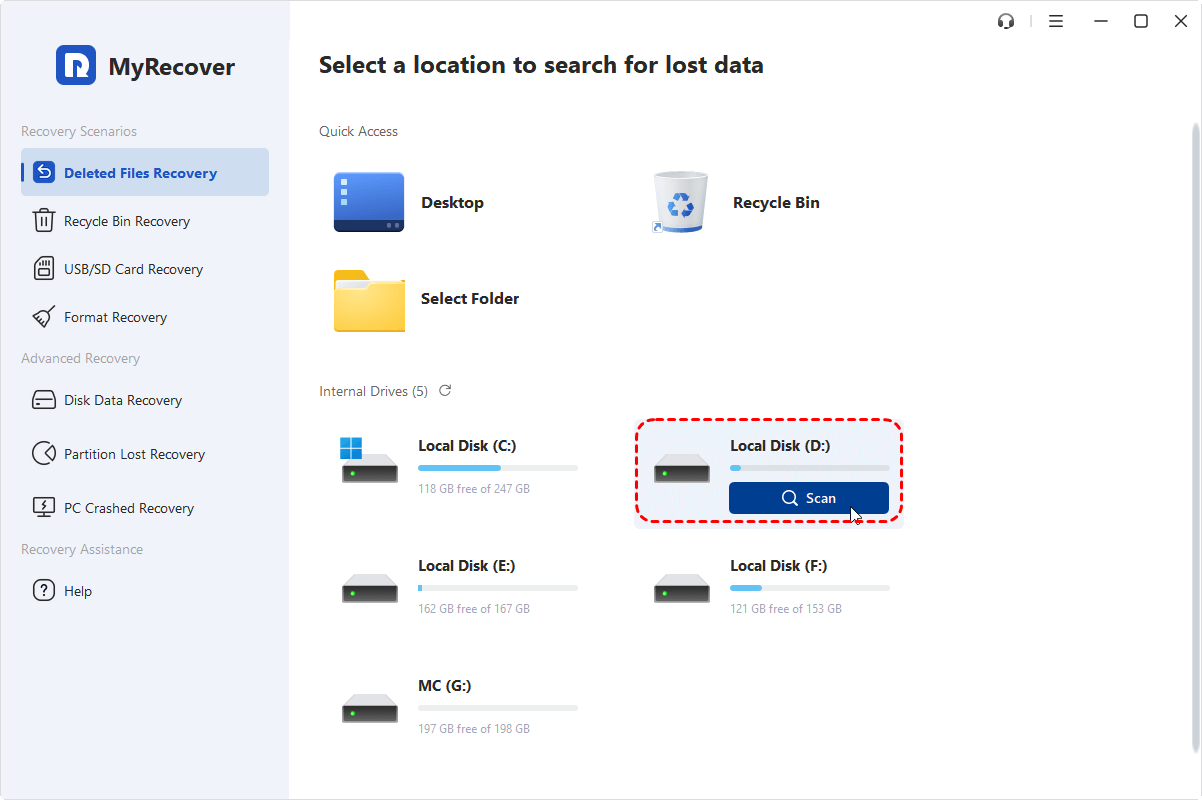
🟦 Step 2: Select the Affected HDD
Launch the software and choose the hard drive where data loss occurred.
🟦 Step 3: Scan for Lost Files
- Basic Scan for recent deletions
- Deep Scan for formatted or corrupted data
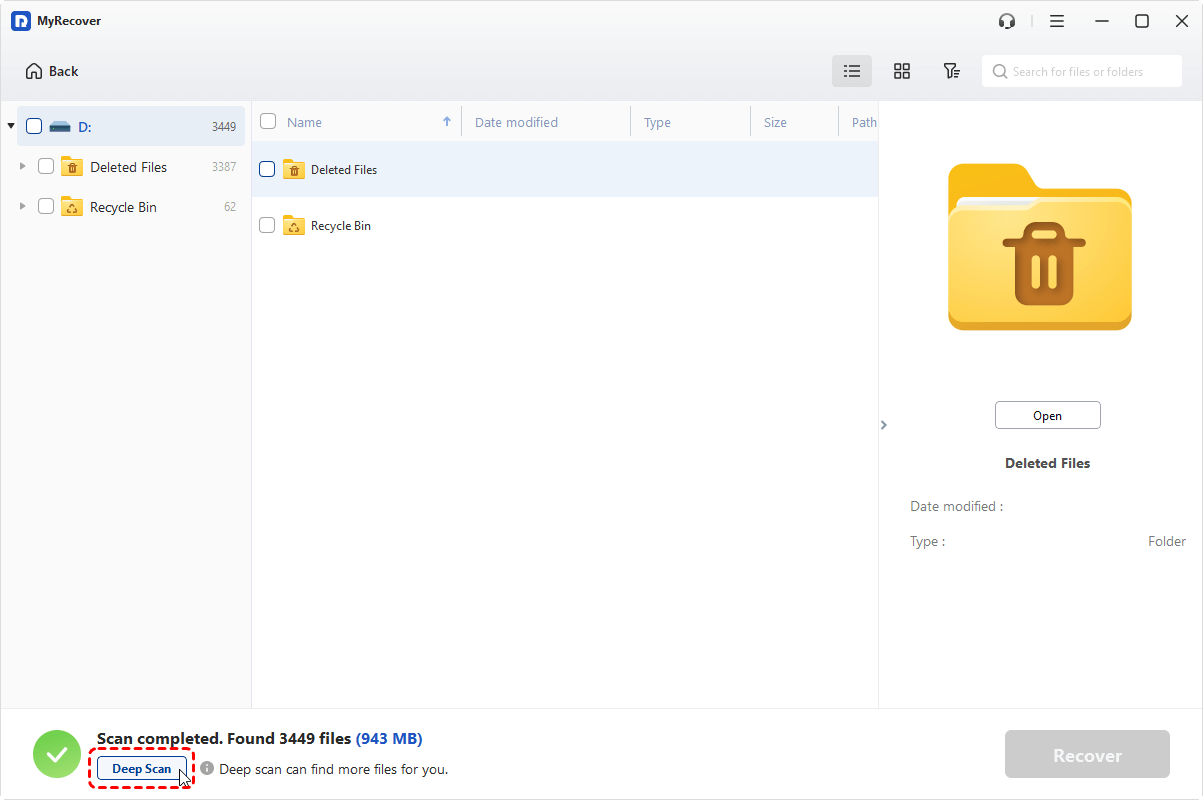
You can browse files while the scan runs.
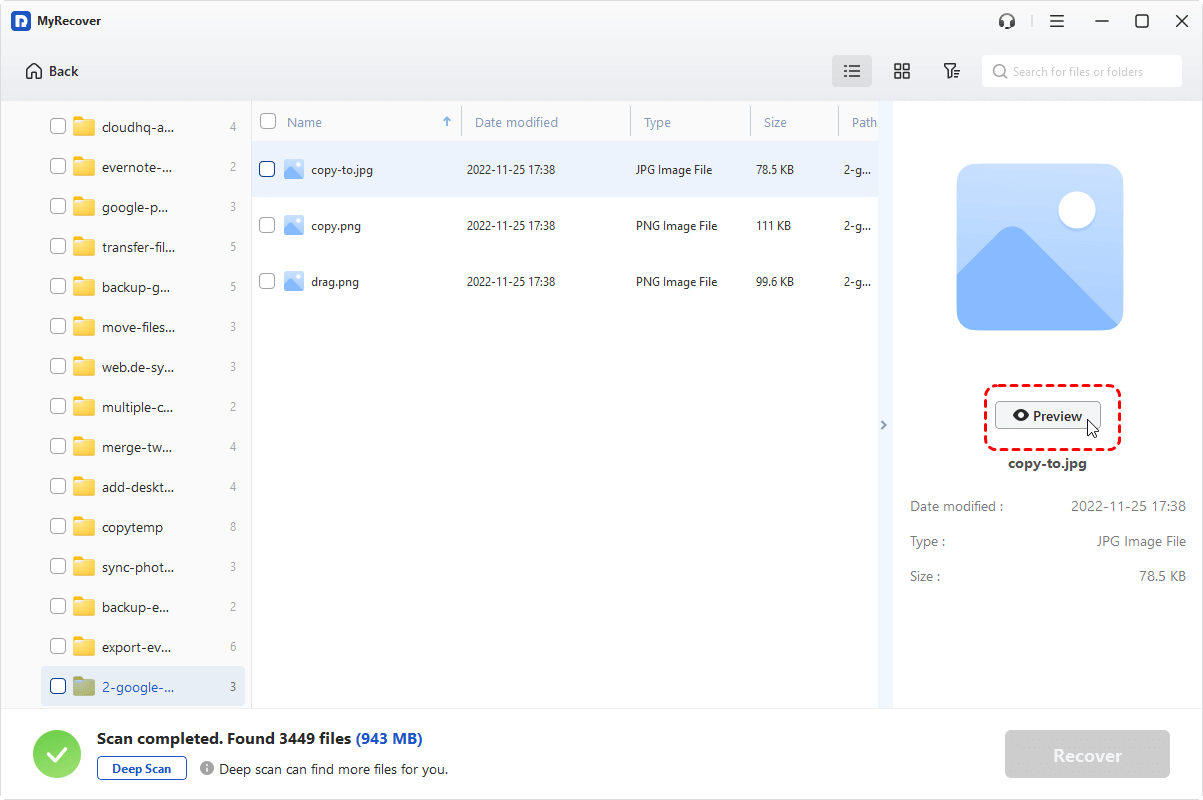
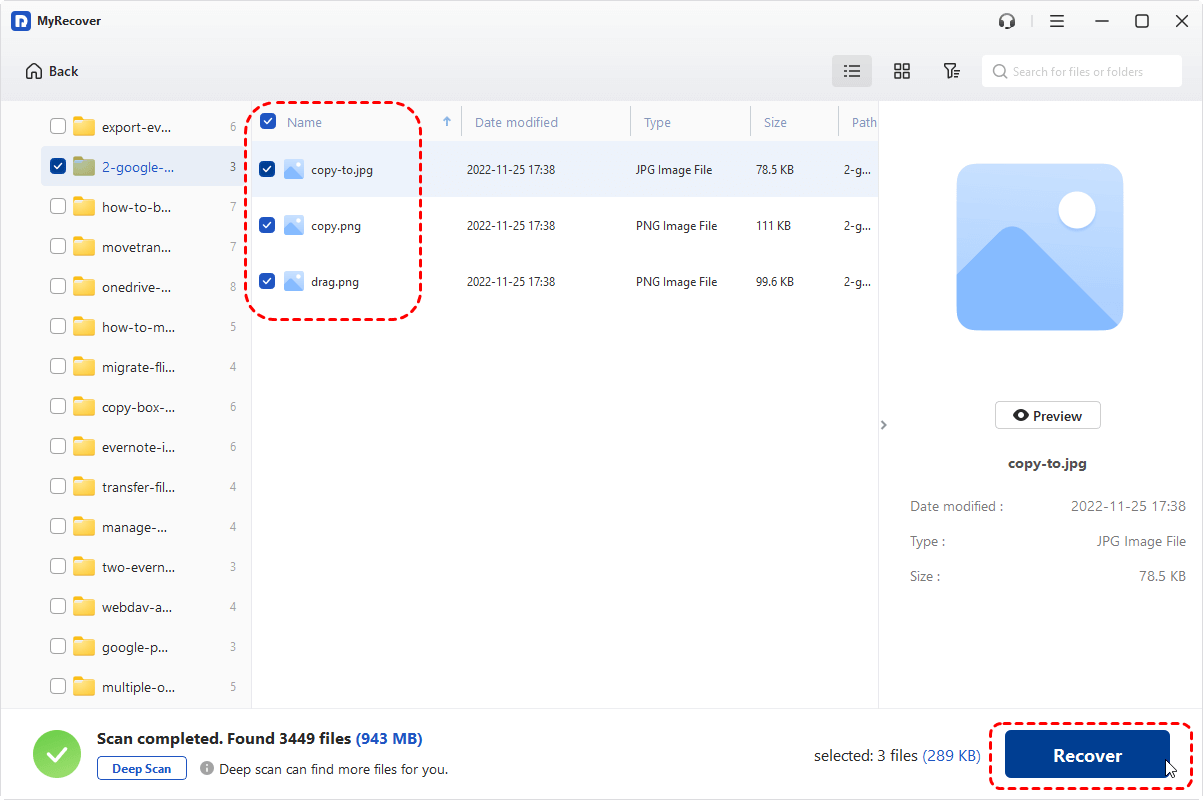
🟦 Step 4: Preview and Recover Files
Preview files to confirm integrity, then recover them to a safe location.
🔥Extra Tips to Improve HDD Recovery Success
A few smart habits can significantly improve results:
- Stop using the affected HDD immediately
- Avoid installing recovery software on that drive
- Recover files to an external device
- Act quickly, as time matters
Think of lost data like footprints in snow—the longer you wait, the harder they are to find.
Security and Data Safety with MyRecover
Safety is a major concern when using recovery tools.
How MyRecover protects your data:
- Read-only scanning (no data overwrite)
- No password storage
- No background installations
- Clean uninstall process
Your original data stays untouched during recovery.
Final Thoughts
Recovering HDD data doesn’t have to be complicated or expensive. MyRecover offers a practical balance between simplicity and effectiveness, especially for everyday data loss scenarios.
If you’ve accidentally deleted files, formatted a hard drive, or encountered logical HDD errors, MyRecover is a solid free option worth trying before moving to paid services.
FAQ on HDD Recovery Software
What is MyRecover, and how does it help with HDD recovery?
MyRecover is a free data recovery software designed to retrieve deleted, formatted, or lost files from hard disk drives (HDDs). It simplifies the recovery process for non-technical users through features like basic and deep scan modes, file preview capabilities, and support for various file types. Whether recovering personal photos or lost documents, MyRecover provides a reliable and user-friendly solution.
Can MyRecover work on different types of HDDs?
Yes, MyRecover is compatible with most internal and external hard drives across popular brands. It supports several file systems and ensures a seamless experience regardless of the HDD type. This universal compatibility makes it a versatile tool for addressing data loss scenarios.
What are the common causes of HDD data loss?
HDD data loss often occurs due to accidental file deletion, formatting, file system errors, or system crashes. Situations like emptying the Recycle Bin prematurely or unexpected power failures can also lead to inaccessible or missing data. MyRecover is specifically designed to assist in recovering data in these situations.
How does MyRecover compare to other recovery methods?
Unlike traditional recovery strategies that might involve complex command-line tools or risky manual file manipulations, MyRecover provides a straightforward, read-only scanning process. It minimizes risks such as data overwriting and offers better efficiency with its deep scanning capability to locate hidden or lost files.
Is MyRecover easy to use for non-technical users?
Absolutely. MyRecover provides a guided process with no complicated setup requirements, making it easy to handle even for beginners. Its user-friendly interface ensures that individuals with minimal technical experience can confidently recover their data without professional assistance.
Does MyRecover support multiple file types for recovery?
Yes, MyRecover is equipped to recover various file types, including documents, photos, videos, audio files, and more. This comprehensive support makes it excellent for both general and professional applications involving diverse data recovery needs.
How does MyRecover's deep scan mode work?
The deep scan mode digs deeper into the HDD to identify lost or inaccessible files that might not surface during a basic scan. It effectively analyzes even the most fragmented or corrupted segments of a drive, ensuring thorough data retrieval.
What makes MyRecover a must-try tool for entrepreneurs?
Entrepreneurs often deal with critical data that could directly impact their businesses. MyRecover provides a cost-effective and reliable data recovery solution to safeguard essential documents and sensitive information. Its simplicity saves both time and effort, enabling entrepreneurs to focus on growing their ventures.
Does MyRecover offer any additional insights for innovators?
For entrepreneurs and tech-enthusiasts exploring advancements, the convergence of tools like MyRecover with broader tech trends opens new possibilities. Learn more about the evolution of technologies like AI and 3D within industries by checking out The Intersection of 3D and AI: Transforming Industries and Creativity.
What steps can I take to maximize data recovery success?
To improve your chances of recovering lost data, avoid using the HDD after data loss to prevent overwriting. Use MyRecover's basic and deep scan modes for a comprehensive recovery attempt. Always maintain backups to reduce dependency on recovery tools for critical data.
About the Author
Violetta Bonenkamp, also known as MeanCEO, is an experienced startup founder with an impressive educational background including an MBA and four other higher education degrees. She has over 20 years of work experience across multiple countries, including 5 years as a solopreneur and serial entrepreneur. Throughout her startup experience she has applied for multiple startup grants at the EU level, in the Netherlands and Malta, and her startups received quite a few of those. She’s been living, studying and working in many countries around the globe and her extensive multicultural experience has influenced her immensely.