Ask an engineering team whether their CAD files are encrypted and the answer is usually "yes". The laptops have BitLocker, the vault sits on an encrypted server and the cloud provider promises AES-256. Then ask what happens to the STEP file that went to a new supplier last week, and the answer gets quieter. CAD encryption is not one switch. A CAD file lives in three states (stored, moving and opened), and each state needs its own kind of encryption. This guide explains what CAD encryption protects, where it stops, how to encrypt CAD files in practice and which option fits which risk, from a stolen laptop to a supplier who keeps your model after the project ends.
TL;DR: CAD encryption turns design files into unreadable data for anyone without the key. Use full-disk encryption on every workstation and laptop, encrypted storage with MFA for vaults and cloud CAD, and TLS or a secure portal for every transfer. Those three cover files at rest and in transit, but the protection ends the moment an authorised person opens or downloads the file. For files that leave your company, use file-level encryption with rights (CAD DRM or IRM), so access can expire or be revoked. AutoCAD no longer offers drawing passwords, so do not rely on native CAD passwords. Keys and passwords decide whether any of this works.
What is CAD encryption?
CAD encryption is the use of cryptography to make computer-aided design files (native formats such as DWG, IPT, IAM, SLDPRT, SLDASM, CATPart and PRT, neutral formats such as STEP, IGES, JT and STL, and the drawings and PDFs made from them) unreadable to anyone who does not hold the right key. Modern systems use a symmetric cipher, usually AES with a 128-bit or 256-bit key, to encrypt the data itself, and public-key cryptography to share or protect that key. If you want the cryptography explained step by step, read our technical deep dive into how CAD file encryption works. This article stays practical.
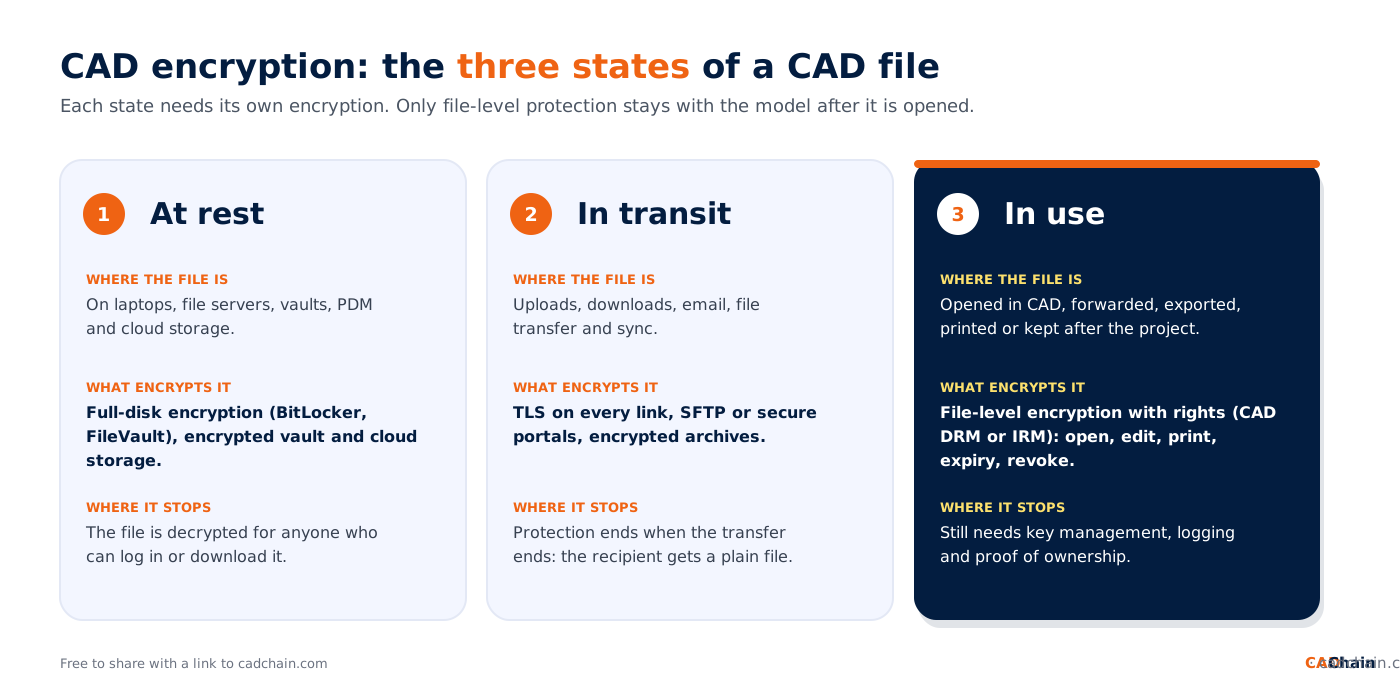
The important idea is that a CAD file is never in just one place. It is encrypted, decrypted and copied many times on its way from a designer's workstation to a machine shop. That is why it helps to think in three states:
- At rest: stored on a laptop, a file server, a PDM or PLM vault, a cloud drive or a backup.
- In transit: moving between systems, as an upload, a download, a sync, an email attachment or a file transfer.
- In use: opened in a CAD application, or sitting on someone else's computer after they received it.
What does CAD encryption protect, and what does it not protect?
Encryption is excellent at one job: keeping data unreadable for people who never had the key. It protects you when a laptop is stolen, when a backup disk is lost, when someone taps a network connection or when an attacker copies raw files from a storage system without valid credentials.
It does much less once a person is allowed in. Disk and storage encryption decrypt files automatically for any logged-in user or any process running under that account. Transport encryption ends when the transfer ends. An encrypted ZIP becomes an ordinary folder the moment the supplier types the password. From then on the file can be copied, forwarded, exported to another format or kept after the contract ends, and the original encryption has nothing to say about it. Our comparison of CAD file encryption vs access control explains why the two need each other.
So the honest answer to "is encryption enough?" is no. Encryption is the foundation of CAD file security, but it has to be combined with access control that travels with the file, logging and a way to prove that the design is yours.
CAD encryption options compared
The table lists the encryption options engineering teams actually use, what each one covers and where it stops.
Two notes on the table. First, Microsoft Purview protects Office files and PDFs natively, but according to Microsoft's documentation, file types without native support get "generic" .pfile protection: the recipient must sign in to open the file, yet usage rights are not enforced. That is why CAD-aware extensions such as SECUDE HaloCAD exist. Second, file-level protection is a different category from the rest: it encrypts the file itself and keeps checking permissions each time it is opened. Our complete guide to CAD file DRM protection covers how that works.
How to encrypt CAD files: a step-by-step plan
You do not need to buy everything at once. Work through these steps in order and stop when the remaining risk is acceptable for the files involved.
- Know which files matter. List the models, assemblies, drawings and BOMs that carry real IP or are export-controlled. Label them, so people and tools can treat them differently from routine files.
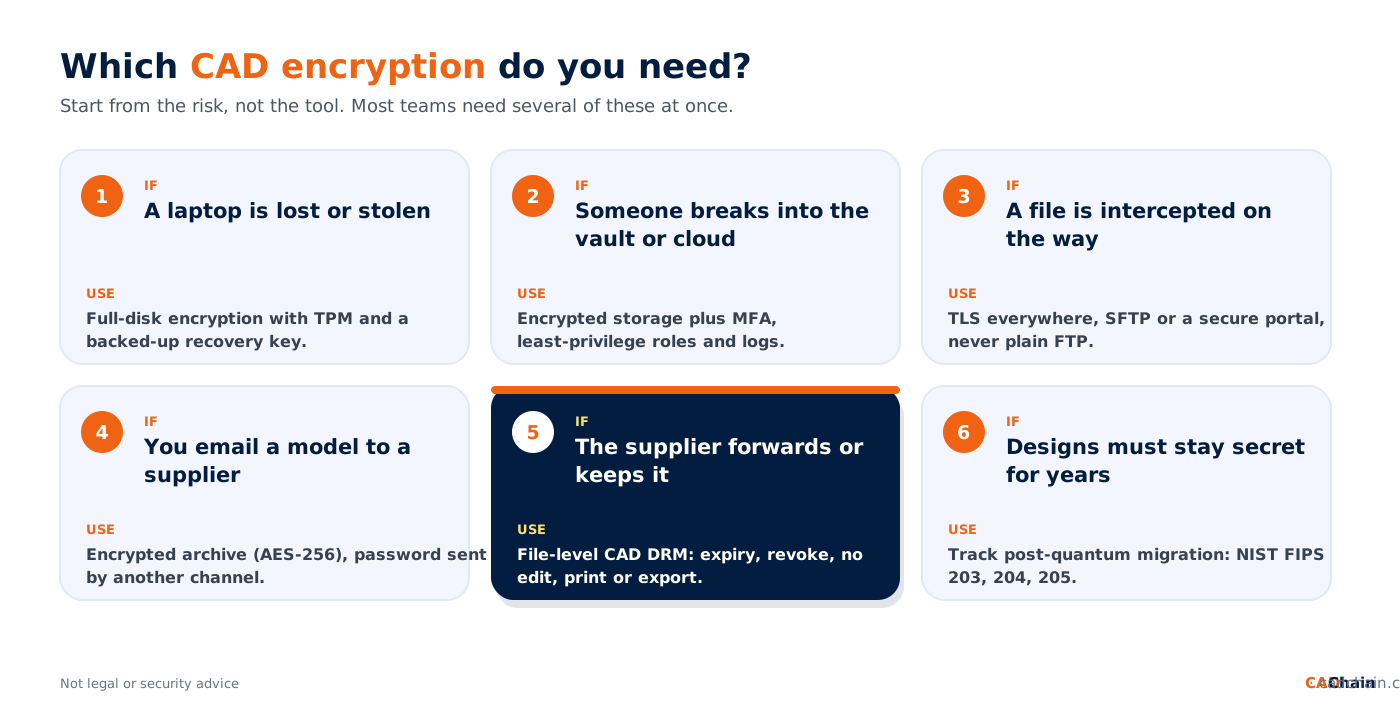
- Encrypt every device. Turn on BitLocker on Windows workstations and FileVault on Macs, with a TPM where available, and make sure the recovery keys are backed up to your directory, not to a sticky note.
- Encrypt storage and lock the doors. Use vaults, PDM and cloud CAD platforms that encrypt data at rest, and protect them with single sign-on, MFA and least-privilege roles. Read our guide to cloud storage security for CAD files.
- Encrypt every transfer. Use TLS for web and sync traffic and SFTP or a secure portal for file exchange. Retire plain FTP and shared links without expiry.
- Send less, and send it protected. Share the minimum geometry a partner needs (a simplified STEP, a 2D drawing or a viewer link), and put file-level protection on anything sensitive that leaves the company. See how to share CAD files with contractors securely.
- Manage the keys and passwords. Keep keys away from the files they protect, send archive passwords through a different channel, rotate access when people leave and test that you can recover encrypted data.
- Keep control after sharing. Set an expiry date on supplier access and be ready to revoke CAD file access after it has been sent. Log who opened what.
- Keep proof. Encryption hides a design but does not prove who created it or when. Record dated proof of important revisions, so you can show ownership if a copy appears elsewhere.
How to encrypt CAD files in AutoCAD, SOLIDWORKS, Inventor and other CAD tools
Many people search for a "save with password" button inside their CAD program. In most cases it is not there. According to Autodesk's own FAQ, AutoCAD 2016-based products and later do not support password protection of drawing files, and an older password-protected drawing loses its password when it is opened and saved in a 2016-based product or later. If you still have such files, do not count on that old protection. Our guide on how to password protect CAD files walks through the workarounds that remain, and AutoCAD DWG file security covers the rest of the DWG picture.
For mechanical CAD, protection usually comes from the environment around the files rather than from the part files themselves: the operating system, the PDM or PLM vault, the cloud platform and, for shared files, a DRM layer that understands the CAD format. If you work in SOLIDWORKS, our sister site explains AES-256 encryption for CAD files and compares encryption methods for SOLIDWORKS teams. Autodesk Inventor users can read about the limits of CAD file encryption for Autodesk Inventor users. For mixed environments, see multi-CAD environment security.
Cloud-native CAD changes the picture again. Onshape, for example, says on its security page that it encrypts all documents with AES-256 and uses TLS 1.2 for communication between clients and its servers, and it lets teams share models through links and permissions instead of sending files. That removes many copies, but anything exported from the platform becomes an ordinary file again.
Encrypting CAD files you share with suppliers and partners
Sharing is where CAD encryption most often fails, because it is the one moment the file has to be readable by someone outside your control. Three approaches are common:
- Encrypted archive plus a separate password. 7-Zip supports AES-256 encryption in 7z and ZIP formats, and it is free. This protects the transfer, but once the supplier extracts the archive the files are plain copies. Fine for trusted partners and low-risk parts.
- A secure portal or cloud share. Files stay on an encrypted platform, access is logged and links can expire. Downloads, however, leave the platform unprotected.
- File-level CAD DRM or IRM. The file is encrypted and carries its own permissions: who may open it, whether it may be edited, printed or exported, from where and until when. Vendors such as Seclore advertise this for neutral formats like STEP, IGES and JT and for DWG and DXF, with expiry dates and revocation. It is the only option that keeps working after the file is opened.
Encryption does not replace contracts. Our article on NDA limitations for CAD protection explains why legal agreements and technical controls work best together, and CAD file security for supply chain collaboration covers the supplier side in more depth. If you send models to be printed, also read time-limited CAD file sharing for project-based work.
Key management: the part that decides whether CAD encryption works
Strong algorithms rarely fail. Keys and passwords do. A few habits make the difference:
- Keep keys and files apart. A password in the same email as the encrypted archive, or a key file stored next to the data, cancels the encryption.
- Back up recovery keys centrally. Microsoft's BitLocker documentation describes backing up recovery keys to Microsoft Entra ID or Active Directory, and notes that a device using only local accounts remains unprotected even though the data is encrypted.
- Use people's identities, not shared passwords. Rights management and cloud platforms tie access to a signed-in user, which makes revocation and logging possible.
- Plan for leavers and partners. Remove access when a project or employment ends, and check that it is really gone.
- Test recovery. An encrypted design you cannot decrypt after a disaster is as lost as a stolen one. Our guide to ransomware protection for engineering firms covers backups.
Key rotation, hardware security modules and cipher modes are covered in detail in our CAD file encryption guide for SMEs.
Does CAD encryption slow down engineering work?
Full-disk and storage encryption run in the background on modern hardware, and most users never notice them. File-level protection is different: it has to check permissions when a file is opened and may need a plug-in or viewer on each workstation, which is where teams feel friction. The practical answer is to protect the files that leave the company most strictly and keep internal work in a well-secured vault. For measurements and trade-offs, read about the performance impact of DRM on CAD software and about offline access management for CAD DRM.
CAD encryption and export control
For defence and aerospace teams, encryption also has a legal role. Under the US International Traffic in Arms Regulations, 22 CFR 120.54 lists activities that are not exports. One of them is sending, taking or storing unclassified technical data that is secured with end-to-end encryption, using cryptographic modules compliant with FIPS 140-2 or its successors (or other means at least as strong as AES-128), as long as the data is not intentionally sent to or stored in, and not sent from, a country listed in section 126.1. End-to-end means the data stays encrypted between the originator and the intended recipient and the means of decryption are not given to any third party. Ordinary cloud storage where the provider holds the keys may not meet that test. This is not legal advice; check with your export-control officer, and read our article on aerospace CAD file security for defence contractors.
Post-quantum cryptography and the future of CAD encryption
Designs for aircraft, medical devices or machinery may need to stay secret for many years. That makes "harvest now, decrypt later" a real concern: encrypted data copied today could become readable once large quantum computers can break today's public-key algorithms. On 13 August 2024 NIST released its first three finalised post-quantum standards: FIPS 203 (ML-KEM) for key establishment and FIPS 204 (ML-DSA) and FIPS 205 (SLH-DSA) for digital signatures, and urged organisations to start the transition. Symmetric encryption such as AES-256 is considered far less exposed than the public-key algorithms used to exchange keys.
In practice, ask your CAD, PDM and DRM vendors when their key exchange will move to these standards. For background, read our articles on quantum-resistant encryption for CAD protection and on homomorphic encryption for analysing encrypted CAD data, a research area that would let partners compute on models without decrypting them.
Where CADChain fits
CADChain was built for the gap that ordinary encryption leaves: the moment a design file is shared. Its approach combines file-level access control, a kind of DRM that goes further than classic DRM, with blockchain-based proof of ownership. You decide who can open a file and for how long, you can withdraw access later, and you keep a dated, tamper-evident record that the design was yours. Our BORIS add-ins for SOLIDWORKS and Autodesk Inventor register a fingerprint (hash) and a timestamp of your files as dated proof; they are not encryption, and they work alongside it. Read more about blockchain vs traditional DRM for CAD protection.
Protect your CAD files after they leave your company. Encryption keeps files safe in storage and in transit; CADChain keeps control and proof of ownership when you share them. Discover CADChain
Conclusion
CAD encryption works best when you stop thinking of it as a single feature. Encrypt every device, encrypt storage and every transfer, and you have covered files at rest and in transit. Then accept that the hardest moment, a file opened by someone outside your company, needs file-level protection with rights that can expire and be revoked. Look after the keys, keep proof of what you created, and you will have encryption that protects your designs instead of just ticking a box.
FAQ
What is CAD encryption?
CAD encryption is the use of cryptography, usually AES, to make CAD files unreadable to anyone without the right key. It covers files at rest (on devices, vaults and cloud storage), in transit (uploads, downloads, transfers) and, with file-level protection, in use.
How do I encrypt a CAD file?
For storage, turn on full-disk encryption and use encrypted vaults or cloud CAD. For a one-off transfer, put the files in an AES-256 encrypted archive and send the password separately. For files that leave your company, use CAD DRM or IRM so access can expire.
Can I password protect a DWG file in AutoCAD?
Not in current AutoCAD. Autodesk says AutoCAD 2016-based products and later do not support password protection of drawing files. Use an encrypted archive, a protected PDF, an encrypted platform or file-level DRM instead.
Is BitLocker enough to protect CAD files?
BitLocker protects files on a lost, stolen or decommissioned device. It does not protect a file that is copied, emailed or uploaded by a logged-in user, so it has to be combined with transfer encryption and file-level protection.
What is the difference between CAD encryption and CAD DRM?
Encryption makes a file unreadable without a key. CAD DRM uses encryption too, but adds permissions that stay with the file after it is opened: who may view, edit, print or export it, and until when.
Can STEP and other neutral CAD files be encrypted?
Yes. Any file can be encrypted at rest or in transit. File-level protection that controls use after opening needs a tool that supports the format; some vendors list STEP, IGES and JT among supported neutral formats.
Should I use AES-128 or AES-256 for CAD files?
Both are considered strong. AES-256 is the common choice for long-lived design data, and US export rules for end-to-end encrypted technical data set security comparable to AES-128 as the minimum.
Does encryption slow down CAD software?
Disk and storage encryption are rarely noticeable on modern hardware. File-level protection adds checks when a file is opened and may need a plug-in, so test it with real assemblies before rolling it out.
Will quantum computers break CAD encryption?
The main risk is to the public-key algorithms used to exchange keys, not to AES-256 itself. NIST published post-quantum standards FIPS 203, 204 and 205 in August 2024; ask your vendors about their migration plans.