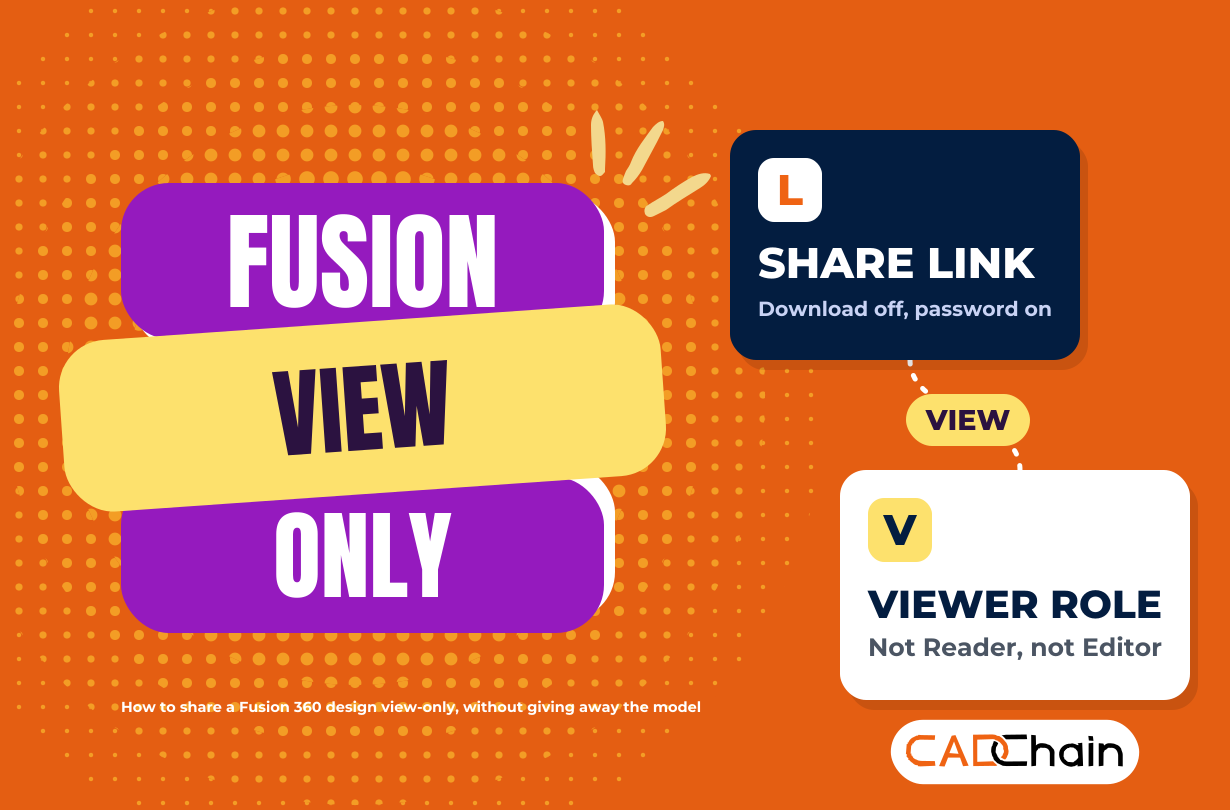
To share a Fusion 360 design view-only, right-click it in the Data Panel, choose Share Link, tick "Share the latest version with anyone using this link", leave "Allow item to be downloaded" unticked and set a password. The recipient sees the model in the Fusion web viewer in a browser, with no Autodesk ID needed and no way to download the CAD file. For people inside your project, give them the Viewer role, not Reader: Readers can open, download and copy the design.
That is the short answer to the question behind every "Fusion 360 share view only" search: how do I let a client, a supplier or an investor look at my model without handing over the model itself? The longer answer matters, because Autodesk Fusion (still called Fusion 360 by most of its users) has several sharing routes, and two of them look view-only but are not. This guide walks through each route using Autodesk's own help pages, all read on 26 November 2026, shows which settings to switch on and off, and explains what view-only sharing cannot stop. It sits next to our broader guide to view-only CAD access for vendors, which covers the same problem across CAD systems.
TL;DR: Fusion 360 share view only in five lines
1. Share Link (Data Panel, right-click, Share Link): turn the link on, keep Download off, add a password.
2. Viewer role for project members: view online and comment only. Reader is not view-only.
3. Hub admins can switch off file sharing for the whole hub, which deactivates every existing link.
4. PDF and Office files stay downloadable even with Download off, and the dialog has no expiry date.
5. View-only protects the native model, not the shape on screen. Files that leave Fusion need their own protection.
How do you share a Fusion 360 design view-only with a share link?
A share link is the fastest way to show a design to someone outside your team. According to Autodesk's Share designs help page, the steps in the Fusion desktop app are:
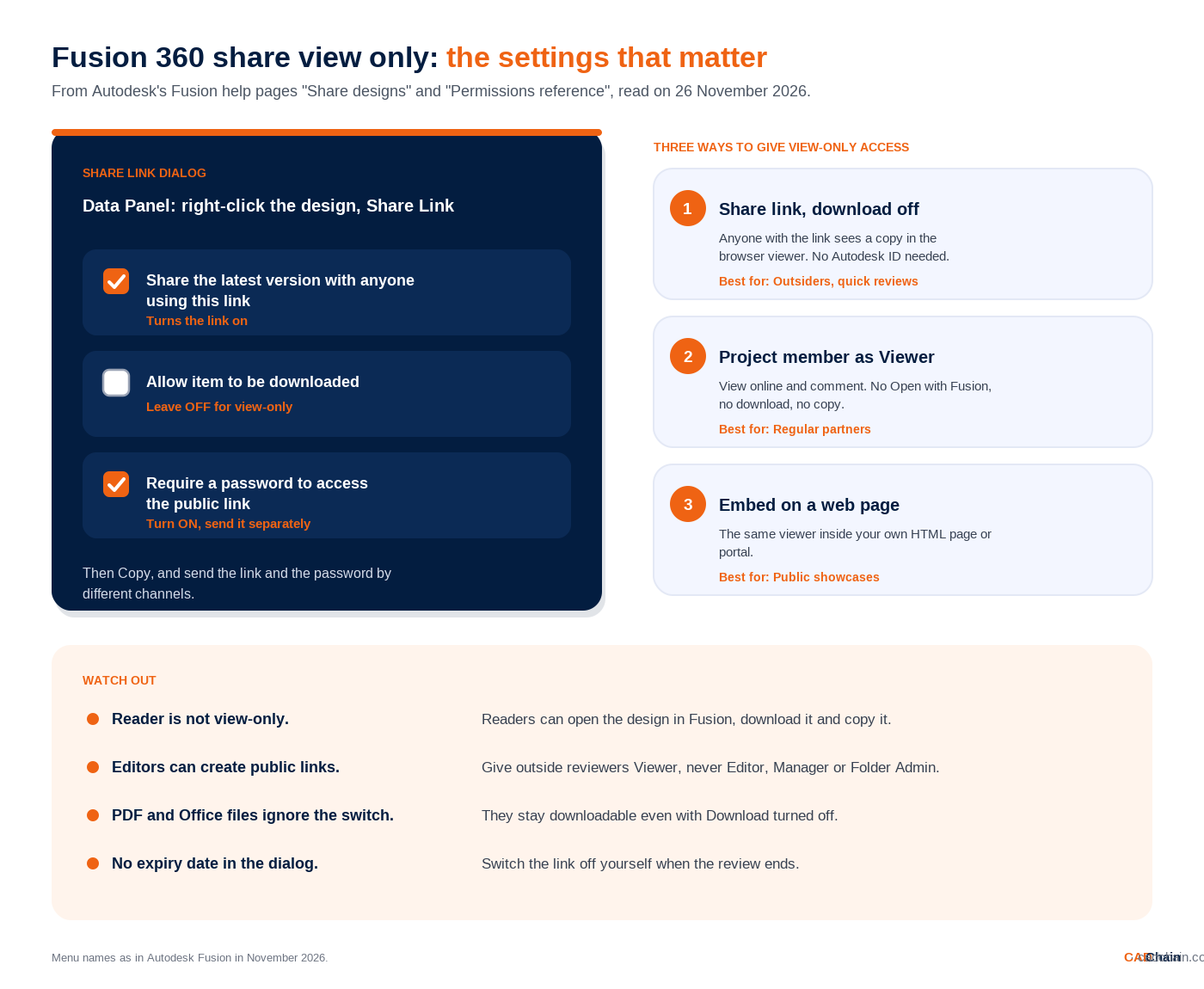
- Open the Data Panel and right-click the design you want to show.
- Select Share Link. The Share dialog opens.
- Tick Share the latest version with anyone using this link. This switches the public link on.
- Leave Allow item to be downloaded unticked. This is the setting that makes the link view-only for CAD files.
- Tick Require a password to access the public link and enter a password.
- Click Copy, close the dialog, and send the link. Send the password through a different channel, for example the link by email and the password by phone or chat.
The same options exist in the Fusion web client. There, the Share button on a design's Overview, Properties or View tab offers three ways to share: copy a link, email the link with a message, or embed the design in an HTML page. For both the link and the email you choose whether the design can be downloaded and whether a password is needed. Embedding is meant for websites and blogs, so treat it as public: anything you embed on a page can be seen by everyone who reaches that page.
Two details are easy to miss. First, Autodesk says that when you share a link with someone who is not a team member, a copy of the design is shared, not the design itself, while a project member who opens the same link sees the original in the viewer. Second, since the July 2026 update Fusion can create share links for a specific point in the design history, so you can show the version you agreed on instead of whatever you saved this morning. If you are still on an older build, the link shows the latest version, which can surprise a client who reviewed an earlier one.
What does the recipient see when you share a Fusion design view-only?
The recipient pastes the link into a browser, enters the password if you set one, and the design opens in the Fusion web client Viewer. They do not need Fusion installed and, as Autodesk puts it, you can share a link with users who do not have an Autodesk ID. With Download off, there is no Download menu, so the session stays in the browser.
If you do allow downloads, the recipient gets a Download menu in the application bar, picks a CAD format and enters an email address. Fusion exports the design and emails a download link that stays active for seven days. That is useful for a supplier who needs a STEP file to quote, but it is no longer view-only: once a file is on their disk, Fusion's settings no longer apply to it. If that is what you need, read our guide to what neutral CAD formats like STEP and STL do and do not protect before you tick the box.
One exception is written into Autodesk's help page: the Download option only applies to CAD files. Office files and PDFs open in the PDF viewer and can be downloaded even when Download is turned off. If your project folder holds drawings exported to PDF, a share link to those PDFs is never view-only. For drawings you want to show but not hand over, see how to share 3D PDF and engineering PDF files securely.
Viewer or Reader: which Fusion project role is really view-only?
For people you work with every week, a project invitation is often better than a public link: you see who has access, and you can remove one person without breaking a link for everyone else. Fusion's permissions reference lists five project roles, and each role includes everything the role below it can do.
- Viewer: view files online in the web client, post and read comments, read wiki pages, see members and roles. No Open with Fusion, no download, no copy. This is the only view-only role.
- Reader: everything a Viewer can do, plus Open with Fusion, Download and Copy (copying needs Editor access or higher at the destination). The name sounds harmless, but a Reader can take the model home.
- Editor: adds create and edit, upload, rename, move, delete and restore, and generate and share public links.
- Manager: an Editor who can also invite members, set access levels and remove members.
- Folder Admin: a Manager who can also delete items permanently, manage groups and activate or deactivate members.
Autodesk's own projects page recommends giving new project members Viewer access and raising it only where needed. Roles can also be set per folder, so a supplier can be a Viewer on the assembly and an Editor only in the folder where they deliver their own part. Two rules follow from the table: never give an outside reviewer Reader when you mean "look but don't take", and never give them Editor, because Editors can create public links to your designs themselves. Copying deserves extra care since the Fusion October 2026 update that added copy across hubs on our sister site, because a copy is a complete design that lives on in another hub.
Which Fusion sharing method should you use? A comparison
The table compares the ways to show a Fusion design to someone else, from the most to the least controlled. "Can they get the file?" refers to the native or exported CAD file, not to screenshots.
The pattern is simple: the further down the table, the more the recipient holds, and the less any Fusion setting can do about it. For the email route in particular, read why sending CAD files by email is risky.
How do you stop people in your hub from creating public links?
A view-only policy fails if anyone with Editor rights can publish a design with Download switched on. Autodesk gives hub administrators a single switch for this. In the Fusion web client, the administrator opens the User Profile menu, chooses Admin, clicks Edit in the File Sharing panel and sets Allow File Sharing For All on or off. File sharing is on by default. When an administrator turns it off, existing share links are deactivated, and they come back to life if sharing is turned on again.
Most teams do not need sharing off for good. A practical middle path is to keep it on, limit Editor rights to staff, give every outside person Viewer, and agree that public links are always created with Download off and a password. Write that rule into your CAD file security checklist so new hires learn it on day one, and see DRM access control levels for CAD files for the wider view, print and export permissions model.
How do you turn off a Fusion share link?
Open the same Share dialog for the design and untick the option that shares it with anyone using the link. The link then stops working for everyone who has it. Two limits apply. The Share dialog described in Autodesk's help has no expiry date, so a link you forget stays live until you switch it off; put an end date in your own calendar when you create it. And switching a link off cannot recall files that were downloaded while Download was on, or the emailed download links that were already sent.
If you share often, keep a short list of open links per project and review it when a deal ends or a supplier changes. Our guides to revoking CAD file access after it is sent and time-limited CAD file sharing explain how to plan expiry from the start.
What does view-only sharing in Fusion not protect?
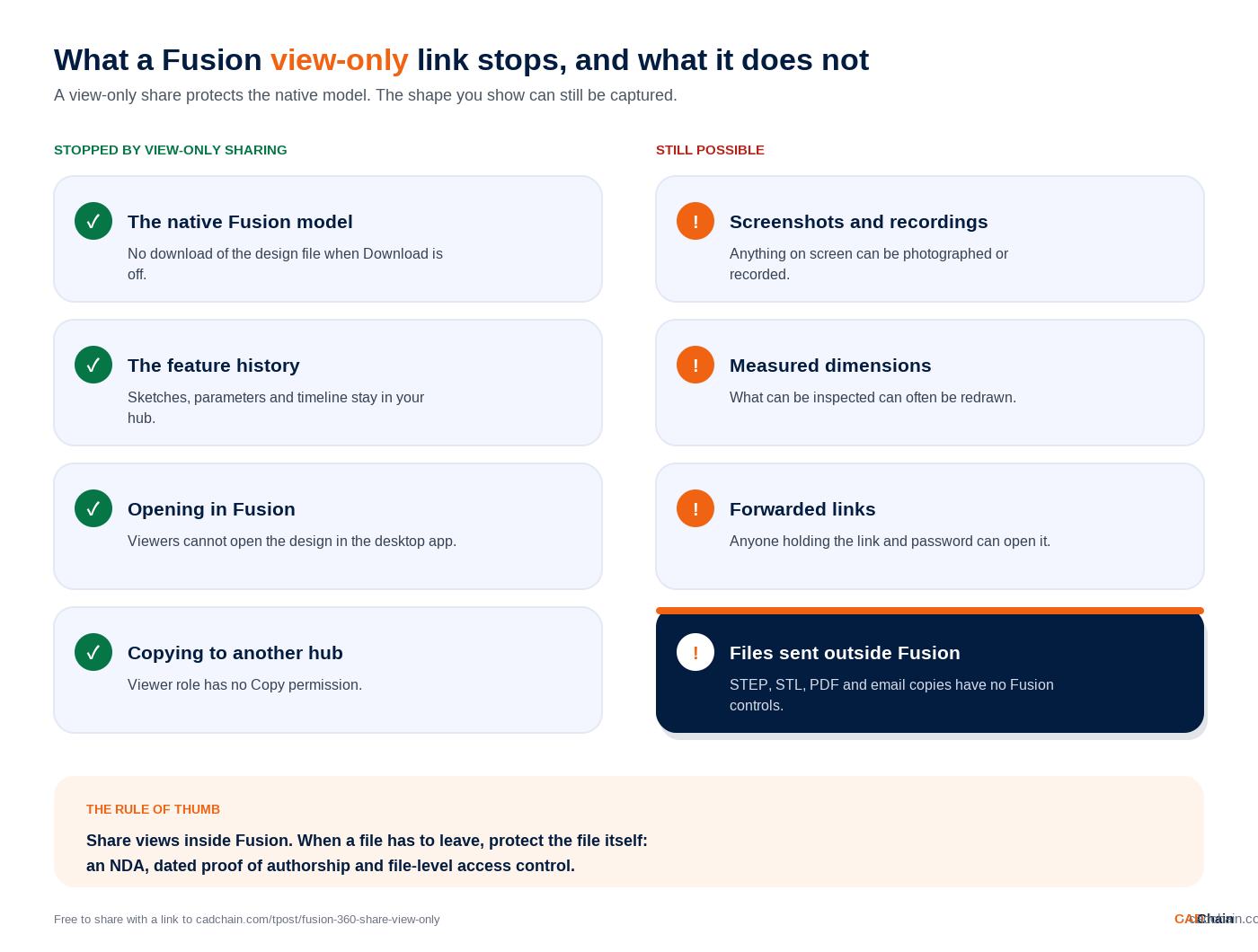
A view-only link protects the native model: the Fusion design file, its feature history, sketches and parameters. It does not protect the shape you are showing. To display a model in a browser, the viewer has to draw it on the recipient's screen, and what is on a screen can be photographed, recorded or measured. A competitor who studies a part long enough can often redraw it. Our article on screen capture threats to CAD IP covers that risk in detail.
Links also travel. A share link with a password works for anyone who has both, so a reviewer who forwards your email forwards your access. That is why a password should go through a different channel, and why sensitive designs belong in a project with named Viewers rather than behind a public link.
When should you send a file instead of a view-only link?
Sooner or later someone needs more than a look: a machine shop needs geometry to quote, a partner needs an interface to design against. Send the least you can. A 2D PDF drawing or a rendered image is often enough for a first quote; a simplified STEP of the outer envelope is enough for a mating part; a mesh is enough for a 3D print. Keep the native Fusion design, with its history and parameters, inside your hub.
Before any file leaves, put the commercial protection in place too. An NDA sets the rules but does not enforce them, as explained in why NDAs alone don't protect CAD files. If you want to know whether a leaked copy came from a particular recipient, digital watermarking of CAD geometry is one option. Our step-by-step guide to sharing CAD files with contractors securely puts these pieces in order, and how to password protect CAD files covers the password options in AutoCAD and other tools.
How can you prove a Fusion design is yours once you have shared it?
Sharing is when ownership disputes start, so record what you have before you show it. BORIS for Autodesk Fusion registers a fingerprint (hash) and a timestamp of your design file as dated, tamper-evident proof that you had that version on that day, without sending the design itself anywhere new. When a file has to leave your hub, CADChain adds file-level access control, a sort of DRM that goes further than classic DRM: the copy can be limited to named people, logged and revoked later, whatever system they open it in. Neither replaces a Viewer role or a share link with Download off; they cover the moment view-only is no longer enough.
Two more Fusion questions often come up at the same time. If you are worried about what happens to designs you store in Fusion, our guide to whether Autodesk uses your designs to train AI reads the current terms. If you are comparing tools, see European alternatives to Fusion 360. And if you are buying seats for reviewers, check the new Autodesk Fusion plans that start on 28 January 2027, which include a separate Fusion Contributor plan, against the free Viewer role before you pay for licences.
Checklist: before you share a Fusion design view-only
- Is the recipient a regular partner? Invite them to the project as Viewer, not Reader.
- Is it a one-off review? Use a Share Link with Download off and a password sent separately.
- Does the folder hold PDFs or Office files you don't want to hand over? Move them out: Download off does not cover them.
- Are you showing the agreed version? Use a link to that point in the design history where your Fusion build supports it.
- Who in your hub has Editor rights and could create public links? Review the list.
- Have you noted when to switch the link off? There is no expiry date in the dialog.
- Is there an NDA, and dated proof of the version you are showing?
- Will a file leave Fusion later? Decide now how that copy is limited, logged and revoked.
Conclusion: Fusion 360 share view only, done properly
Fusion gives you everything needed to share a design view-only: a share link with Download off and a password for one-off reviews, the Viewer role for regular partners, and a hub-wide switch for administrators. The traps are in the details: Reader is not view-only, Editors can create public links, PDFs and Office files ignore the Download setting, and links have no expiry date. Set those right and the native model stays in your hub. For everything a screen can still reveal, and for every file that has to leave, add the contractual and file-level protection described in our CAD software-specific protection strategies guide.
FAQ: Fusion 360 share view only
How do I share a Fusion 360 file view-only?
In the Data Panel, right-click the design, choose Share Link, tick "Share the latest version with anyone using this link", leave "Allow item to be downloaded" unticked, optionally require a password, and copy the link. The recipient sees the design in the Fusion web viewer and cannot download the CAD file.
Can someone view a Fusion 360 design without an Autodesk account?
Yes. Autodesk's help says you can share a design via a share link with users who don't have an Autodesk ID. They open it in a browser; Fusion does not need to be installed.
What is the difference between Viewer and Reader in Fusion?
A Viewer can view files online, comment and see members. A Reader can also open the design in Fusion, download it and copy it. Only Viewer is view-only.
Can I password protect a Fusion 360 share link?
Yes. The Share dialog has the option "Require a password to access the public link". Send the password separately from the link.
Do Fusion 360 share links expire?
The Share dialog in Autodesk's help has no expiry setting, so a link stays active until you switch it off or a hub administrator turns off file sharing. Emailed download links, when downloads are allowed, stay active for seven days.
Can a recipient download my design if Download is turned off?
Not the CAD file. PDFs and Office files are the exception: they open in the PDF viewer and can be downloaded even with Download off. Anything shown on screen can still be captured with screenshots.
How do I disable public links for my whole Fusion hub?
A hub administrator opens Admin from the User Profile menu in the Fusion web client, edits the File Sharing panel and turns "Allow File Sharing For All" off. Existing links are deactivated until sharing is turned on again.
Who can create public links in Fusion?
Editors, Managers and Folder Admins. Viewers and Readers cannot, which is another reason to give outside reviewers the Viewer role.