Autodesk AI training data does include customer content, but only for some features and, according to Autodesk, only in aggregated and de-identified form. Autodesk's own transparency cards say Fusion AutoConstrain, Find Similar and AutoTimeline, and AutoCAD's Macro Advisor, were trained partly on customer content, while other features use synthetic data or third-party models. Your designs stay yours under the terms, and Autodesk says it does not share customer data with third parties for their own model training.
Engineers ask this question in many forms: will Fusion use my data to train AI, does AutoCAD learn from my drawings, can Autodesk see my models. This guide answers it from the documents that decide it, all read on autodesk.com on 24 November 2026: the Autodesk General Terms (last updated 11 November 2026), the Acceptable Use Policy (8 December 2025), the Privacy Statement (effective 1 January 2026), the Autodesk Analytics Programs page and the AI transparency cards for Fusion and AutoCAD. Where the documents leave a gap, we say so instead of guessing.
TL;DR: does Autodesk use your designs to train AI?
Yes, for some features. Fusion AutoConstrain, Find Similar and AutoTimeline list customer content (geometry) as training data; AutoCAD My Insights: Macro Advisor lists customer content (text). Autodesk says this means common, non-proprietary patterns, aggregated and de-identified, not customer-specific data. Fusion Automated CAM Programming was trained on synthetic data only, and Fusion AI Media Generation and the AutoCAD on the Web AI tools run on third-party models. The General Terms say you keep ownership of your files, and that Autodesk may use your content to provide and improve its offerings. The cards' "Turn off" and "Always on" labels describe the feature, not a training opt-out; your Product Privacy settings control optional usage data, but Required Data Collection cannot be switched off.
Does Autodesk use your designs to train AI?
Partly, yes. In an August 2026 explainer on how Autodesk builds trusted AI, Chief Trust Officer Sebastian Goodwin wrote that Autodesk draws on synthetic, licensed, open-source and internal data to power its AI features, and that for certain features the training datasets include elements of customer content in aggregated and de-identified form, limited to common elements, industry standards or other non-sensitive information. The same piece says many features run on proprietary Autodesk models and others on third-party models, and puts it plainly: "We do not share customer data with third parties for their own model training."
So the answer is neither "never" nor "everything": some geometry and text patterns from customer content went into some Autodesk models, after aggregation and de-identification. Whether that is acceptable depends on what you design. A bracket for a garden shed and a weapons-system part under export control are not the same risk, and our guide to EU dual-use export controls for CAD files explains which technical data falls under export rules before it goes anywhere.
Autodesk's AI development platform is certified to ISO/IEC 42001, the management-system standard for AI, and it publishes a transparency card for each AI feature. For the wider picture of how AI is changing CAD tools, read machine learning in CAD in 2026; this article stays on one question: what happens to your design data.
What do the Autodesk General Terms say about your designs and AI?
The Autodesk General Terms do not contain a section titled AI training. Four clauses answer the question between them:
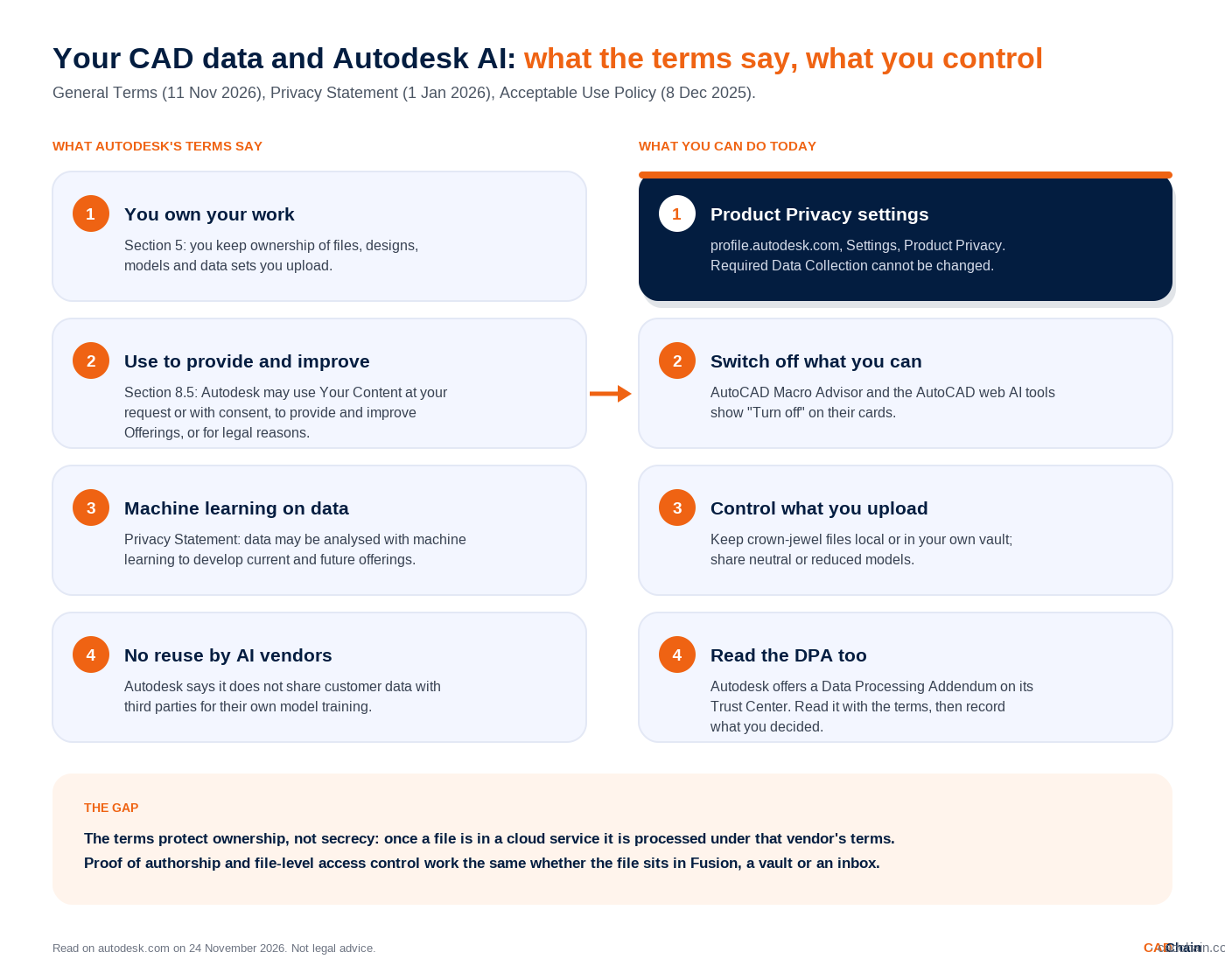
- Section 5, You Own Your Work. You keep your ownership rights to files, designs, models, data sets, images and documents that you or your authorised users create and upload.
- Section 8.5, Use of Your Content. Autodesk personnel will not use Your Content except at your request or with your consent, in connection with providing and improving Offerings (including maintaining, securing and updating them), or for legal obligations and proceedings. When you upload content, you authorise Autodesk and its designees to use, reproduce, modify and distribute it in connection with providing the Offerings.
- Section 18, Definitions. "Your Content" covers uploaded files, designs, models and data sets, and also your specific output generated from your own raw data. So AI-assisted output built from your inputs is treated as your content too.
- Section 10, Feedback. Ideas and suggestions you send Autodesk come with a broad, irrevocable, royalty-free licence. Do not paste design details into a feedback form.
The key phrase is "providing and improving Offerings". Training an Autodesk model that powers an Autodesk feature can sit under "improving", which is why the transparency cards and the Trust Center statements matter more than the contract text alone. Section 12 adds a detail many teams miss: content you send to, or let a third party access through, an Autodesk offering is excluded from confidential information under the terms. Sharing a Fusion link with a supplier is your decision, under your NDA, with all its limits.
The Privacy Statement covers personal data, not geometry, but it points the same way: Autodesk may analyse data with machine learning and other analytic techniques to develop and improve its current and future offerings, based on legitimate interests or, where needed, consent. Personal data that has been anonymised, aggregated or de-identified is no longer personal data under the statement. For European teams, our guide to GDPR compliance for CAD systems in Europe explains the controller and processor roles, and Autodesk offers a Data Processing Addendum on its Trust Center.
Will Fusion use my data to train AI?
For some Fusion features, it already has. Autodesk's AI transparency cards list the training data behind each feature. On 24 November 2026, the Fusion cards said:
- AutoConstrain suggests constraints and dimensions to fully constrain sketches. Training data: geometry, from customer content and synthetic data. Personal data: not used. Safeguards: tokenisation and de-identification. Choice format: always on.
- Find Similar finds duplicate or similar designs in your hub, using 3D geometry as the search query; users only see designs they have permission to access. Training data: geometry, from customer content. Safeguard: de-identification. Always on.
- AutoTimeline (Beta) rebuilds imported non-Fusion CAD models as editable parametric timelines. Training data: geometry, from customer content. Safeguards: encryption, tokenisation, de-identification. Always on.
- Automated CAM Programming (Beta) suggests machining and toolpath strategies and tool selection. Training data: geometry, from synthetic data only, with on-device processing.
- AI Media Generation turns a Fusion screenshot and a prompt into product images through Autodesk Assistant. It runs on a third-party model, so the card shows no Autodesk training data.
Three of the five Fusion features on the cards learned from customer geometry. The guide on the same page explains what that means: the listed data types reflect common, non-proprietary, recurring patterns, not customer-specific data, and "customer content" means data that customers or their authorised users create or import into Autodesk products. In practice, a model that learns how sketches are usually constrained does not need your trade secret; but it did learn from many customers' sketches. Inventor teams that connect to Fusion should also read our piece on Autodesk Assistant and the Fusion Connected Client in Inventor.
Will AutoCAD use my data to train AI?
Mostly not, on the three AutoCAD cards published on 24 November 2026, with one clear exception. AutoCAD My Insights: Macro Advisor recommends macros based on your product usage patterns; its card lists text from customer content as training data, personal data not used, encryption and de-identification as safeguards, and a "Turn off" choice. Two AutoCAD on the Web features in Tech Preview, Block Generate with AI and Block Auto-Categorization and Search, run on third-party models and can also be turned off.
The Autodesk Assistant app, in alpha for selected customers, uses a licensed pre-trained model and draws on user input, product usage data and project data. Its card says prompts are stored for 45 days for debugging and service optimisation, are not shared for third-party model training, and that the feature can be turned off. If your team works with general AI assistants as well, compare this with what we found in Claude Fable 5.2 for CAD and hardware design and in European alternatives to ChatGPT that state their training rules.
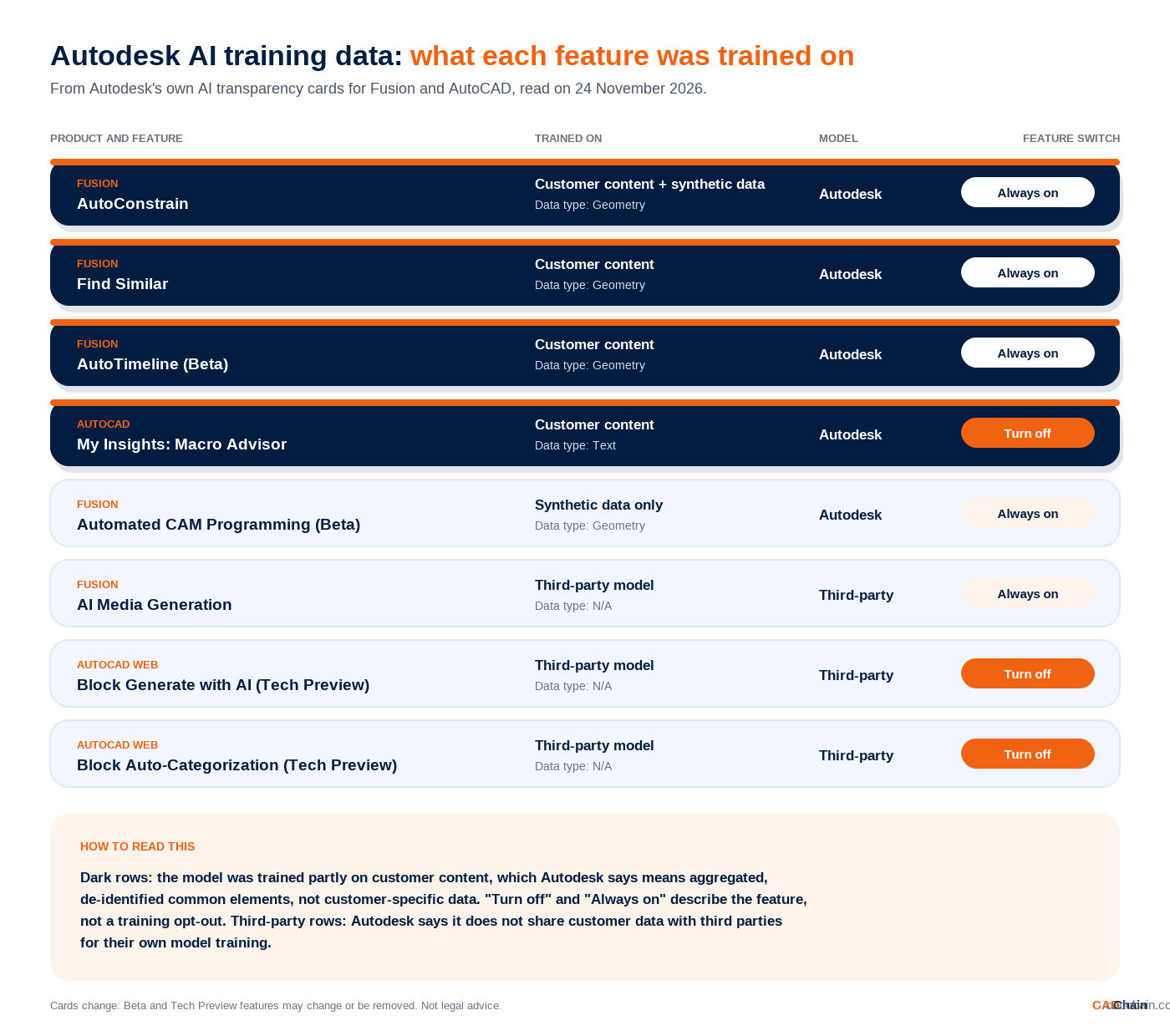
Which Autodesk AI features were trained on customer content?
This table brings the Fusion and AutoCAD cards together. "Feature switch" is the card's choice format, which tells you whether you can turn the feature off, not whether your data is used for training.
Beta and Tech Preview features can change or disappear, and Autodesk announced updated cards at Autodesk University in September 2026, now also shown inside Autodesk Assistant. Check the card for any feature again before you rely on this table for a contract or a security review.
What do "customer content", "common elements" and "de-identified" mean on the cards?
The cards come with a glossary, and three of its definitions matter for IP. Customer content is data that a customer or its authorised users create or import into Autodesk products and services. Common elements is the note under the data types: Autodesk says the types reflect common, non-proprietary, recurring patterns rather than customer-specific data. And the safeguards are not all the same strength:
- Anonymisation: data is irreversibly altered so it can no longer be linked to an individual.
- De-identification: identifying details are removed or obscured, but the data may be re-linked to an individual under certain conditions.
- Tokenisation: certain information is replaced with tokens during processing.
- On-device processing: data is processed on your computer, not on Autodesk's servers.
Notice that these definitions talk about individuals, which is the privacy view. For a design team, the question is different: could a distinctive feature of your product be learned and reproduced? Autodesk Research has published work on "generative parroting", where models reproduce training data too closely, so the company is studying that risk. That research does not change the fact that de-identification protects who you are better than what you made. That gap is the subject of our article on generative AI and CAD IP protection challenges.
Can you opt out of Autodesk AI training?
Not with one switch labelled for model training, as far as the documents we read show. What you can control:
- Product Privacy settings. Sign in at profile.autodesk.com, open Settings and set your preferences under Product Privacy, or use Privacy Settings or Desktop Analytics in the product's Help or account menu. For most 2023 and later desktop products, one change applies across your Autodesk Account.
- Required Data Collection. Autodesk says some usage data is required for operational purposes and this selection cannot be changed.
- Features marked "Turn off". On the cards above, AutoCAD Macro Advisor, the AutoCAD on the Web AI tools and the Autodesk Assistant app can be switched off at supported levels. Fusion AutoConstrain, Find Similar and AutoTimeline are listed as always on.
The analytics page also lists what usage data can include: your Autodesk ID and IP address, product and licence information, sessions and commands, device setup, and design metadata, which Autodesk defines as file path, file name, file format, size, dimensional units, and object and layer metrics. File names alone can reveal a project, so naming conventions are part of your data hygiene. If you need a firm answer for a regulated programme, ask Autodesk in writing which data from your account feeds which model, and keep the reply with your CAD file security records.
Can you train your own AI on files made with Autodesk software?
The rule in the Acceptable Use Policy runs the other way: you may not use any Autodesk offering to reverse engineer or replicate the functionality of any offering, including by training a machine learning or AI model, and you may not scrape or data-mine Autodesk or third-party content from within an offering except where the documentation or Special Terms allow it. The clause targets copying Autodesk's own functionality; it does not mention your own design data, which you own under Section 5. Before you sell or license a design archive for AI training, read our sister site's warning about AI data brokers who offer money for old CAD archives.
What should engineering teams do before using Autodesk AI on sensitive designs?
- Classify the project first. Export-controlled, defence, medical or customer-owned designs need a decision before anyone opens them in a cloud tool with AI features switched on.
- Read the card for each feature you use. Note the training data source, model provider and choice format, and date your notes.
- Set Product Privacy for every account, not only your own; for most 2023 and later products the setting follows the Autodesk Account.
- Turn off what you do not need where the card says "Turn off", and record which features stay always on.
- Keep crown jewels out of shared hubs. Store the full parametric model in your own vault and share reduced or neutral files, as explained in sharing CAD files with contractors securely.
- Clean up file names and metadata, because design metadata is part of usage data.
- Write AI rules into supplier contracts. Your NDA and supply agreements should say whether a partner may run your files through any AI tool, Autodesk's or anyone else's.
- Record proof of authorship before you upload. A dated fingerprint of each version is the quickest evidence if a similar design appears later; see who owns AI-assisted inventions and what to record.
For Fusion users, this is where BORIS for Autodesk Fusion fits: it registers a fingerprint (hash) and a timestamp of your design file as dated, tamper-evident proof that you had it first, without sending the design itself anywhere new. When you also need to decide who can open a file after it leaves your company, CADChain adds file-level access control, a sort of DRM that goes further than classic DRM. Neither changes Autodesk's terms; both help you prove and control what is yours whatever those terms say.
How do Autodesk's AI terms fit with EU rules?
Autodesk has signed the voluntary EU AI Pact and says it aligns AI development with AI, IP, data protection and privacy law. For European teams, GDPR covers personal data, the AI Act covers how AI systems are built, and the Data Act covers cloud switching and trade secrets in shared data; see EU AI Act enforcement and your CAD data and the EU Data Act and trade secrets. If data sovereignty decides it, compare European alternatives to Fusion 360 and European alternatives to AutoCAD, and read their AI terms just as closely.
Conclusion: what the Autodesk AI training data question really comes down to
Autodesk is more open about its AI training data than most software vendors: it names, feature by feature, whether a model learned from customer content, synthetic data or a third-party provider. The answer for 2027 is that Fusion's constraint, search and timeline features and AutoCAD's Macro Advisor learned from customer content in aggregated, de-identified form; you keep ownership of your designs; and there is no single training opt-out in the documents we read. Treat the cards as a starting point, decide which projects may enter AI-enabled cloud tools at all, and keep your own proof of what you designed and when. Our CAD file encryption guide on resources.cadchain.com covers the encryption side.
FAQ: Autodesk AI training data
Does Autodesk train AI on my Fusion designs?
For some features, yes. The transparency cards for Fusion AutoConstrain, Find Similar and AutoTimeline list customer content (geometry) as training data. Autodesk says this is aggregated and de-identified and limited to common elements, not customer-specific data.
Will Fusion for design use my data to train AI/ML?
Fusion's design features AutoConstrain and AutoTimeline list customer geometry as training data, and both are marked always on. Automated CAM Programming was trained on synthetic data only, and AI Media Generation uses a third-party model.
Will AutoCAD use my data to train AI/ML?
On the current cards, only My Insights: Macro Advisor lists customer content (text) as training data, and it can be turned off. The AutoCAD on the Web AI block tools use third-party models and can also be turned off.
Does Autodesk give my CAD files to OpenAI or other AI companies?
Autodesk says it does not share customer data with third parties for their own model training. Features that use third-party models are marked on the cards, so you can see where a third-party model is involved.
Do I still own designs made with Autodesk AI features?
Section 5 of the General Terms says you keep ownership of the files, designs, models and data you upload, and Your Content includes your specific output generated from your own raw data. Copyright in purely AI-generated output is a separate legal question.
How do I change my Autodesk data collection settings?
Sign in at profile.autodesk.com, open Settings and use the Product Privacy section, or open Privacy Settings or Desktop Analytics from the product's Help or account menu. Required Data Collection cannot be changed.
Can I train my own AI model on files I made in AutoCAD or Fusion?
The Acceptable Use Policy forbids using Autodesk offerings to replicate Autodesk functionality, including by training AI models, and forbids scraping content from within an offering. It does not mention your own design data, which you own.