Most engineering teams already protect the places where their files live: a PDM vault, a PLM system, a SharePoint site, an encrypted laptop. The trouble starts when a drawing, a STEP file or a bill of materials leaves those places. It goes to a supplier for a quote, to a contract manufacturer for production or to a consultant for a review, and from that moment the vault's permissions no longer apply. Information rights management (IRM) was built for exactly this moment: it puts the permissions inside the file, so they travel with it. This guide explains how IRM works on engineering files, which CAD and document formats it really protects, what it can and cannot enforce, which options exist in 2026 and how to roll it out with suppliers without stopping production.
TL;DR: Information rights management (IRM) encrypts a file and attaches a policy that says who may open it, what they may do (view, edit, print, copy, export) and until when. Every time someone opens the file, they sign in and the app enforces those rights; you can let access expire or revoke it. For engineering files the catch is format support: Microsoft Purview enforces rights on Office files, PDFs, images and a few others, but most CAD formats only get generic protection, where rights are shown, not enforced. To control what happens inside DWG, SLDPRT, IPT or STEP files you need a CAD-aware extension or an enterprise DRM tool. Plan for offline access, screenshots and printed drawings, and keep separate proof of ownership.
What is information rights management (IRM)?
Information rights management is a way of protecting documents and files by combining three things: encryption, so the content is unreadable without a key; identity, so only named people, groups or domains can get that key; and usage rights, so the application that opens the file knows what the person may do with it. The policy is stored with the file. If the file is copied to a USB drive, forwarded by email or uploaded somewhere else, it stays encrypted, and anyone who opens it must authenticate first.
In the Microsoft world, IRM today runs through Microsoft Purview Information Protection: sensitivity labels apply encryption from the Azure Rights Management service. Microsoft's documentation says content protected this way remains encrypted no matter where it resides, inside or outside your organisation, even if the file is renamed. Standalone vendors offer the same idea under names such as enterprise DRM (EDRM) or file-centric security. If you are deciding between the two families, read our comparison of enterprise DRM vs information rights management for CAD files and the technical deep dive on DRM vs IRM for CAD files on CADChain Resources. This article stays with the practical question: how IRM behaves on real engineering files.
Why engineering files are harder to protect with IRM than Office documents
IRM was born in email and office documents, where one application (Word, Excel, Outlook) both opens the file and enforces the rights. Engineering data breaks that model in several ways:
- Many formats, many applications. A single product can involve native CAD parts and assemblies (SLDPRT, SLDASM, IPT, IAM, CATPart, PRT), 2D drawings (DWG, DXF, IDW, SLDDRW), neutral exports (STEP, IGES, Parasolid, JT, STL), PDFs, spreadsheets and CAM files. Each application has to understand the protection, or the rights cannot be enforced.
- Assemblies are made of references. An assembly opens dozens or hundreds of part files. Protecting one file and not the parts it references leaves most of the design exposed.
- Neutral exports are the files that travel. Suppliers rarely get your native model. They get a STEP file or a PDF drawing, which is exactly the copy that leaves your control.
- Files are big and work is offline. Shop floors, test benches and field sites do not always have a network connection, and IRM needs one to check rights.
- Recipients use their own tools. A machine shop may open your drawing in a different CAD package, a free viewer or a CAM system. If that tool cannot read the protected file, the supplier calls you, and the protection gets removed "just this once".
That is why IRM for engineering files is less about switching a feature on and more about matching formats, applications and partners. Our pillar guide to CAD file security shows where IRM sits among the other layers.
How IRM works on an engineering file
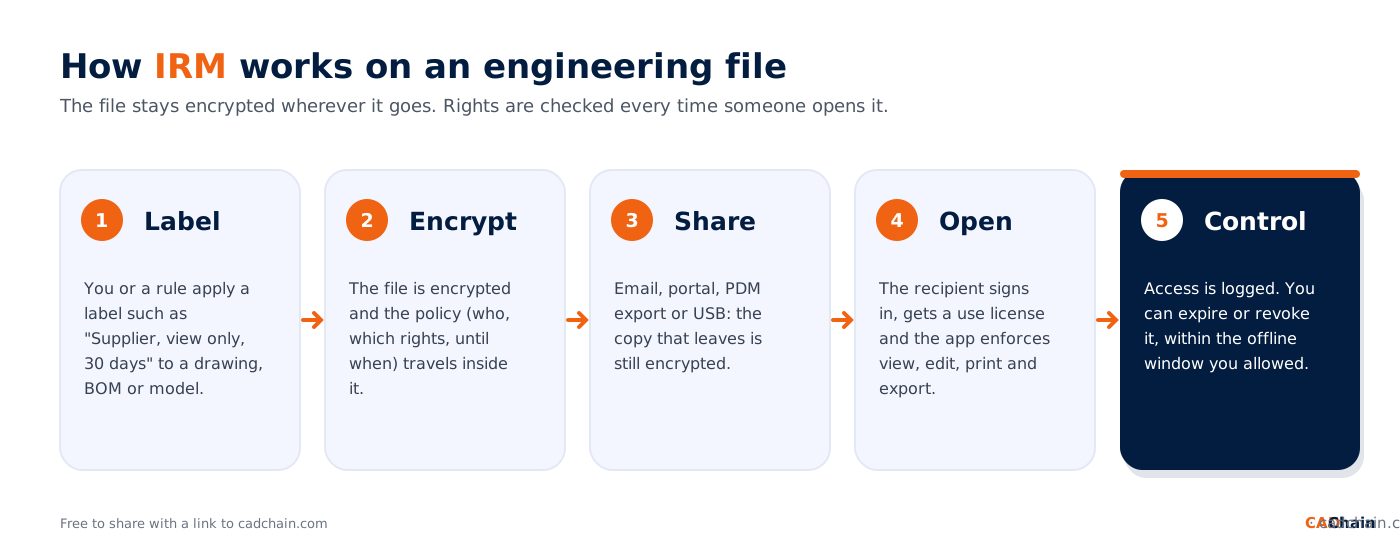
Whatever the product, the life of an IRM-protected engineering file follows the same five steps:
- Label. You, a rule or an integration applies a label to the file, for example "Supplier, view only, 30 days".
- Encrypt. The file is encrypted, and the policy (who, which rights, until when) is attached to it.
- Share. The file goes out by email, portal, PDM export or USB stick. The copy that leaves is still encrypted.
- Open. The recipient signs in. In Microsoft's model they receive a use license, a certificate that holds their rights and the key, and the application enforces what they may do.
- Control. Opens and denied attempts are logged. You can let access expire on a date, or revoke it, within the offline window you allowed.
Which rights can IRM control on CAD models and drawings?
The rights themselves are standard. Microsoft's usage rights documentation lists them, and CAD-focused vendors use very similar sets:
- View, open, read: the right to open the file and see the content.
- Edit and save: change the model or drawing and save it back in a protected format.
- Save as, export: save to a new name or export to another format. For CAD this is the right that decides whether a supplier can turn your protected model into an unprotected STEP or STL file.
- Print: make paper or PDF copies of drawings.
- Copy: copy content into another file. In Microsoft's definition this right also covers screen captures, so withholding it is how supported apps block screenshots.
- Full control (owner): all rights, including removing the protection. Give it to almost nobody outside your company.
- Expiry: access ends on a date or a number of days after the label is applied.
- Offline access: never, always, or for a set number of days before the user must sign in again.
- Revocation, watermarks and audit: withdraw access to a file already sent, overlay the viewer's name and the date, and log who opened what and when.
Microsoft groups the rights into permission levels: Viewer, Restricted Editor (previously Reviewer), Editor (previously Co-Author) and Owner (previously Co-Owner). For a supplier quoting a part, Viewer with an expiry date is usually enough. For a design partner who must change the model, Restricted Editor keeps them from exporting or copying. We explain how to design these levels for CAD in view, edit, print and export permissions for CAD files and how to set end dates in time-based expiration for CAD file access.
Which engineering file types does IRM really protect?
This is the question most IRM projects skip, and the one that decides whether the project works. Microsoft's own list of supported file types for the Purview Information Protection client separates two levels of protection:
- Native protection covers Office files (Word, Excel, PowerPoint, Visio), PDFs, text files and common image formats. Here the rights are enforced when the file is opened in a supporting application or the Information Protection viewer. Microsoft also lists .jt among the native types (it becomes .pjt), but the rights still depend on the application that opens it, so test your JT viewer.
- Generic protection covers every other type, which includes DWG, DXF, STEP, IGES and native CAD formats. The file is wrapped in a .pfile container. Microsoft states that authentication is required to open it and opens are logged, but usage rights are only displayed, not enforced. Once an authorised user opens a generically protected CAD file, they have it in full.
Two more details matter for engineering teams. The Information Protection client that applies these labels runs on Windows only, and Microsoft's track-and-revoke feature supports Office file types only. In practice, Purview on its own protects your BOM spreadsheets, specifications and PDF drawings very well, and your CAD models only up to the moment someone authorised opens them. Microsoft's Endpoint DLP adds a setting called advanced label-based protection, which enforces the label's restrictions on other file types on managed devices and applies the encryption when the file leaves the computer, but that only helps inside your own fleet, not at a supplier.
For PDF drawings in particular, see our guide to sharing 3D PDF files securely.
IRM options for engineering teams compared
There are five realistic ways to bring rights management to engineering files in 2026. Most teams combine two of them.
Vendor capabilities in the table come from the vendors' own product pages, checked in November 2026; test them on your real files before you buy. Our DRM vendor selection criteria for engineering firms gives a longer checklist, and CAD encryption in 2026 explains the encryption underneath all of these options.
How to roll out IRM for engineering files in 8 steps
- Map what leaves. List which files go to whom: RFQ packages to suppliers, production data to contract manufacturers, models to design partners. The outgoing copies, not the vault, are your IRM scope.
- Define three to five labels. For example "Internal", "Supplier, view only, 30 days", "Partner, edit, no export" and "Highly confidential, no offline access". Fewer labels are easier for engineers to apply correctly.
- Set the offline window per label. Microsoft recommends allowing offline access for 7 days for sensitive business data and never for very sensitive data, so that removing someone's access takes effect. Match it to how quickly you need revocation to bite.
- Close the format gap. Decide which formats need enforced rights (often STEP, DWG and native CAD) and pick the extension or DRM tool that covers them. Everything else can live with native Office and PDF protection.
- Protect at the source. Apply labels automatically when files are checked out or exported from PDM or PLM, not by hand at the end of the process. Read our guide to PLM integration with CAD DRM systems.
- Onboard one real supplier first. External users may need guest accounts and Conditional Access changes, and their CAD or CAM software has to open the files. A pilot with one friendly supplier finds these problems in days instead of during a production deadline.
- Add deterrents for the analogue gap. Use dynamic watermarks with the viewer's name and date where your tool supports them, and block copy and screen capture for view-only labels. See screenshot and screen recording threats to CAD IP.
- Review, revoke and offboard. Check access logs, revoke access when a quote is lost or a contract ends, and make offboarding a step in your supplier process. Our guides to auditing CAD file access and revoking CAD file access after it is sent cover both.
Where IRM stops: the limits to plan for
IRM is strong against the most common leak, a file forwarded to someone it was never meant for. It is weaker against a determined insider or a partner who already has legitimate access. Microsoft's documentation is open about several of these limits:
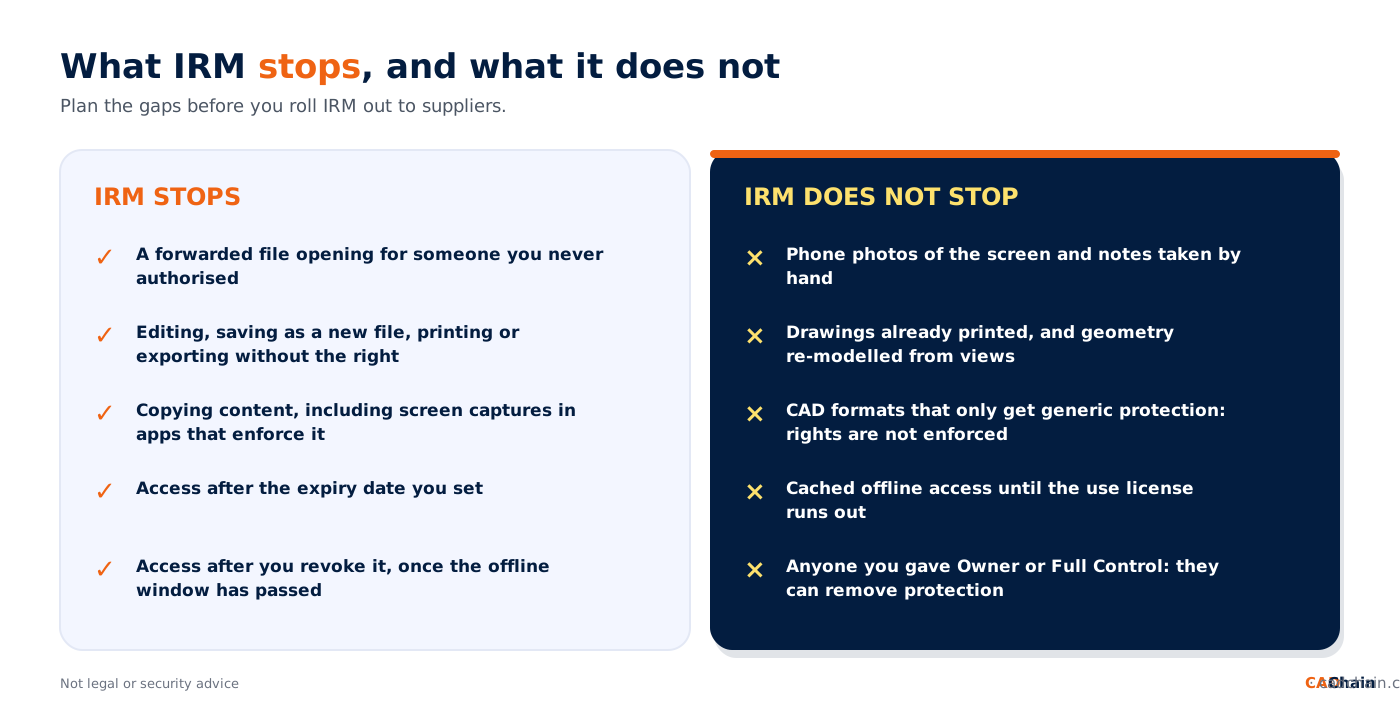
- Offline access delays revocation. If offline access is allowed, people can keep opening a revoked file until their offline period runs out. The default use license in Microsoft's service is valid for 30 days.
- The issuer and owners keep control. The account that protected the file can always open it, offline and after expiry or revocation, and anyone with Full Control can remove the protection.
- Generic protection does not enforce rights. As shown above, most CAD formats need an extension or a DRM tool for real usage control.
- Copies can lose tracking. Microsoft notes that a protected file downloaded from SharePoint or OneDrive gets a new content ID, so revoking the original does not revoke the downloaded copies.
- The analogue hole remains. A phone photo of a screen, a printed drawing or a part measured and re-modelled is outside any file protection. Our article on digital watermarking for CAD geometry covers tracing leaks back to their source.
That is also why contracts still matter, even though they are not enough on their own. Read why in NDA limitations for CAD protection.
IRM with PDM, PLM, suppliers and cloud CAD
IRM does not replace your vault. PDM and PLM decide who can check out, change and release a file inside your company; IRM decides what happens to the copy after it leaves. The two meet at the export step. HaloCAD, for example, describes a PLM integration that locks a file during download and unlocks it when it is returned to the vault, and Seclore describes APIs that protect design files automatically when they are checked out of PLM, PDM or ERP systems. Ask any vendor to show this on your own PDM.
Cloud CAD changes the picture again. When suppliers work inside your cloud platform instead of receiving files, access control moves to the platform's sharing settings, and IRM is needed only for the exports. We looked at this for SOLIDWORKS suppliers editing models on your own platform, and at the wider trade-off in zero trust for CAD file distribution. Users of SOLIDWORKS and Autodesk Inventor can also read about the limits of traditional DRM for CAD files and digital rights management systems for Autodesk Inventor users on our sister sites.
IRM, CAD DRM and proof of ownership: where CADChain fits
IRM answers one question very well: who may use this file, and how, right now. It does not answer a second question that matters just as much when a design leaks or a partner relationship ends: can you prove the design was yours, and from when? CADChain was built around both. Its approach combines file-level access control, a kind of DRM that goes further than classic DRM, with blockchain-based proof of ownership, so you decide who can open a shared file and for how long, and you keep a dated, tamper-evident record of what you created. Our BORIS add-ins for SOLIDWORKS and Autodesk Inventor register a fingerprint (hash) and a timestamp of your files as dated proof; they are not encryption or access control, and they work alongside IRM. Read more in blockchain vs traditional DRM for CAD protection and the complete guide to CAD file DRM protection.
Share engineering files without losing control or proof. IRM keeps permissions inside the file; CADChain adds access control for shared designs and a dated record that they are yours. Discover CADChain
Conclusion
Information rights management is the right tool for the moment an engineering file leaves your vault, because it keeps the permissions inside the file. Start with the files that actually travel, keep labels few and clear, and be honest about format support: Office files and PDFs are well covered, while CAD and neutral formats need a CAD-aware extension or an enterprise DRM tool. Set offline windows that let revocation work, add watermarks for the gaps no software closes, and keep proof of ownership alongside your rights. Do that, and IRM becomes part of how your team shares designs instead of a project that engineers work around.
FAQ
What is information rights management (IRM)?
IRM is a way of protecting files with encryption, identity and usage rights stored inside the file. Only authorised people can open it, the application enforces what they may do (view, edit, print, copy, export), and access can expire or be revoked.
Can IRM protect CAD files such as DWG, SLDPRT or STEP?
Yes, but not always fully. Microsoft Purview on its own gives most CAD formats generic .pfile protection, which controls who can open the file but does not enforce usage rights. For enforced rights inside CAD applications you need a CAD extension or an enterprise DRM tool that supports your formats.
What is the difference between IRM and DRM for engineering files?
IRM grew out of enterprise documents and email, while DRM is the wider term that also covers media and CAD-specific products. For engineering files they overlap; the practical difference is which formats and CAD applications each product supports.
Does IRM work when the supplier is offline?
It can. With Microsoft Purview you choose per label whether offline access is never, always or allowed for a number of days. The longer the offline window, the longer a revoked supplier can keep opening a cached file.
Can IRM stop screenshots of CAD models?
Partly. Applications that enforce the Copy right can block screen captures when that right is not granted, and dynamic watermarks deter photos. No software stops someone photographing a screen with a phone.
Can I revoke access to a CAD file I already sent?
Yes, if it is protected with a tool that supports revocation. Microsoft's track and revoke feature covers Office file types; CAD-focused DRM tools offer revocation for the CAD formats they support. Offline access delays the effect.
Do suppliers need special software to open IRM-protected files?
Usually yes. They need an account the service recognises and an application that understands the protection: an Office app or the Information Protection viewer for Microsoft, or the vendor's plug-in or agent for CAD formats. Test with a real supplier before rolling out.
Does IRM replace PDM or PLM permissions?
No. PDM and PLM control access inside your company; IRM controls the copies that leave it. The best setups apply IRM automatically when files are exported or checked out of the vault.
Does IRM prove that I own a design?
No. IRM controls access and use, and its logs show who opened a file. Proof that a design existed in a given form at a given time needs a separate record, such as a timestamped fingerprint registered with BORIS or CADChain.