Trending tech news does not wait for you to visit ten websites. The founders and engineers who spot a technology shift early usually rely on a small set of trending tech news tools: news aggregators that show what everyone is talking about, alerts that tell them when their own topics show up, and trend trackers that show whether a topic is really rising before it becomes a headline. This guide lists 10 proven tools for tracking trending tech news in 2026, what each one is good at and how to combine them into a weekly trend radar.
TL;DR: To track trending tech news, use one aggregator (Techmeme, Google News, Hacker News or Feedly) for the daily picture, Google Alerts or a Google News "Following" list for your own keywords, and a trend tracker (Google Trends, Exploding Topics, GitHub Trending or Hugging Face Trending Papers) to check whether a topic is really rising. Spend about 30 minutes a week turning the signals into decisions, and use SANDBOX with PlayPal to test whether a trend is worth building a startup on.
Boost Your SEO with product placement and guest blogging: get a permanent do-follow backlink and traffic
- Product Placement: Add your startup into one of our listicles.
- Guest Post: Publish an article about your startup or product in our blog
🔗 Boost SEO for your startup
This page is about tools that collect and filter tech news for you. If you want the full list of news outlets to read, start with our guide to the top tech news sites. For long reads, see our list of in-depth technology news articles; for new products and launches, our guide to innovation and product launch news; and for research and lab news, our page on science and technology news.
What Is a Trending Tech News Tool?
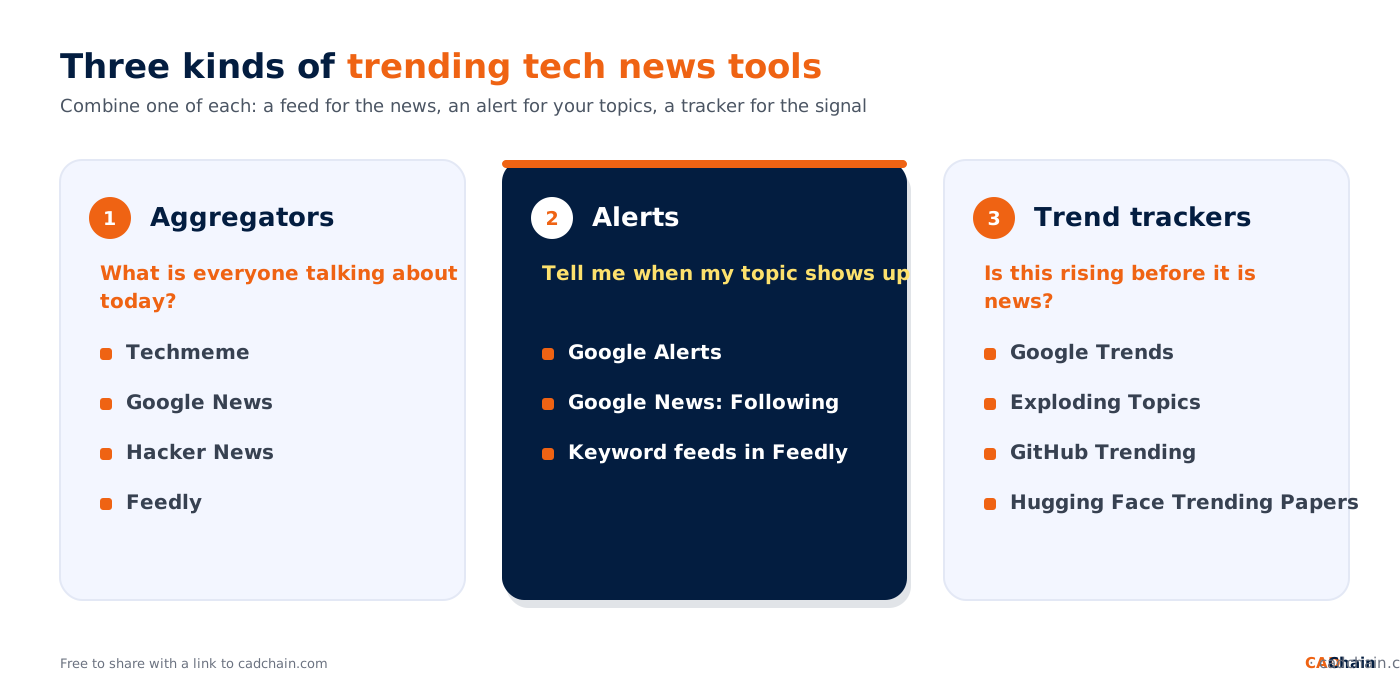
A trending tech news tool does not write the news. It finds, ranks, filters or measures it, so you see the stories and topics that are gaining attention without reading every outlet yourself. Most tools fall into one of three groups:
- News aggregators: collect headlines from many sources and rank them by importance or popularity (Techmeme, Google News, Hacker News, Feedly).
- Alerts: watch the web or the news for your own keywords and notify you when they appear (Google Alerts, Google News "Following", keyword feeds in Feedly).
- Trend trackers: measure attention over time: searches, repository stars, paper upvotes or mentions (Google Trends, Exploding Topics, GitHub Trending, Hugging Face Trending Papers).
Why Entrepreneurs and Engineers Track Trending Tech News
In a deep-tech company, a trend is only useful if you notice it while you can still act on it. Tracking trending tech news with the right tools helps you:
- Spot emerging opportunities: trends often signal new customer needs, untapped markets or a technology becoming cheap enough to build on.
- Reduce risk: early warning about regulation, security incidents, supplier problems or a competitor launch gives you time to adapt.
- Validate ideas: rising search interest, repository activity or research uptake is evidence that a problem matters before you invest in it.
- Protect what you build: news about IP theft, hacking campaigns or trade secret cases shows where engineering data leaks, as in our report on China-linked hackers for hire targeting CAD and PLM data.
For a picture of the trends themselves, see our overview of tech trends in 2026 and our list of emerging technologies entrepreneurs must watch.
Top 10 Proven Trending Tech News Tools in 2026
Every tool below was checked on its own official page in October 2026. The list starts with a startup tool for testing ideas against trends, then moves through aggregators, alerts and trend trackers.
1. SANDBOX and PlayPal: The AI Co-founder
If you're an entrepreneur or aspiring startup founder, the SANDBOX is your ultimate solution for immersing yourself in the world of trending tech and idea validation. Equipped with an AI co-founder called PlayPal, the SANDBOX offers tailored feedback, structured learning-by-doing, and real-time adaptability for your startup journey.
Key Features:
- Trend Spotting: SANDBOX helps you identify tech trends related to your niche while validating startup ideas.
- Problem Validation: Use PlayPal to evaluate whether the problem you're solving aligns with current consumer or technological trends.
- Gamified Progress: Build Blocks in Towers step by step, ensuring your tech-driven business is robust from day one.
- Feedback Loop: Receive actionable advice from PlayPal and even human mentors, enabling deeper insight into trending topics.
Every entrepreneur starting with SANDBOX begins with Block 0 (Problem validation), addressing market relevance based on today's tech ecosystem. Start your Tower journey today and see how SANDBOX can scale your ideas.
2. Techmeme: The Tech News Aggregator Editors Curate
Techmeme has aggregated technology news since its launch in 2005 and is self-funded and independently owned. It pulls stories from thousands of outlets and shows the social media discussion around them. Software crawls and re-sorts the front page, and human editors make the final call on what is featured and write plain, descriptive headlines. Its "River" view shows the same news in reverse chronological order.
- Best for: founders, investors and engineers who want one page that shows the biggest tech stories of the day and who is reacting to them.
- How to use it: check the front page once a day, open the cluster of linked coverage under a big story, or subscribe to the daily newsletter.
- Cost: free to read.
3. Google News: Personal Tech News Feed and Topic Following
Google News combines a personalized "For you" feed with a "Following" tab where you keep the topics, sources and locations you follow. Its "Full Coverage" view is not personalized: it shows the same subjects to everyone with the same language and region, which helps you see a story from several outlets at once.
- Best for: anyone who wants a free, broad tech news feed tuned to their own industry.
- How to use it: follow topics such as "semiconductors", "AI regulation" or your CAD platform, and open Full Coverage for big stories.
- Cost: free; some features need a Google Account.
4. Hacker News: What Developers and Engineers Are Discussing
Hacker News is the community news site run by Y Combinator. Its guidelines define on-topic content as anything good hackers would find interesting, which in practice means software, hardware, science, startups and research, while most politics, crime and celebrity news is off-topic. Members submit and vote on links, so the front page shows what technical people are paying attention to right now, and the comment threads often add expert context.
- Best for: technical founders and engineering teams who want to know which tools, papers and launches developers care about.
- How to use it: scan the front page daily and read the comments on stories in your field; they often surface problems a press release leaves out.
- Cost: free.
5. Feedly: Your Own Tech News Reader With RSS, Newsletters and Keyword Feeds
Feedly's News Reader lets you follow news sites, blogs and industry publications in one place, along with Reddit, email newsletters (delivered to a Feedly address) and Google News keyword feeds. You can save articles to Boards, add notes and highlights, search across all your sources and read on iOS and Android. Feedly also sells AI products for teams, such as Threat Intelligence for security analysts and Market Intelligence.
- Best for: people who want full control over their sources instead of an algorithmic feed.
- How to use it: build one folder per topic (AI, chips, CAD and PLM, security), add a Google News keyword feed for each competitor and forward key newsletters into Feedly.
- Cost: free sign-up without a credit card; paid plans for more features.
Boost Your SEO by Getting Featured in Our Blogs and get a backlink.
We publish content about startups, education, tech, funding, etc. that ranks well not only in Google but also in Perplexity, ChatGPT, Grok and other AI tools.
👉 Get featured now!
6. Google Alerts: Email Alerts for Your Tech Keywords
Google Alerts sends you an email when new search results match a topic you enter. Under "Show options" you choose how often you get notifications, which types of sites to include, the language and region, how many results you want and which account receives the alert.
- Best for: watching your company name, competitors, product categories, standards and regulations without checking manually.
- How to use it: create one alert per narrow keyword (for example a competitor name or a regulation), choose a daily digest and refine the wording if results are noisy.
- Cost: free with a Google Account.
7. Google Trends: Check Whether a Tech Topic Is Really Rising
Google Trends shows relative search interest, not absolute search volume. It uses a large sample of real Google searches and scales each data point from 0 to 100 based on the topic's share of all searches for that place and time. Google adds a little statistical noise to protect privacy, so one-off spikes on small queries should not be over-read. The "Trending now" page shows searches that are rising at the moment.
- Best for: checking whether a technology people talk about in the news is also growing in what people search for.
- How to use it: compare two or three terms over five years and over the past 90 days; a steady rise is a stronger signal than a single spike.
- Cost: free.
8. Exploding Topics: Trend Discovery Before Topics Go Mainstream
Exploding Topics, a trademark of Semrush Inc., tracks topics across social media, search, forums, news, e-commerce and podcasts, and uses machine learning plus human curation to flag emerging trends. It shows search volume and growth for each topic, trending startups and top websites, and sends a weekly trends email.
- Best for: founders and marketers looking for rising categories and products before they show up in mainstream tech news.
- How to use it: search your market, sort by growth and check each promising topic in Google Trends and in the news before acting on it.
- Cost: free tools and a weekly newsletter; the full trend database is in the paid Pro plan, which has a 7-day free trial.
9. GitHub Trending: Which Developer Tools and Projects Are Taking Off
GitHub Trending lists the repositories (and developers) gaining the most attention. You can filter by programming language and spoken language and switch between today, this week and this month. Each repository shows its description, main language, stars, forks and the stars it gained in the chosen period.
- Best for: CTOs and engineers who want to know which open-source tools, AI frameworks and developer platforms are gaining momentum.
- How to use it: check the weekly view for your main languages and look at stars gained, not total stars, to spot new projects.
- Cost: free.
10. Hugging Face Trending Papers: What AI Researchers Are Reading
Hugging Face's Trending Papers page ranks AI research papers by daily, weekly or monthly popularity. It is compiled by AK and the research community; each entry shows a short summary, the organization behind the paper, upvotes and links to the arXiv page and the GitHub repository with its star count. A daily email digest is available.
- Best for: AI and machine learning teams who need to know which models and methods are getting attention before they reach the tech press.
- How to use it: read the weekly list, open the code link for anything relevant and check whether the method is already being used in real projects.
- Cost: free.
Once a new model reaches the market, our roundup of new AI model releases shows how we compare specs, costs and benchmarks.
Trending Tech News Tools Compared
How to Build a Weekly Trend Radar With These Tools
More tools do not mean better insight. A small, repeatable routine does. This is a simple weekly trend radar that a founder or a small engineering team can run in about 30 minutes:
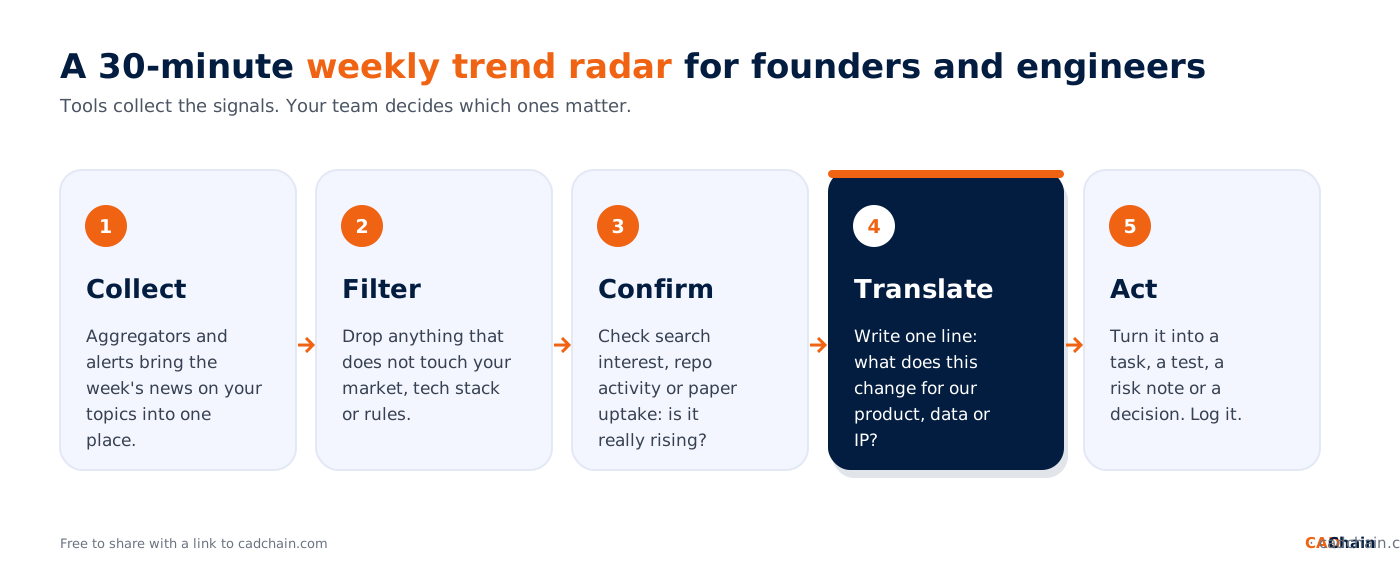
- Collect: let one aggregator and a few alerts gather the week's news on your topics in one place, for example Feedly plus Google Alerts.
- Filter: drop every story that does not touch your market, your tech stack, your suppliers or your regulation.
- Confirm: check the remaining topics in a trend tracker: search interest in Google Trends, stars gained on GitHub Trending or upvotes on Hugging Face Trending Papers.
- Translate: write one sentence per topic on what it changes for your product, your data or your intellectual property.
- Act: turn each relevant topic into a task, an experiment, a risk note or a decision, and keep a simple log so you can see which signals were right.
Our strategies for staying ahead in tech news and our monthly deep tech startup news and trends digest show what this looks like when the signals are written up for a team.
Common Mistakes When Tracking Trending Tech News
- Mistaking noise for a trend: one viral post or one spike in search interest is not a trend. Look for growth across several weeks and several tools.
- Information overload: twenty feeds and fifty alerts produce more noise than insight. Start with one tool from each group.
- Keywords that are too broad: an alert for "AI" is useless; an alert for a competitor, a standard or a specific technology is not.
- Reading without acting: a trend you noticed but never discussed with your team has no value. Write down the decision it leads to.
- Only watching your own bubble: developer communities, research feeds and search data show different sides of the same trend. Mix them.
- Forgetting protection: if a trend makes your designs more valuable, it also makes them a bigger target. Review your IP protection playbook when your market heats up.
Did You Know? F/MS AI SEO Tool - Rank on AI Search Platforms
Finding it hard to optimize your content amid tech competition? The F/MS AI SEO Tool automates SEO setup for entrepreneurs, making your website rank not just on Google but on AI tools like ChatGPT and Perplexity. With human oversight and tailored recommendations, it's perfect for startup founders looking to succeed in digital visibility. Give your content a competitive edge now.
Write FREE SEO-optimized Blog Articles! Our Article Writer ensures your blog is loved by both Google and your readers, turning those clicks into customers.
👉 Write your article here
How CADChain Tracks Trending Tech News
At CADChain we track trending tech news about CAD and PLM security, industrial espionage, AI and new EU rules for manufacturers, because those stories show where engineering data really leaks. We turn the signals into practical guides, such as our guide to IP theft in manufacturing and our trade secrets guide for deep tech startups, and list the tools we use to build our company in our overview of deep tech startup tools.
Protect the designs the trends are about. CADChain gives engineering teams blockchain proof of ownership and file-level access control for CAD files, across CAD systems.
👉 See how CADChain protects CAD files
Conclusion
Staying informed is no longer about reading more. It is about letting a few good tools collect and rank the news, checking whether a topic is really rising and turning the few signals that matter into decisions. Pick one aggregator, one alert tool and one trend tracker from this list, run the weekly trend radar and adjust after a month.
Entrepreneurship thrives on informed decision-making, and equipping yourself with these top 10 trending tech news tools ensures you’re prepared to navigate 2026's opportunities. Explore SANDBOX today to turn tech insights into actionable entrepreneurial strategies.
FAQ
What are the best tools to track trending tech news?
Good options in 2026 are Techmeme, Google News, Hacker News and Feedly for the news itself, Google Alerts for your own keywords, and Google Trends, Exploding Topics, GitHub Trending and Hugging Face Trending Papers to check whether a topic is really rising.
What is the difference between a tech news aggregator and a trend tracker?
An aggregator collects and ranks news stories from many outlets. A trend tracker measures attention over time, such as search interest, repository stars or paper upvotes, so you can see whether a topic is growing before or after it becomes news.
Are there free tools for tracking tech trends?
Yes. Techmeme, Google News, Hacker News, Google Alerts, Google Trends, GitHub Trending and Hugging Face Trending Papers are free to use. Feedly has a free sign-up with paid plans, and Exploding Topics offers free tools and a newsletter, with its full database in a paid plan.
How do I get alerts for new technology news on my topic?
Create a Google Alert for each specific keyword (a competitor, a technology or a regulation), follow the same topics in Google News, or add Google News keyword feeds to a news reader such as Feedly.
How can engineers see which developer tools are trending?
GitHub Trending shows the repositories gaining the most stars today, this week or this month, filtered by programming language. Hacker News shows which tools and launches developers are discussing.
How do I know if a tech trend is real and not hype?
Look for growth that lasts several weeks and shows up in more than one place: news coverage, search interest, code activity and research. A single spike in one tool is a weak signal.
Can I use AI to write SEO-optimized articles that help my brand grow?
Most business owners don't understand how SEO works, let alone how to use AI for writing blog articles. That's why for busy business owners there's a great free tool that doesn't require much knowledge. Write articles for free
Is there a tool to validate startup ideas and track emerging tech trends?
SANDBOX, equipped with PlayPal as its AI co-founder, allows entrepreneurs to validate ideas and spot industry trends interactively. Discover SANDBOX
About the Author
Violetta Bonenkamp, also known as MeanCEO, is an experienced startup founder with an impressive educational background including an MBA and four other higher education degrees. She has over 20 years of work experience across multiple countries, including 5 years as a solopreneur and serial entrepreneur.