No CAD software is "ITAR certified", because there is no formal ITAR certification. CAD software ITAR compliance comes from how a system is deployed and who can reach the data: in 2027 the realistic options are desktop CAD with on-premise PDM that you control, or government cloud editions such as Onshape Government, Altium 365 GovCloud and the Siemens Federal Cloud with Teamcenter, which run on AWS GovCloud (US) with US-person operations. Autodesk is still seeking FedRAMP authorisation for Fusion for Government.
Engineers ask the question in many ways: what CAD systems support ITAR compliance, can we use a cloud CAD or PDM for ITAR-sensitive defence designs, is Fusion ITAR compliant. This comparison answers it from the vendors' own pages and from AWS, all read on 25 November 2026. Where a vendor's wording is vague, or two of its own pages disagree, we say so instead of filling the gap. It is not legal advice: your empowered official or export counsel makes the final call.
TL;DR: which CAD systems support ITAR compliance?
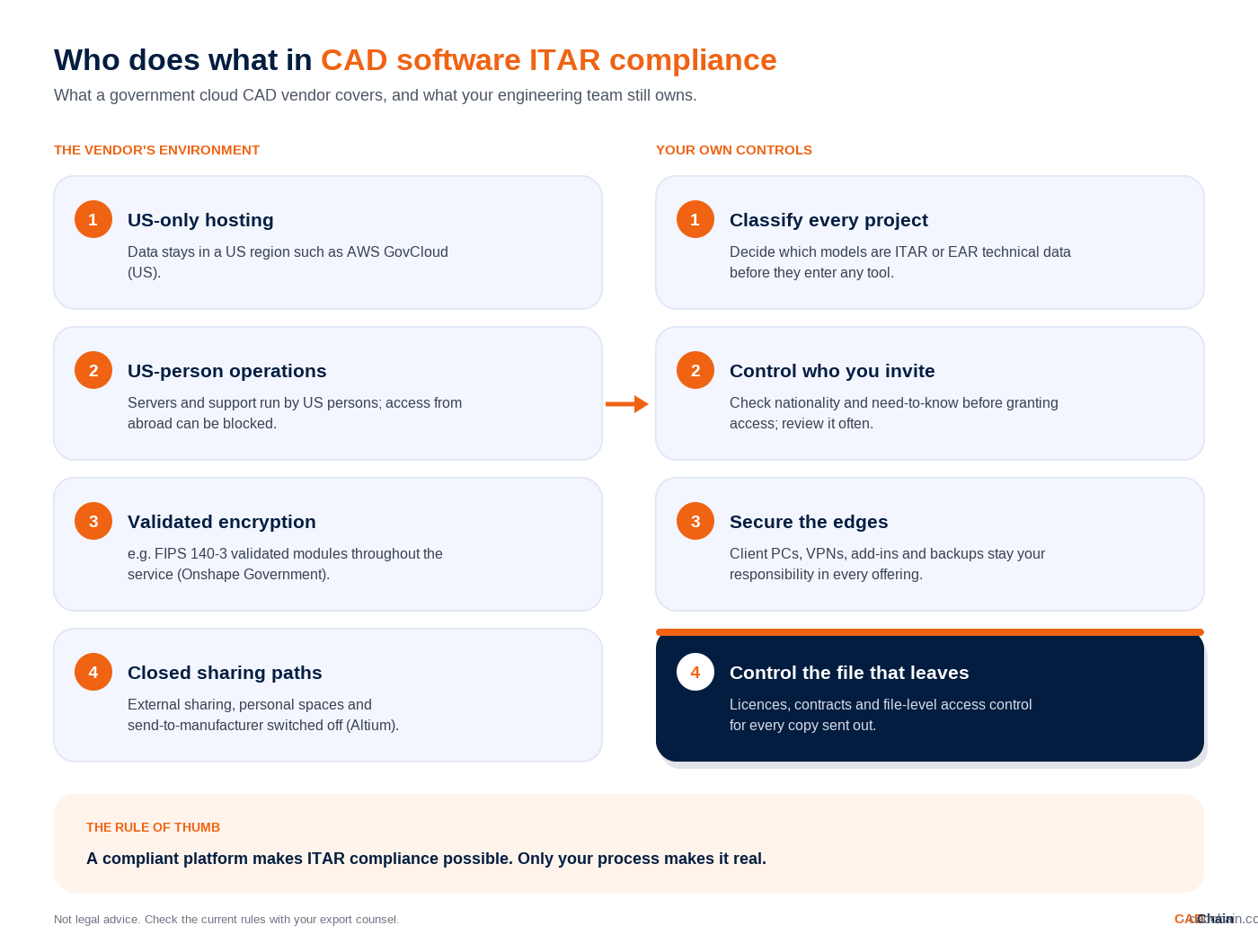
AWS states plainly that there is no formal ITAR certification, so no CAD vendor can sell you one. What vendors can offer is an environment that makes compliance possible: US-only hosting, operations by US persons, access blocked from abroad, and strong encryption. Onshape Government (PTC) runs on AWS GovCloud, is operated only by authorised US persons employed by PTC and uses FIPS 140-3 validated cryptography. Altium 365 GovCloud does the same for electronics design and blocks access from outside the US. Siemens Federal Cloud featuring Teamcenter holds FedRAMP High and runs in AWS GovCloud. Autodesk announced in February 2026 that it is seeking FedRAMP Moderate for Fusion for Government. Desktop SOLIDWORKS, Creo, NX, CATIA or Inventor with an on-premise vault can be compliant too, but then every control is yours.
What does ITAR compliance mean for CAD software?
The International Traffic in Arms Regulations (ITAR), run by the US State Department's Directorate of Defense Trade Controls, control defence articles and the technical data behind them. For an engineering team, technical data means exactly what sits in your CAD system: models, drawings, assemblies, tolerances and the manufacturing know-how in them. Making that data available to a foreign person can be an export, even when nobody ships a part, and even when the foreign person sits in the same office.
That is why ITAR compliance is a property of your process, not of an installer. A CAD tool supports it when it lets you keep controlled data in the right place and in front of the right people only: where files are stored, who operates the servers, who can log in from where, what gets encrypted, and what leaves through sharing links, add-ins and support tickets. Our guide to aerospace CAD file security and defence contractor requirements covers the wider contract side; this article compares the software.
European teams are not outside the question. US-origin technical data stays under ITAR after it reaches Europe, so a German or Dutch supplier holding a US prime's models needs the same discipline before re-transferring them to a colleague, subcontractor or cloud. European controls apply in parallel: see EU dual-use export controls for CAD files and, for US Commerce rules on affiliates, what the BIS affiliates rule means for design data shared with suppliers.
Is any CAD software ITAR certified?
No. The clearest statement comes from the cloud provider most ITAR-ready CAD platforms run on. On its ITAR compliance page, AWS says AWS GovCloud (US) supports compliance with ITAR, lets qualified companies transmit, process and store data subject to ITAR, limits access by AWS personnel to US citizens and grants accounts only to US persons working for US organisations. It also says, in so many words, that there is no formal ITAR certification. GovCloud holds a FedRAMP Provisional Authority to Operate at the High baseline, and customers stay responsible for their own on-premises systems and applications.
So be careful with marketing that says a product is "ITAR certified" or "ITAR compliant" with nothing else. Ask instead: where is the data, who operates the service, which certifications does it hold (FedRAMP, CMMC), what is switched off, and what is still your job. Onshape itself puts the last point clearly in its glossary of government terms: the platform is structured to support ITAR and EAR compliance, but it is ultimately the customer's responsibility to ensure compliance in their own use of the environment.
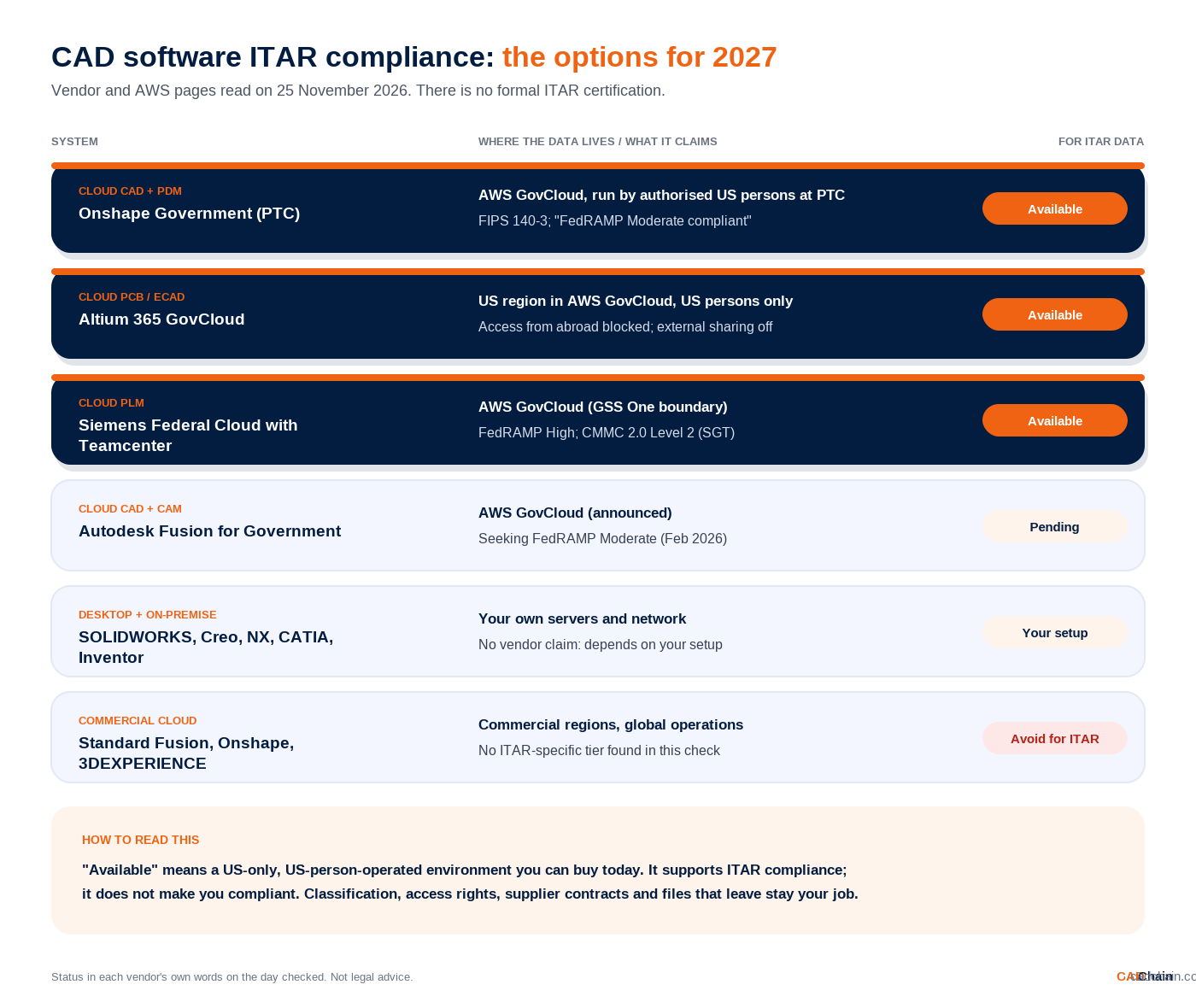
What CAD systems support ITAR compliance in 2027?
The table puts the options side by side. "Status" is the vendor's own wording on the day we read it; check it again before you buy, because several of these programmes were still moving in 2026.
Two names are missing on purpose. We found no ITAR-specific cloud tier for the 3DEXPERIENCE platform on Dassault Systèmes' public pages in this run; SOLIDWORKS and CATIA teams with controlled data usually keep it on desktop installs and on-premise PDM, and should ask their reseller in writing about anything cloud-connected. PTC also announced new FedRAMP offerings in November 2026, but the announcement page could not be read for this article, so we leave its details out rather than repeat them second hand.
Can you use Onshape for ITAR-sensitive defence designs?
Yes, but only Onshape Government, not the commercial Onshape service. The Onshape Government page says the product is deployed on AWS GovCloud, that access is only available to authorised US persons employed by PTC, and that it uses FIPS 140-3 approved cryptographic algorithms and validated modules throughout the service. It adds access controls and audit logging for teams working with CUI, and Onshape describes the key ITAR and EAR requirement as limiting access to regulated technical data from non-US persons.
On FedRAMP, read the wording closely. The product page answers "Is Onshape Government FedRAMP compliant?" with yes, calling it a FedRAMP Moderate compliant environment. Onshape's January 2025 glossary said it was working with a third-party assessor towards an Authority to Operate, aiming for full certification in 2026. "Compliant" and "authorised" are not the same claim, so check the FedRAMP Marketplace if your contract asks for an authorisation. On CMMC, Onshape says it intends to meet CMMC 2.0 and will pursue certification once accredited assessors are available, and that it does not currently intend to pursue DFARS certification.
Onshape Government also connects to Arena PLM for GovCloud and to Altium for electronics, so a mechanical and electrical team can stay inside US-only environments end to end. For the commercial PTC desktop side, our article on PTC Creo rights management covers how Creo files are protected once they leave the vault.
Is Autodesk Fusion ITAR compliant?
Not as a certified offering yet. On 12 February 2026, Autodesk announced it was seeking FedRAMP Moderate authorisation for products within Autodesk Construction Cloud and Autodesk Fusion, and named Fusion for Government, Fusion Contributor for Government (view and markup) and Fusion Manage for Government (PLM) as joining its government portfolio, supported by AWS GovCloud. Autodesk wrote that it recognises the need to support customers complying with ITAR and called it a multi-year government, aerospace and defence roadmap. Its earlier FedRAMP Moderate authorisation, achieved in 2024, covers Autodesk Docs for Government and BIM Collaborate Pro for Government, which are construction products.
Until Fusion for Government is authorised and available to you, treat standard Fusion as a commercial cloud service: do not put ITAR technical data in it. Inventor with an on-premise Vault remains the Autodesk route for controlled mechanical design; read Autodesk Inventor file security and our sister site's export control considerations for Inventor CAD files. If you are weighing Fusion's data terms more widely, our check of whether Autodesk uses your designs to train AI shows which Fusion features learn from customer content.
What about Siemens NX and Teamcenter?
Siemens has the strongest certification on paper for PLM. In July 2026, Siemens Government Technologies, the cleared US subsidiary of Siemens Corporation, announced that the Siemens Federal Cloud featuring Teamcenter had earned FedRAMP Class D (High) certification, and that the company had earned CMMC 2.0 Level 2 at the enterprise level from a certified third-party assessor, covering the 110 controls of NIST SP 800-171 R2 for three years. The Federal Cloud runs inside the GSS One AWS authorisation boundary operated by Project Hosts and is deployed within AWS GovCloud.
Two caveats. Neither the press release nor Siemens' Teamcenter blog post mentions ITAR by name, and neither mentions NX; the certified service is Teamcenter. NX itself is desktop software, so an NX team with controlled data usually pairs it with an on-premise or Federal Cloud Teamcenter. See Siemens NX CAD protection for the file-level side.
Does Altium 365 GovCloud make PCB design ITAR compliant?
It helps, and Altium is careful to say only that. Its trust page describes Altium 365 GovCloud as a dedicated US region of the platform, operated exclusively by US persons in AWS GovCloud, which "can help" organisations comply with regulations such as ITAR and EAR. The controls are concrete: access from outside the US is blocked, even for US persons travelling abroad; sharing projects, releases, libraries and manufacturing packages with anyone outside the workspace is disabled, including Send to manufacturer; users cannot keep data in personal spaces; PLM integration is controlled by the administrator; and outbound traffic goes through a proxy.
Those switched-off features are the honest part of any ITAR cloud: the convenience that makes commercial cloud CAD attractive is exactly what leaks controlled data. Altium also says the customer remains responsible for its own browsers and CAD tools that connect to the service.
Is desktop CAD with on-premise PDM still the safest choice for ITAR?
Often, yes, because nothing leaves your network unless someone sends it. SOLIDWORKS with SOLIDWORKS PDM, Creo with Windchill, NX with Teamcenter, CATIA with ENOVIA and Inventor with Vault can all be run on servers you own, behind your firewall, with accounts you approve. Onshape points out the catch: desktop CAD places the burden of many regulatory responsibilities on the customer. You patch the servers, check nationality before granting access, encrypt laptops, log access and control every export path.
The export paths are where on-premise setups fail. Email attachments, USB sticks, a supplier portal, a cloud add-in that uploads files in the background, or a quote request to an online manufacturer each move technical data outside your controls. Our guides on preventing CAD export to competitors, what neutral CAD formats do and do not protect and connecting PLM with CAD DRM cover them one by one. SOLIDWORKS users will find product-specific steps in ITAR compliance in CAD file management for SOLIDWORKS users and in choosing a SOLIDWORKS reseller that handles ITAR questions.
Encryption deserves its own note. ITAR contains a rule, in 22 CFR 120.54, under which certain end-to-end encrypted technical data is not treated as an export; the conditions are strict and change over time, so read the current text with your counsel before relying on it. Our CAD file encryption guide on resources.cadchain.com explains the encryption options for CAD files in plain terms.
How do you choose CAD software for ITAR work?
- Classify first. Decide which projects contain ITAR or EAR technical data before choosing tools; most companies have a mix, and only the controlled projects need the restricted environment.
- Ask where the data lives and who runs it. US region, US-person operations and support staff, and whether access from abroad is blocked.
- Ask for certifications by exact name and status. FedRAMP Moderate or High, authorised or "in process", CMMC Level 2 certified or "intended". Write down the date you checked.
- List what is switched off. External sharing, personal spaces, add-ins, AI features and support access are the usual leak paths.
- Check the edges. Client PCs, VPNs and the CAD add-ins that connect to the service stay your responsibility in every offering we read.
- Keep commercial and controlled work apart. Separate tenants or servers, separate accounts, and no copy-paste between them.
- Cover suppliers in writing. Technical assistance agreements, NDAs and flow-down clauses decide what a machine shop may do with your models; see CAD security for offshore manufacturing.
- Plan for the file that leaves anyway. Every programme eventually sends a drawing to someone; decide how that copy is controlled, logged and revoked.
That last step is where file-level control matters more than the platform. CADChain adds access control to the CAD file itself, a sort of DRM that goes further than classic DRM, plus blockchain proof of who created which version and when, so a model sent to an approved US supplier can be limited to named users, logged and revoked later, whatever system they open it in. It does not replace your export licences or your government cloud; it covers the copy that leaves them. The wider approaches are compared in information rights management for engineering files.
Do ITAR requirements differ for automotive and other dual-use work?
Yes. Many automotive, energy and industrial programmes fall under the EAR or EU dual-use rules rather than ITAR, and their customer requirements come from TISAX, NDAs and supplier contracts instead. The tools overlap, but the access rules differ: EAR controls depend on the item's classification and destination, not only on nationality. For automotive data, read CATIA file security for the automotive industry; for a sector-by-sector view, see industry-specific CAD protection strategies; and for the CMMC side of US defence work, our sister site's CMMC compliance for CAD security.
State-backed attackers target exactly these files. The campaign described in APT28's attacks on a NATO naval shipbuilder and a military engine maker shows why a compliant platform is only half the job: an infected engineering laptop can reach controlled data in any system it is logged into.
Conclusion: CAD software ITAR compliance is a setup, not a label
The short answer to what CAD systems support ITAR compliance is: those that let you keep controlled technical data in a US-only, US-person-operated environment with strong encryption and closed sharing paths, plus the desktop systems you run yourself. In 2027 that means Onshape Government with Arena for GovCloud, Altium 365 GovCloud for electronics, the Siemens Federal Cloud with Teamcenter for PLM, and desktop SOLIDWORKS, Creo, NX, CATIA or Inventor with on-premise data management. Autodesk's Fusion for Government is on the way but was still seeking authorisation in the latest announcement we could read. Whichever you choose, no vendor carries your ITAR obligations for you, so keep classification, access, supplier contracts and the files that leave under your own control, as explained in sharing CAD files with contractors securely.
FAQ: CAD software ITAR compliance
What CAD systems support ITAR compliance?
Government cloud editions that run in AWS GovCloud with US-person operations, such as Onshape Government, Altium 365 GovCloud and the Siemens Federal Cloud featuring Teamcenter, and any desktop CAD system (SOLIDWORKS, Creo, NX, CATIA, Inventor) run with on-premise data management under your own controls.
Is there an ITAR certification for CAD software?
No. AWS states that there is no formal ITAR certification. Vendors can offer environments and certifications such as FedRAMP and CMMC that support compliance, but compliance depends on how you use them.
Is Onshape ITAR compliant?
Commercial Onshape is not the ITAR option. Onshape Government runs on AWS GovCloud, is operated only by authorised US persons employed by PTC and uses FIPS 140-3 validated cryptography; Onshape says it supports ITAR and EAR compliance and that compliance in your own use remains your responsibility.
Is Fusion 360 ITAR compliant?
Not as a certified service at the time of writing. Autodesk announced in February 2026 that it is seeking FedRAMP Moderate authorisation for Fusion for Government on AWS GovCloud. Keep ITAR technical data out of standard Fusion.
Is SOLIDWORKS ITAR compliant?
SOLIDWORKS desktop with on-premise SOLIDWORKS PDM can be used for ITAR work because the data stays on systems you control; compliance then depends entirely on your servers, accounts and sharing rules. We found no ITAR-specific 3DEXPERIENCE cloud tier on Dassault's public pages.
Can a European company use ITAR-ready cloud CAD?
Access to US government cloud editions is built around US persons, and some block access from outside the US entirely. European suppliers holding US-origin technical data usually keep it on controlled on-premise systems and need authorisation before re-transferring it.
Does encrypting CAD files remove ITAR obligations?
ITAR has a rule for certain end-to-end encrypted technical data in 22 CFR 120.54, with strict conditions. Read the current text with export counsel; encryption alone does not settle who may receive the data.