Your engineers are trained not to open strange email attachments. Then a supplier sends a DXF, a customer uploads a drawing to your portal, or someone downloads a free model, and it gets opened without a second thought. In 2026 that habit has a CVE number.
Between July and September 2026, Autodesk published a series of security advisories for flaws in the way its products read files. The most serious, CVE-2026-16463, is a heap-based buffer overflow in AutoCAD's DXF parser: a maliciously crafted DXF file, when opened, can crash the program, read sensitive data or execute arbitrary code in the context of the current process. A month later Autodesk disclosed CVE-2026-7406, a flaw in BMP image handling in Revit and AutoCAD that can also lead to code execution. Both are rated High, CVSS 7.8.
There is no public report of these flaws being exploited in the wild, and patches are available. That is not the point. The point is that a CAD file is not just data. It is input to a large, complex parser running on the machine that holds your most valuable designs. Here is how a drawing becomes an attack, which entry points a CAD workstation has, and what engineering teams should change, written for founders and engineering managers rather than for security specialists. Files are one way in; the update channel of your add-ins and scripts is another, and in a 2026 UK government test an AI model went straight for it, as our guide to the AI supply chain attack on a real GitHub project shows.
TL;DR: malicious CAD files in one paragraph
CAD applications parse dozens of formats (DWG, DXF, STEP, IGES, embedded images) and run scripts and plugins. Bugs in that parsing code let a crafted file run code on the engineer's machine the moment it is opened, with no macro warning. In 2026 Autodesk fixed a DXF heap overflow (CVE-2026-16463) affecting AutoCAD, AutoCAD LT, DWG TrueView and the vertical products, BMP and TIF flaws in Revit and AutoCAD (CVE-2026-7406 and CVE-2026-7405), and a local privilege flaw in its installer. Patch quickly, treat files from outside like executable code, lock down AutoLISP loading, take local admin rights away, and protect the files themselves so that a compromised workstation does not mean stolen designs.
The 2026 Autodesk file-parsing advisories
Version details differ between third-party databases, so always use the vendor's own advisory: the public CVE record for CVE-2026-16463 links back to Autodesk's Trust Center, where the fixed releases are listed. Updates are delivered through Autodesk Access or the Autodesk account portal.
Note one detail: DWG TrueView is on the affected list. Many teams use a free viewer precisely because it feels safer than opening a file in the full CAD application. A viewer runs the same parsing code. Viewing is opening.
How a CAD file becomes an attack
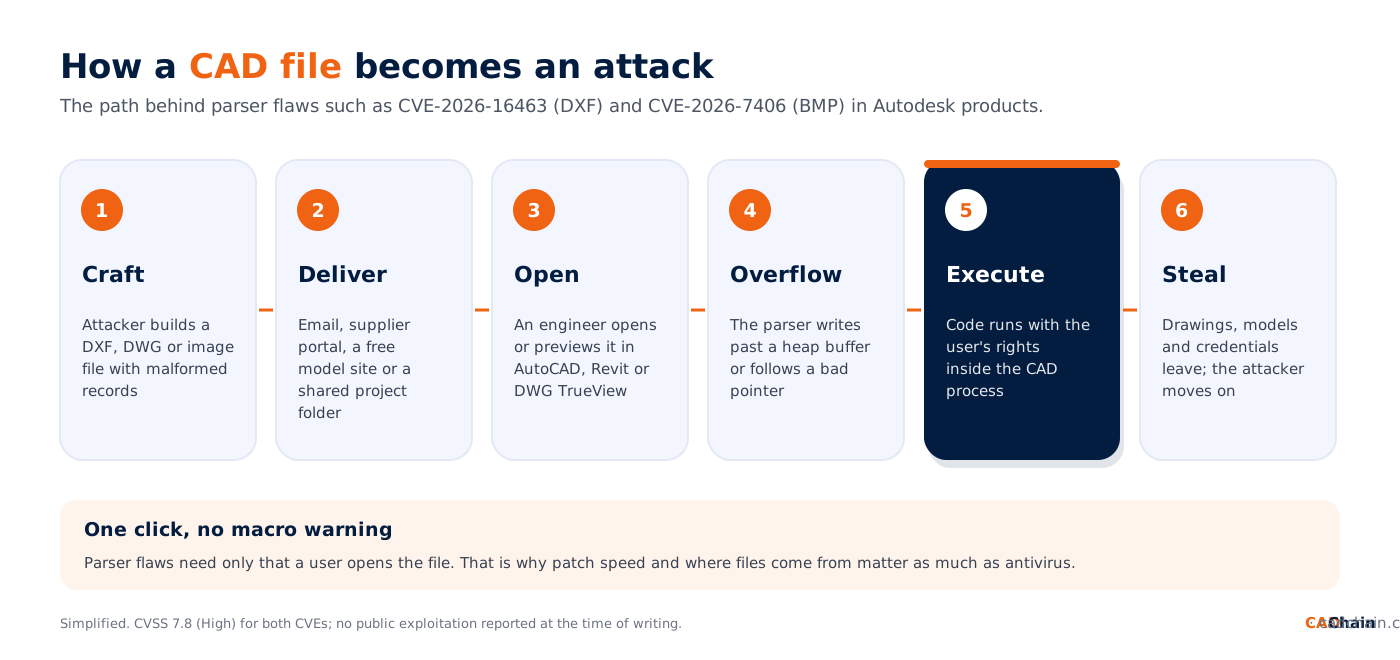
Why parsers are vulnerable. A DXF file is structured text full of group codes and values; a DWG is a compact binary format with many versions; drawings and Revit families embed raster images in formats like BMP and TIF. The software has to read all of it, for decades of versions, quickly. Parsing code like this is mostly written in C and C++ for speed, and a length field that is larger than the buffer, or an index that points outside an array, is enough to write into memory the program did not expect to touch.
Why it is dangerous. A heap overflow or a bad pointer dereference can let a carefully crafted file overwrite data the program later uses to decide what to execute. The attacker's code then runs inside the CAD process, with the engineer's rights. There is no macro prompt, no "enable content" button, and the CVSS score reflects that: no privileges needed, only that the user opens the file.
Why engineers are the perfect target. Opening files from outside the company is their job. Suppliers send drawings, customers send models, contractors send revisions, and engineers download parts from online libraries. Security awareness training teaches people to distrust .exe files and Office macros, not DXFs.
This is not new: a short history of CAD malware
In 2012, researchers at ESET described ACAD/Medre.A, a worm written in AutoLISP that spread through AutoCAD's automatic script loading and emailed tens of thousands of drawings to addresses in China, with most victims in Peru. It needed no memory corruption at all, only a script placed next to a drawing. Parser flaws in CAD tools have been reported and patched for years by many vendors. What has changed is the value of what sits on an engineering workstation, and the professionalisation of attackers who steal it: in 2025 the Qilin ransomware group hit Nissan's design studio Creative Box, and Nissan later confirmed that some design data had leaked. We cover that business model in ransomware targeting engineering firms.
The attack surface of a CAD workstation
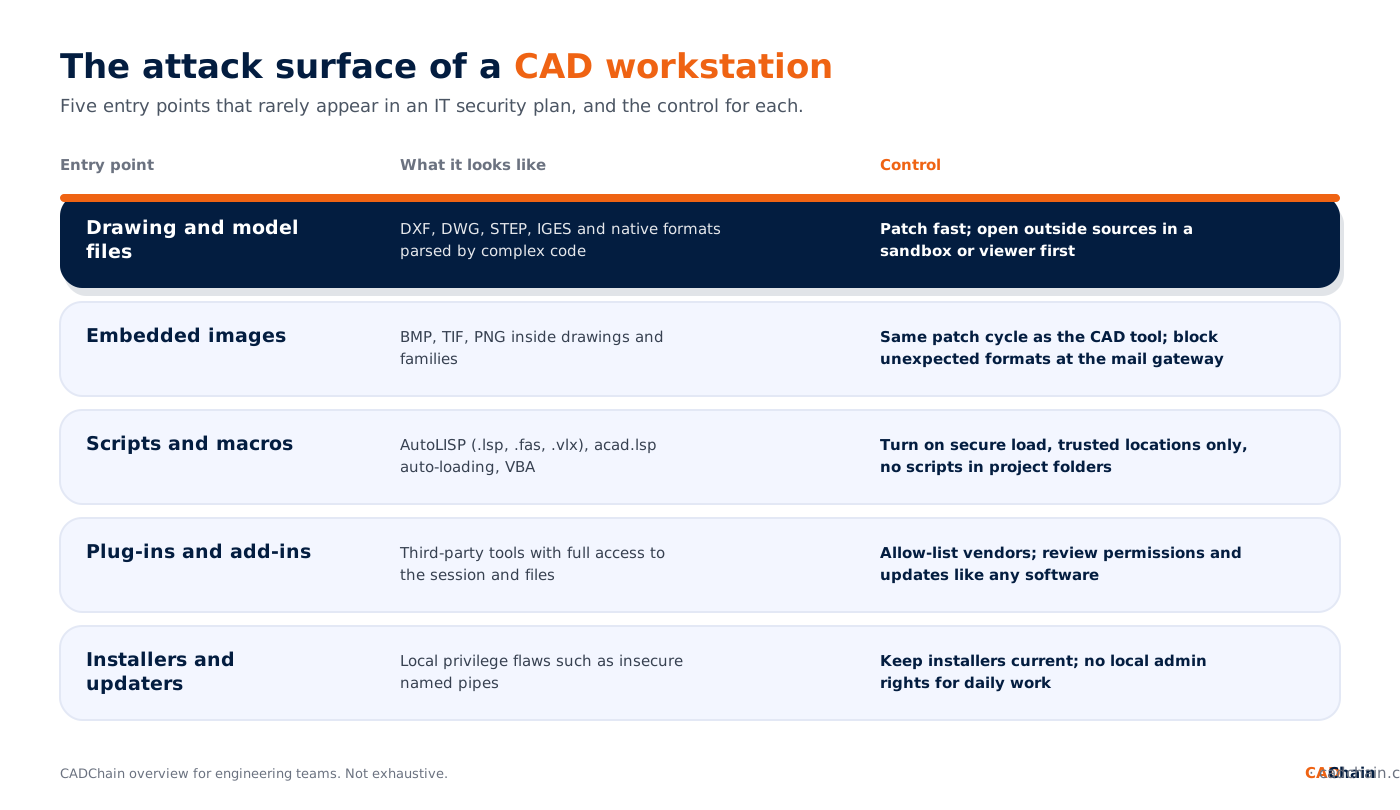
Plug-ins deserve a special mention because they run with the same rights as the CAD application and update themselves. We look at that risk in third-party software vulnerabilities in CAD workflows. And because many of these vendors sell in the EU, the new Cyber Resilience Act reporting rules now oblige them to report actively exploited flaws within 24 hours.
A practical hardening checklist for engineering teams
This week
- Patch. Update AutoCAD, the AutoCAD-based verticals, DWG TrueView and Revit to the fixed releases listed in Autodesk's advisories, and the Autodesk Installer to the fixed version. Do the same for every other CAD and viewer product you run.
- Find the forgotten installs. Old DWG TrueView copies on laptops, a 2024 Revit kept for one customer: these never get patched and they read the same files.
- Lock script loading. In AutoCAD, set SECURELOAD so that executables and LISP files only load from trusted locations, and review TRUSTEDPATHS.
- Remove local admin rights from the accounts engineers use every day.
This quarter
- Create an intake lane for outside files. A dedicated, patched machine or virtual machine where files from new suppliers, customers and model sites are opened first, then converted or checked before entering your PDM.
- Teach the right lesson. Engineers should treat a CAD file from an unknown source like an executable, and report odd behaviour such as a drawing that crashes the application.
- Detect, do not just prevent. Ask your security tooling to alert when acad.exe or revit.exe starts a command shell, PowerShell or a network tool. CAD applications almost never need to.
- Segment workstations. A compromised CAD machine should not reach file servers, PDM admin interfaces and backups with the same credentials.
- Know where files come from. Prefer receiving files through controlled channels with authenticated senders rather than anonymous email attachments and download links.
For the sharing side of the same problem, see zero-trust CAD file distribution and our guide to AutoCAD DWG file security.
Why file-level protection matters when the workstation falls
Patching closes the door that is known today. The next parser bug will open another one. So plan for the day a workstation is compromised, and ask the question that matters for IP: what can the attacker take from it? If design files sit unencrypted in local folders, synced drives and PDM caches, the answer is everything the engineer could see. If files are encrypted and access-controlled individually, an attacker with a foothold still has to break the protection of each file, and every access attempt is logged.
That is the design principle behind CADChain. It does not replace patching or endpoint security; it limits what a breach can cost. Our CAD file protection fundamentals guide explains the layers, and the Joby trade secret verdict shows what happens in court when nobody can prove who had access to which design.
Keep your designs locked, even on a compromised machine. CADChain's BORIS plugins for SolidWorks, Autodesk Inventor and Blender encrypt and certify CAD files inside the tools your engineers already use, control who can open each file, and keep a tamper-proof record of every version and every access.
👉 Protect your CAD files with CADChain
Mistakes engineering teams make
- Treating viewers as safe. DWG TrueView was affected by the same DXF flaw as AutoCAD.
- Leaving CAD out of the patch process. IT patches Windows and Office; nobody owns the CAD stack, so it lags by months.
- Trusting files because the sender is trusted. A supplier's compromised mailbox sends perfectly normal-looking drawings.
- Running as admin "because the plugin needs it". Then any code that runs in the CAD process owns the machine.
- Assuming IP is safe because the PDM is secure. Local caches, exports and synced folders hold the same designs outside the PDM's controls.
What happens next
Expect more of these advisories, not fewer: researchers increasingly fuzz CAD and engineering file formats, and every fix makes the next bug in the same code easier to find. With the Cyber Resilience Act in force for reporting, vendors selling in the EU must now report exploited flaws to authorities within 24 hours, which should make the information you get faster and more complete. Meanwhile, the incidents that make headlines, from the Albert Heijn hack to ransomware against design studios, show that attackers go where the valuable data is. For engineering companies, that is the CAD workstation.
This article reflects vendor advisories and public CVE records as of 13 October 2026. Check Autodesk's Trust Center for the current fixed versions. It is general information, not security or legal advice.
FAQ: malicious CAD files
Can a DXF or DWG file contain a virus?
A CAD file can be crafted to exploit a bug in the software that opens it, which lets it run code on the machine. CVE-2026-16463, a DXF parsing flaw in AutoCAD fixed in 2026, is an example. Older CAD malware such as the 2012 Medre worm used AutoLISP scripts instead.
What is CVE-2026-16463?
A heap-based buffer overflow in the DXF parser of Autodesk AutoCAD and related products, including AutoCAD LT and DWG TrueView. A crafted DXF file can cause a crash, expose data or execute code. It is rated High (CVSS 7.8) and was disclosed in Autodesk advisory ADSK-SA-2026-0009.
Has CVE-2026-16463 been exploited?
No public exploitation had been reported at the time of writing, and it is not on CISA's Known Exploited Vulnerabilities list. Patches are available, so update to the fixed release listed by Autodesk.
Is it safe to open untrusted files in DWG TrueView?
Not automatically. DWG TrueView uses the same parsing code and was listed as affected by the 2026 DXF flaw. Keep it patched and open files from unknown sources on an isolated machine.
How do I stop malicious AutoLISP scripts in AutoCAD?
Use the SECURELOAD system variable so AutoCAD only loads executable files from trusted locations, keep the TRUSTEDPATHS list short and controlled, and never treat a project folder received from outside as a trusted location.
Do image files inside drawings pose a risk?
Yes. In 2026 Autodesk fixed a BMP handling flaw (CVE-2026-7406) in Revit and AutoCAD that could lead to code execution, and a TIF flaw (CVE-2026-7405) that could crash the application.
How can engineering teams protect IP if a workstation is compromised?
Encrypt and access-control design files individually, log every access, keep local admin rights away from daily accounts and segment CAD workstations from file servers and backups, so a single compromised machine does not expose every design.
Who must report exploited CAD software vulnerabilities in the EU?
Under the Cyber Resilience Act, manufacturers of software and connected products sold in the EU must report actively exploited vulnerabilities to authorities within 24 hours of becoming aware, since 11 September 2026.